I have a pandas dataframe in the following format:
df = pd.DataFrame([[1.1, 1.1, 1.1, 2.6, 2.5, 3.4,2.6,2.6,3.4,3.4,2.6,1.1,1.1,3.3], list('AAABBBBABCBDDD'), [1.1, 1.7, 2.5, 2.6, 3.3, 3.8,4.0,4.2,4.3,4.5,4.6,4.7,4.7,4.8], ['x/y/z','x/y','x/y/z/n','x/u','x','x/u/v','x/y/z','x','x/u/v/b','-','x/y','x/y/z','x','x/u/v/w'],['1','3','3','2','4','2','5','3','6','3','5','1','1','1']]).T
df.columns = ['col1','col2','col3','col4','col5']
df:
   col1 col2 col3     col4 col5
0   1.1    A  1.1    x/y/z    1
1   1.1    A  1.7      x/y    3
2   1.1    A  2.5  x/y/z/n    3
3   2.6    B  2.6      x/u    2
4   2.5    B  3.3        x    4
5   3.4    B  3.8    x/u/v    2
6   2.6    B    4    x/y/z    5
7   2.6    A  4.2        x    3
8   3.4    B  4.3  x/u/v/b    6
9   3.4    C  4.5        -    3
10  2.6    B  4.6      x/y    5
11  1.1    D  4.7    x/y/z    1
12  1.1    D  4.7        x    1
13  3.3    D  4.8  x/u/v/w    1
Now I want to group this by two columns like following:
df.groupby(['col5','col2']).reset_index()
OutPut:
             index col1 col2 col3     col4 col5
col5 col2
1    A    0      0  1.1    A  1.1    x/y/z    1
     D    0     11  1.1    D  4.7    x/y/z    1
          1     12  1.1    D  4.7        x    1
          2     13  3.3    D  4.8  x/u/v/w    1
2    B    0      3  2.6    B  2.6      x/u    2
          1      5  3.4    B  3.8    x/u/v    2
3    A    0      1  1.1    A  1.7      x/y    3
          1      2  1.1    A  2.5  x/y/z/n    3
          2      7  2.6    A  4.2        x    3
     C    0      9  3.4    C  4.5        -    3
4    B    0      4  2.5    B  3.3        x    4
5    B    0      6  2.6    B    4    x/y/z    5
          1     10  2.6    B  4.6      x/y    5
6    B    0      8  3.4    B  4.3  x/u/v/b    6
I want to get the count by each row like following.
Expected Output:
col5 col2 count
1    A      1
     D      3
2    B      2
etc...
How to get my expected output? And I want to find largest count for each ‘col2’ value?
Answers:
Thank you for visiting the Q&A section on Magenaut. Please note that all the answers may not help you solve the issue immediately. So please treat them as advisements. If you found the post helpful (or not), leave a comment & I’ll get back to you as soon as possible.
Method 1
You are looking for size:
In [11]: df.groupby(['col5', 'col2']).size()
Out[11]:
col5  col2
1     A       1
      D       3
2     B       2
3     A       3
      C       1
4     B       1
5     B       2
6     B       1
dtype: int64
To get the same answer as waitingkuo (the “second question”), but slightly cleaner, is to groupby the level:
In [12]: df.groupby(['col5', 'col2']).size().groupby(level=1).max()
Out[12]:
col2
A       3
B       2
C       1
D       3
dtype: int64
Method 2
Followed by @Andy’s answer, you can do following to solve your second question:
In [56]: df.groupby(['col5','col2']).size().reset_index().groupby('col2')[[0]].max()
Out[56]:
      0
col2
A     3
B     2
C     1
D     3
Method 3
Idiomatic solution that uses only a single groupby
(df.groupby(['col5', 'col2']).size()
   .sort_values(ascending=False)
   .reset_index(name='count')
   .drop_duplicates(subset='col2'))

  col5 col2  count
0    3    A      3
1    1    D      3
2    5    B      2
6    3    C      1
Explanation
The result of the groupby size method is a Series with col5 and col2 in the index. From here, you can use another groupby method to find the maximum value of each value in col2 but it is not necessary to do. You can simply sort all the values descendingly and then keep only the rows with the first occurrence of col2 with the drop_duplicates method.
Method 4
Inserting data into a pandas dataframe and providing column name.
import pandas as pd
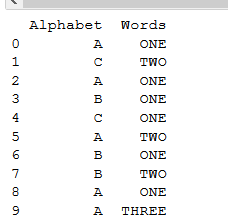
df = pd.DataFrame([['A','C','A','B','C','A','B','B','A','A'], ['ONE','TWO','ONE','ONE','ONE','TWO','ONE','TWO','ONE','THREE']]).T
df.columns = [['Alphabet','Words']]
print(df)   #printing dataframe.
This is our printed data:
For making a group of dataframe in pandas and counter,
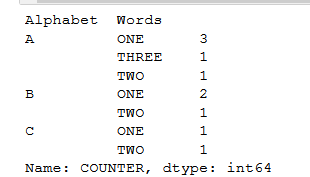
You need to provide one more column which counts the grouping, let’s call that column as, “COUNTER” in dataframe.
Like this:
df['COUNTER'] =1       #initially, set that counter to 1.
group_data = df.groupby(['Alphabet','Words'])['COUNTER'].sum() #sum function
print(group_data)
OUTPUT:
Method 5
Should you want to add a new column (say ‘count_column’) containing the groups’ counts into the dataframe:
df.count_column=df.groupby(['col5','col2']).col5.transform('count')
(I picked ‘col5’ as it contains no nan)
Method 6
Since pandas 1.1.0., you can value_counts on a DataFrame:
out = df[['col5','col2']].value_counts().sort_index()
Output:
col5  col2
1     A       1
      D       3
2     B       2
3     A       3
      C       1
4     B       1
5     B       2
6     B       1
dtype: int64
Method 7
You can just use the built-in function count follow by the groupby function
df.groupby(['col5','col2']).count()
All methods was sourced from stackoverflow.com or stackexchange.com, is licensed under cc by-sa 2.5, cc by-sa 3.0 and cc by-sa 4.0