I have a dataframe df1 which looks like:
   c  k  l
0  A  1  a
1  A  2  b
2  B  2  a
3  C  2  a
4  C  2  d
and another called df2 like:
   c  l
0  A  b
1  C  a
I would like to filter df1 keeping only the values that ARE NOT in df2. Values to filter are expected to be as (A,b) and (C,a) tuples. So far I tried to apply the isin method:
d = df[~(df['l'].isin(dfc['l']) & df['c'].isin(dfc['c']))]
That seems to me too complicated, it returns:
   c  k  l
2  B  2  a
4  C  2  d
but I’m expecting:
   c  k  l
0  A  1  a
2  B  2  a
4  C  2  d
Answers:
Thank you for visiting the Q&A section on Magenaut. Please note that all the answers may not help you solve the issue immediately. So please treat them as advisements. If you found the post helpful (or not), leave a comment & I’ll get back to you as soon as possible.
Method 1
You can do this efficiently using isin on a multiindex constructed from the desired columns:
df1 = pd.DataFrame({'c': ['A', 'A', 'B', 'C', 'C'],
                    'k': [1, 2, 2, 2, 2],
                    'l': ['a', 'b', 'a', 'a', 'd']})
df2 = pd.DataFrame({'c': ['A', 'C'],
                    'l': ['b', 'a']})
keys = list(df2.columns.values)
i1 = df1.set_index(keys).index
i2 = df2.set_index(keys).index
df1[~i1.isin(i2)]
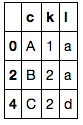
I think this improves on @IanS’s similar solution because it doesn’t assume any column type (i.e. it will work with numbers as well as strings).
(Above answer is an edit. Following was my initial answer)
Interesting! This is something I haven’t come across before… I would probably solve it by merging the two arrays, then dropping rows where df2 is defined. Here is an example, which makes use of a temporary array:
df1 = pd.DataFrame({'c': ['A', 'A', 'B', 'C', 'C'],
                    'k': [1, 2, 2, 2, 2],
                    'l': ['a', 'b', 'a', 'a', 'd']})
df2 = pd.DataFrame({'c': ['A', 'C'],
                    'l': ['b', 'a']})

# create a column marking df2 values
df2['marker'] = 1

# join the two, keeping all of df1's indices
joined = pd.merge(df1, df2, on=['c', 'l'], how='left')
joined
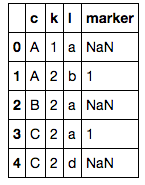
# extract desired columns where marker is NaN
joined[pd.isnull(joined['marker'])][df1.columns]
There may be a way to do this without using the temporary array, but I can’t think of one. As long as your data isn’t huge the above method should be a fast and sufficient answer.
Method 2
This is pretty succinct and works well:
df1 = df1[~df1.index.isin(df2.index)]
Method 3
Using DataFrame.merge & DataFrame.query:
A more elegant method would be to do left join with the argument indicator=True, then filter all the rows which are left_only with query:
d = (
    df1.merge(df2,
              on=['c', 'l'],
              how='left',
              indicator=True)
    .query('_merge == "left_only"')
    .drop(columns='_merge')
)

print(d)
   c  k  l
0  A  1  a
2  B  2  a
4  C  2  d
indicator=True returns a dataframe with an extra column _merge which marks each row left_only, both, right_only:
df1.merge(df2, on=['c', 'l'], how='left', indicator=True)

   c  k  l     _merge
0  A  1  a  left_only
1  A  2  b       both
2  B  2  a  left_only
3  C  2  a       both
4  C  2  d  left_only
Method 4
I think this is a quite simple approach when you want to filter a dataframe based on multiple columns from another dataframe or even based on a custom list.
df1 = pd.DataFrame({'c': ['A', 'A', 'B', 'C', 'C'],
                    'k': [1, 2, 2, 2, 2],
                    'l': ['a', 'b', 'a', 'a', 'd']})
df2 = pd.DataFrame({'c': ['A', 'C'],
                    'l': ['b', 'a']})

#values of df2 columns 'c' and 'l' that will be used to filter df1
idxs = list(zip(df2.c.values, df2.l.values)) #[('A', 'b'), ('C', 'a')]

#so df1 is filtered based on the values present in columns c and l of df2 (idxs)
df1 = df1[pd.Series(list(zip(df1.c, df1.l)), index=df1.index).isin(idxs)]
Method 5
How about:
df1['key'] = df1['c'] + df1['l']
d = df1[~df1['key'].isin(df2['c'] + df2['l'])].drop(['key'], axis=1)
Method 6
Another option that avoids creating an extra column or doing a merge would be to do a groupby on df2 to get the distinct (c, l) pairs and then just filter df1 using that.
gb = df2.groupby(("c", "l")).groups
df1[[p not in gb for p in zip(df1['c'], df1['l'])]]]
For this small example, it actually seems to run a bit faster than the pandas-based approach (666 µs vs. 1.76 ms on my machine), but I suspect it could be slower on larger examples since it’s dropping into pure Python.
Method 7
You can concatenate both DataFrames and drop all duplicates:
df1.append(df2).drop_duplicates(subset=['c', 'l'], keep=False)
Output:
   c    k  l
0  A  1.0  a
2  B  2.0  a
4  C  2.0  d
This method doesn’t work if you have duplicates subset=['c', 'l'] in df1.
All methods was sourced from stackoverflow.com or stackexchange.com, is licensed under cc by-sa 2.5, cc by-sa 3.0 and cc by-sa 4.0