I have a pandas data frame with two columns one is temperature the other is time.
I would like to make third and fourth columns called min and max. Each of these columns would be filled with nan’s except where there is a local min or max, then it would have the value of that extrema.
Here is a sample of what the data looks like, essentially I am trying to identify all the peaks and low points in the figure.
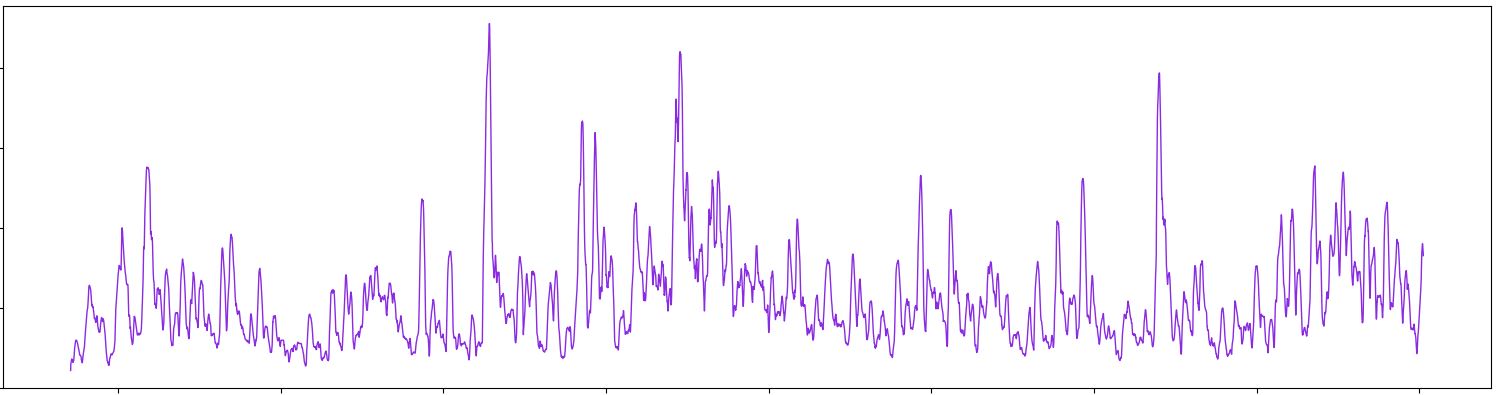
Are there any built in tools with pandas that can accomplish this?
Answers:
Thank you for visiting the Q&A section on Magenaut. Please note that all the answers may not help you solve the issue immediately. So please treat them as advisements. If you found the post helpful (or not), leave a comment & I’ll get back to you as soon as possible.
Method 1
The solution offered by fuglede is great but if your data is very noisy (like the one in the picture) you will end up with lots of misleading local extremes. I suggest that you use scipy.signal.argrelextrema() method. The .argrelextrema() method has its own limitations but it has a useful feature where you can specify the number of points to be compared, kind of like a noise filtering algorithm. for example:
import numpy as np
import matplotlib.pyplot as plt
import pandas as pd
from scipy.signal import argrelextrema

# Generate a noisy AR(1) sample

np.random.seed(0)
rs = np.random.randn(200)
xs = [0]
for r in rs:
    xs.append(xs[-1] * 0.9 + r)
df = pd.DataFrame(xs, columns=['data'])

n = 5  # number of points to be checked before and after

# Find local peaks

df['min'] = df.iloc[argrelextrema(df.data.values, np.less_equal,
                    order=n)[0]]['data']
df['max'] = df.iloc[argrelextrema(df.data.values, np.greater_equal,
                    order=n)[0]]['data']

# Plot results

plt.scatter(df.index, df['min'], c='r')
plt.scatter(df.index, df['max'], c='g')
plt.plot(df.index, df['data'])
plt.show()
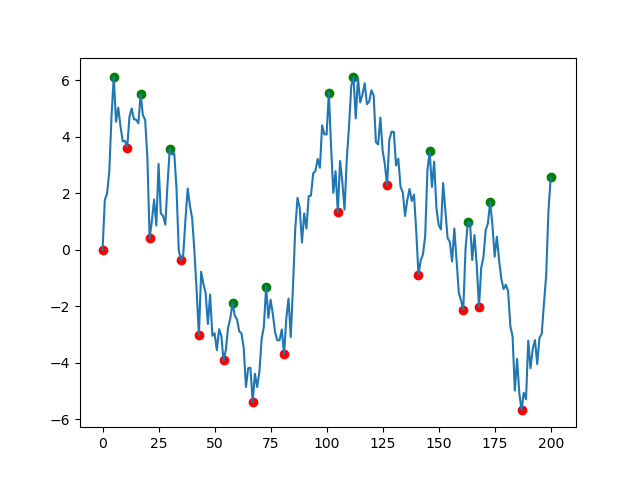
Some points:
- you might need to check the points afterward to ensure there are no twine points very close to each other.
- you can play with
nto filter the noisy points argrelextremareturns a tuple and the[0]at the end extracts anumpyarray
Method 2
Assuming that the column of interest is labelled data, one solution would be
df['min'] = df.data[(df.data.shift(1) > df.data) & (df.data.shift(-1) > df.data)]
df['max'] = df.data[(df.data.shift(1) < df.data) & (df.data.shift(-1) < df.data)]
For example:
import numpy as np
import matplotlib.pyplot as plt
import pandas as pd

# Generate a noisy AR(1) sample
np.random.seed(0)
rs = np.random.randn(200)
xs = [0]
for r in rs:
    xs.append(xs[-1]*0.9 + r)
df = pd.DataFrame(xs, columns=['data'])

# Find local peaks
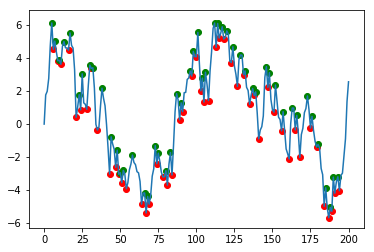
df['min'] = df.data[(df.data.shift(1) > df.data) & (df.data.shift(-1) > df.data)]
df['max'] = df.data[(df.data.shift(1) < df.data) & (df.data.shift(-1) < df.data)]

# Plot results
plt.scatter(df.index, df['min'], c='r')
plt.scatter(df.index, df['max'], c='g')
df.data.plot()
Method 3
using Numpy
ser = np.random.randint(-40, 40, 100) # 100 points
peak = np.where(np.diff(ser) < 0)[0]
or
double_difference = np.diff(np.sign(np.diff(ser)))
peak = np.where(double_difference == -2)[0]
using Pandas
ser = pd.Series(np.random.randint(2, 5, 100))
peak_df = ser[(ser.shift(1) < ser) & (ser.shift(-1) < ser)]
peak = peak_df.index
All methods was sourced from stackoverflow.com or stackexchange.com, is licensed under cc by-sa 2.5, cc by-sa 3.0 and cc by-sa 4.0