I have data in long format and am trying to reshape to wide, but there doesn’t seem to be a straightforward way to do this using melt/stack/unstack:
Salesman  Height   product      price
  Knut      6        bat          5
  Knut      6        ball         1
  Knut      6        wand         3
  Steve     5        pen          2
Becomes:
Salesman  Height    product_1  price_1  product_2 price_2 product_3 price_3
  Knut      6        bat          5       ball      1        wand      3
  Steve     5        pen          2        NA       NA        NA       NA
I think Stata can do something like this with the reshape command.
Answers:
Thank you for visiting the Q&A section on Magenaut. Please note that all the answers may not help you solve the issue immediately. So please treat them as advisements. If you found the post helpful (or not), leave a comment & I’ll get back to you as soon as possible.
Method 1
A simple pivot might be sufficient for your needs but this is what I did to reproduce your desired output:
df['idx'] = df.groupby('Salesman').cumcount()
Just adding a within group counter/index will get you most of the way there but the column labels will not be as you desired:
print df.pivot(index='Salesman',columns='idx')[['product','price']]

        product              price
idx            0     1     2      0   1   2
Salesman
Knut         bat  ball  wand      5   1   3
Steve        pen   NaN   NaN      2 NaN NaN
To get closer to your desired output I added the following:
df['prod_idx'] = 'product_' + df.idx.astype(str)
df['prc_idx'] = 'price_' + df.idx.astype(str)

product = df.pivot(index='Salesman',columns='prod_idx',values='product')
prc = df.pivot(index='Salesman',columns='prc_idx',values='price')

reshape = pd.concat([product,prc],axis=1)
reshape['Height'] = df.set_index('Salesman')['Height'].drop_duplicates()
print reshape

         product_0 product_1 product_2  price_0  price_1  price_2  Height
Salesman
Knut           bat      ball      wand        5        1        3       6
Steve          pen       NaN       NaN        2      NaN      NaN       5
Edit: if you want to generalize the procedure to more variables I think you could do something like the following (although it might not be efficient enough):
df['idx'] = df.groupby('Salesman').cumcount()

tmp = []
for var in ['product','price']:
    df['tmp_idx'] = var + '_' + df.idx.astype(str)
    tmp.append(df.pivot(index='Salesman',columns='tmp_idx',values=var))

reshape = pd.concat(tmp,axis=1)
@Luke said:
I think Stata can do something like this with the reshape command.
You can but I think you also need a within group counter to get the reshape in stata to get your desired output:
     +-------------------------------------------+
     | salesman   idx   height   product   price |
     |-------------------------------------------|
  1. |     Knut     0        6       bat       5 |
  2. |     Knut     1        6      ball       1 |
  3. |     Knut     2        6      wand       3 |
  4. |    Steve     0        5       pen       2 |
     +-------------------------------------------+
If you add idx then you could do reshape in stata:
reshape wide product price, i(salesman) j(idx)
Method 2
Here’s another solution more fleshed out, taken from Chris Albon’s site.
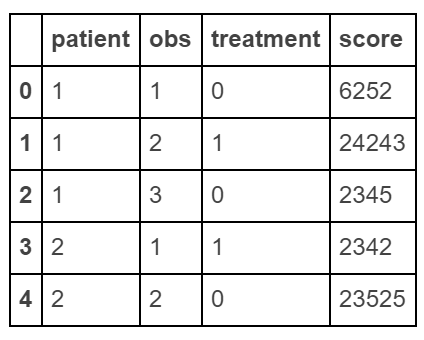
Create “long” dataframe
raw_data = {'patient': [1, 1, 1, 2, 2],
                'obs': [1, 2, 3, 1, 2],
          'treatment': [0, 1, 0, 1, 0],
              'score': [6252, 24243, 2345, 2342, 23525]}

df = pd.DataFrame(raw_data, columns = ['patient', 'obs', 'treatment', 'score'])
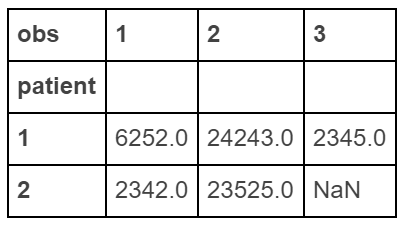
Make a “wide” data
df.pivot(index='patient', columns='obs', values='score')
Method 3
Karl D’s solution gets at the heart of the problem. But I find it’s far easier to pivot everything (with .pivot_table because of the two index columns) and then sort and assign the columns to collapse the MultiIndex:
df['idx'] = df.groupby('Salesman').cumcount()+1
df = df.pivot_table(index=['Salesman', 'Height'], columns='idx',
                    values=['product', 'price'], aggfunc='first')

df = df.sort_index(axis=1, level=1)
df.columns = [f'{x}_{y}' for x,y in df.columns]
df = df.reset_index()
Output:
  Salesman  Height  price_1 product_1  price_2 product_2  price_3 product_3
0     Knut       6      5.0       bat      1.0      ball      3.0      wand
1    Steve       5      2.0       pen      NaN       NaN      NaN       NaN
Method 4
A bit old but I will post this for other people.
What you want can be achieved, but you probably shouldn’t want it 😉
Pandas supports hierarchical indexes for both rows and columns.
In Python 2.7.x …
from StringIO import StringIO

raw = '''Salesman  Height   product      price
  Knut      6        bat          5
  Knut      6        ball         1
  Knut      6        wand         3
  Steve     5        pen          2'''
dff = pd.read_csv(StringIO(raw), sep='s+')

print dff.set_index(['Salesman', 'Height', 'product']).unstack('product')
Produces a probably more convenient representation than what you were looking for
                price
product          ball bat pen wand
Salesman Height
Knut     6          1   5 NaN    3
Steve    5        NaN NaN   2  NaN
The advantage of using set_index and unstacking vs a single function as pivot is that you can break the operations down into clear small steps, which simplifies debugging.
Method 5
pivoted = df.pivot('salesman', 'product', 'price')
pg. 192 Python for Data Analysis
Method 6
An old question; this is an addition to the already excellent answers. pivot_wider from pyjanitor may be helpful as an abstraction for reshaping from long to wide (it is a wrapper around pd.pivot):
# pip install pyjanitor
import pandas as pd
import janitor

idx = df.groupby(['Salesman', 'Height']).cumcount().add(1)

(df.assign(idx = idx)
   .pivot_wider(index = ['Salesman', 'Height'], names_from = 'idx')
)

  Salesman  Height product_1 product_2 product_3  price_1  price_2  price_3
0     Knut       6       bat      ball      wand      5.0      1.0      3.0
1    Steve       5       pen       NaN       NaN      2.0      NaN      NaN
All methods was sourced from stackoverflow.com or stackexchange.com, is licensed under cc by-sa 2.5, cc by-sa 3.0 and cc by-sa 4.0