I am trying to create a stacked bar graph that replicates the picture, all my data is separate from that excel spreadsheet.
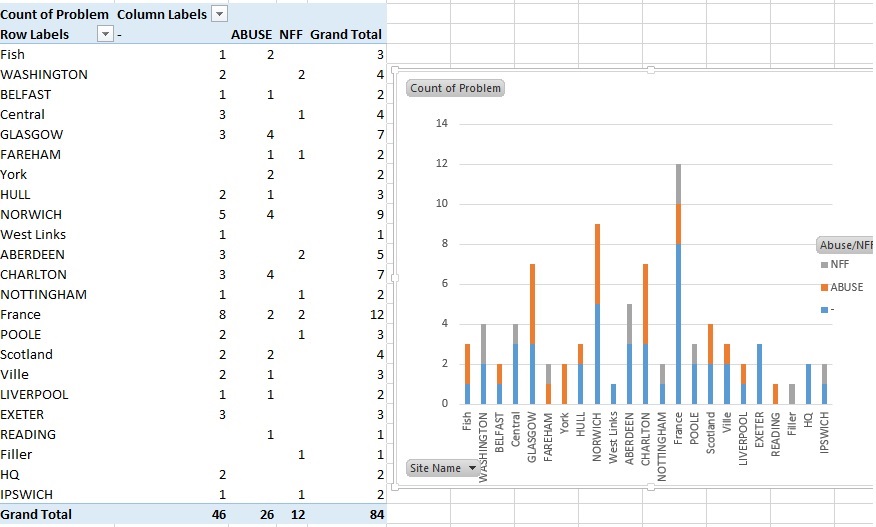
I cant figure out how to make a dataframe for it like pictured, nor can I figure out how to make the stacked bar chart. All examples I locate work in different ways to what I’m trying to create.
My dataframe is a csv of all values narrowed down to the following with a pandas dataframe.
      Site Name    Abuse/NFF
0    NORTH ACTON       ABUSE
1    WASHINGTON         -
2    WASHINGTON        NFF
3    BELFAST            -
4    CROYDON            -
I have managed to count the data with totals and get individual counts for each site, I just cant seem to combine it in a way to graph.
Would really appreciate some strong guidance.
Completed code, many thanks for the assistance completing.
test5 = faultdf.groupby(['Site Name', 'Abuse/NFF'])['Site Name'].count().unstack('Abuse/NFF').fillna(0)

test5.plot(kind='bar', stacked=True)
Answers:
Thank you for visiting the Q&A section on Magenaut. Please note that all the answers may not help you solve the issue immediately. So please treat them as advisements. If you found the post helpful (or not), leave a comment & I’ll get back to you as soon as possible.
Method 1
Are you getting errors, or just not sure where to start?
%pylab inline
import pandas as pd
import matplotlib.pyplot as plt

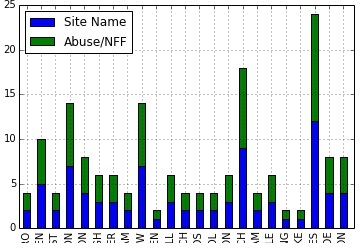
df2 = df.groupby(['Name', 'Abuse/NFF'])['Name'].count().unstack('Abuse/NFF').fillna(0)
df2[['abuse','nff']].plot(kind='bar', stacked=True)
Method 2
That should help
df.groupby(['NFF', 'ABUSE']).size().unstack().plot(kind='bar', stacked=True)
Method 3
Maybe you can use pandas crosstab function
test5 = pd.crosstab(index=faultdf['Site Name'], columns=faultdf['Abuse/NFF'])

test5.plot(kind='bar', stacked=True)
Method 4
If you want to change the size of plot the use arg figsize
df.groupby(['NFF', 'ABUSE']).size().unstack()
      .plot(kind='bar', stacked=True, figsize=(15, 5))
Method 5
from matplotlib import cm
cmap = cm.get_cmap('Spectral') # Colour map (there are many others)

df.plot(kind='bar', stacked=True, figsize=(20, 10), cmap=cmap, edgecolor='None')
plt.show()
This will also avoid duplicate colors in the legend of your bar chart.
All methods was sourced from stackoverflow.com or stackexchange.com, is licensed under cc by-sa 2.5, cc by-sa 3.0 and cc by-sa 4.0