I have a problem viewing the following DataFrame:
n = 100
foo = DataFrame(index=range(n))
foo['floats'] = np.random.randn(n)
foo
The problem is that it does not print all rows per default in ipython notebook, but I have to slice to view the resulting rows. Even the following option does not change the output:
pd.set_option('display.max_rows', 500)
Does anyone know how to display the whole array?
Answers:
Thank you for visiting the Q&A section on Magenaut. Please note that all the answers may not help you solve the issue immediately. So please treat them as advisements. If you found the post helpful (or not), leave a comment & I’ll get back to you as soon as possible.
Method 1
Set display.max_rows:
pd.set_option('display.max_rows', 500)
For older versions of pandas (<=0.11.0) you need to change both display.height and display.max_rows.
pd.set_option('display.height', 500)
pd.set_option('display.max_rows', 500)
See also pd.describe_option('display').
You can set an option only temporarily for this one time like this:
from IPython.display import display
with pd.option_context('display.max_rows', 100, 'display.max_columns', 10):
    display(df) #need display to show the dataframe when using with in jupyter
    #some pandas stuff
You can also reset an option back to its default value like this:
pd.reset_option('display.max_rows')
And reset all of them back:
pd.reset_option('all')
Method 2
Personally, I like setting the options directly with an assignment statement as it is easy to find via tab completion thanks to iPython. I find it hard to remember what the exact option names are, so this method works for me.
For instance, all I have to remember is that it begins with pd.options
pd.options.<TAB>
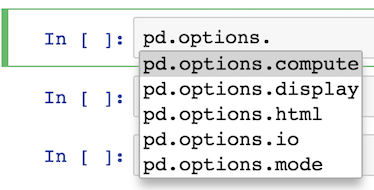
Most of the options are available under display
pd.options.display.<TAB>
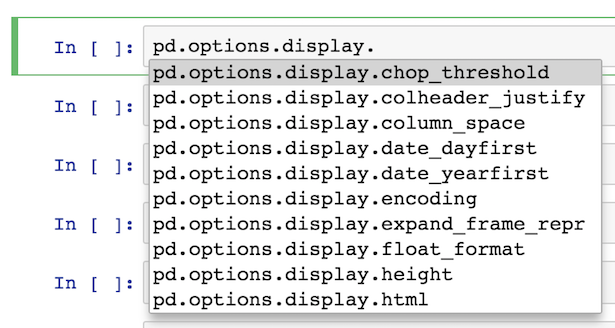
From here, I usually output what the current value is like this:
pd.options.display.max_rows
60
I then set it to what I want it to be:
pd.options.display.max_rows = 100
Also, you should be aware of the context manager for options, which temporarily sets the options inside of a block of code. Pass in the option name as a string followed by the value you want it to be. You may pass in any number of options in the same line:
with pd.option_context('display.max_rows', 100, 'display.max_columns', 10):
    some pandas stuff
You can also reset an option back to its default value like this:
pd.reset_option('display.max_rows')
And reset all of them back:
pd.reset_option('all')
It is still perfectly good to set options via pd.set_option. I just find using the attributes directly is easier and there is less need for get_option and set_option.
Method 3
pd.set_option('display.max_rows', 500)
df
Does not work in Jupyter!
Instead use:
pd.set_option('display.max_rows', 500)
df.head(500)
Method 4
It was already pointed in this comment and in this answer, but I’ll try to give a more direct answer to the question:
from IPython.display import display
import numpy as np
import pandas as pd

n = 100
foo = pd.DataFrame(index=range(n))
foo['floats'] = np.random.randn(n)

with pd.option_context("display.max_rows", foo.shape[0]):
    display(foo)
pandas.option_context is available since pandas 0.13.1 (pandas 0.13.1 release notes).
According to this,
[it] allow[s] you to execute a codeblock with a set of options that revert to prior settings when you exit the with block.
Method 5
to set unlimited number of rows use
None
i.e.,
pd.set_option('display.max_columns', None)
now the notebook will display all the rows in all datasets within the notebook 😉
Similarly you can set to show all columns as
pd.set_option('display.max_rows', None)
now if you use run the cell with only dataframe with out any head or tail tags
as
df
then it will show all the rows and columns in the dataframe df
Method 6
As @hanleyhansen noted in a comment, as of version 0.18.1, the display.height option is deprecated, and says “use display.max_rows instead”. So you just have to configure it like this:
pd.set_option('display.max_rows', 500)
See the Release Notes — pandas 0.18.1 documentation:
Deprecated display.height, display.width is now only a formatting option does not control triggering of summary, similar to < 0.11.0.
Method 7
As in this answer to a similar question, there is no need to hack settings. It is much simpler to write:
print(foo.to_string())
Method 8
I don’t know why nobody mentioned this.
You should also set 'display.min_rows'.
pd.set_option('display.min_rows', 500)  # <-add this!
pd.set_option('display.max_rows', 500)
If total number of rows > display.max_rows,
then, setting only display.max_rows would not work.
(Yeah, it’s confusing. This should be modified.)
All methods was sourced from stackoverflow.com or stackexchange.com, is licensed under cc by-sa 2.5, cc by-sa 3.0 and cc by-sa 4.0