I’m looking for an HTML Parser module for Python that can help me get the tags in the form of Python lists/dictionaries/objects.
If I have a document of the form:
<html>
<head>Heading</head>
<body attr1='val1'>
    <div class='container'>
        <div id='class'>Something here</div>
        <div>Something else</div>
    </div>
</body>
</html>
then it should give me a way to access the nested tags via the name or id of the HTML tag so that I can basically ask it to get me the content/text in the div tag with class='container' contained within the body tag, or something similar.
If you’ve used Firefox’s “Inspect element” feature (view HTML) you would know that it gives you all the tags in a nice nested manner like a tree.
I’d prefer a built-in module but that might be asking a little too much.
I went through a lot of questions on Stack Overflow and a few blogs on the internet and most of them suggest BeautifulSoup or lxml or HTMLParser but few of these detail the functionality and simply end as a debate over which one is faster/more efficent.
Answers:
Thank you for visiting the Q&A section on Magenaut. Please note that all the answers may not help you solve the issue immediately. So please treat them as advisements. If you found the post helpful (or not), leave a comment & I’ll get back to you as soon as possible.
Method 1
So that I can ask it to get me the content/text in the div tag with class=’container’ contained within the body tag, Or something similar.
try:
    from BeautifulSoup import BeautifulSoup
except ImportError:
    from bs4 import BeautifulSoup
html = #the HTML code you've written above
parsed_html = BeautifulSoup(html)
print(parsed_html.body.find('div', attrs={'class':'container'}).text)
You don’t need performance descriptions I guess – just read how BeautifulSoup works. Look at its official documentation.
Method 2
I guess what you’re looking for is pyquery:
pyquery: a jquery-like library for python.
An example of what you want may be like:
from pyquery import PyQuery
html = # Your HTML CODE
pq = PyQuery(html)
tag = pq('div#id') # or     tag = pq('div.class')
print tag.text()
And it uses the same selectors as Firefox’s or Chrome’s inspect element. For example:
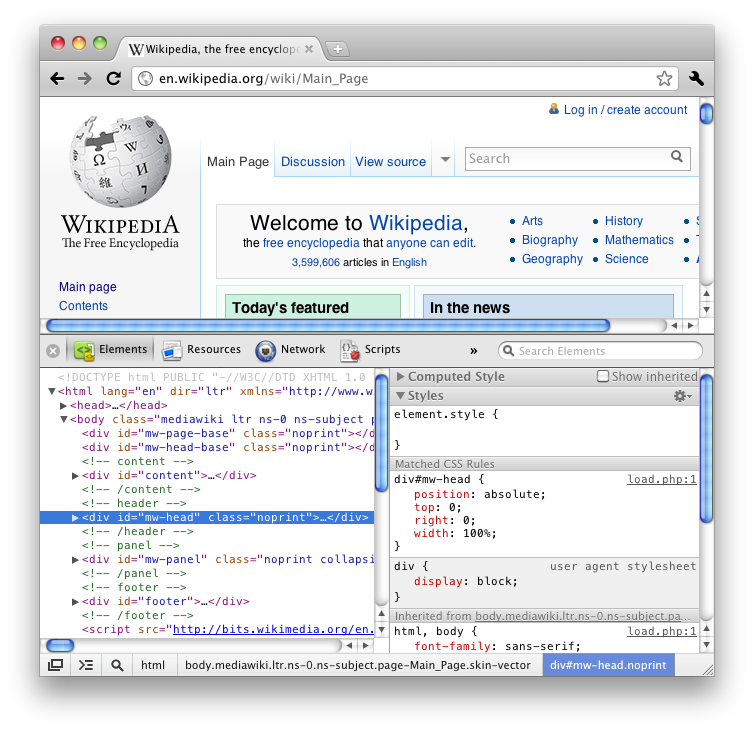
The inspected element selector is ‘div#mw-head.noprint’. So in pyquery, you just need to pass this selector:
pq('div#mw-head.noprint')
Method 3
Here you can read more about different HTML parsers in Python and their performance. Even though the article is a bit dated it still gives you a good overview.
Python HTML parser performance
I’d recommend BeautifulSoup even though it isn’t built in. Just because it’s so easy to work with for those kinds of tasks. Eg:
import urllib2
from BeautifulSoup import BeautifulSoup

page = urllib2.urlopen('http://www.google.com/')
soup = BeautifulSoup(page)

x = soup.body.find('div', attrs={'class' : 'container'}).text
Method 4
Compared to the other parser libraries lxml is extremely fast:
- http://blog.dispatched.ch/2010/08/16/beautifulsoup-vs-lxml-performance/
- http://www.ianbicking.org/blog/2008/03/python-html-parser-performance.html
And with cssselect it’s quite easy to use for scraping HTML pages too:
from lxml.html import parse
doc = parse('http://www.google.com').getroot()
for div in doc.cssselect('a'):
    print '%s: %s' % (div.text_content(), div.get('href'))
Method 5
I recommend lxml for parsing HTML. See “Parsing HTML” (on the lxml site).
In my experience Beautiful Soup messes up on some complex HTML. I believe that is because Beautiful Soup is not a parser, rather a very good string analyzer.
Method 6
I recommend using justext library:
https://github.com/miso-belica/jusText
Usage:
Python2:
import requests
import justext

response = requests.get("http://planet.python.org/")
paragraphs = justext.justext(response.content, justext.get_stoplist("English"))
for paragraph in paragraphs:
    print paragraph.text
Python3:
import requests
import justext

response = requests.get("http://bbc.com/")
paragraphs = justext.justext(response.content, justext.get_stoplist("English"))
for paragraph in paragraphs:
    print (paragraph.text)
Method 7
I would use EHP
Here it is:
from ehp import *

doc = '''<html>
<head>Heading</head>
<body attr1='val1'>
    <div class='container'>
        <div id='class'>Something here</div>
        <div>Something else</div>
    </div>
</body>
</html>
'''

html = Html()
dom = html.feed(doc)
for ind in dom.find('div', ('class', 'container')):
    print ind.text()
Output:
Something here
Something else
All methods was sourced from stackoverflow.com or stackexchange.com, is licensed under cc by-sa 2.5, cc by-sa 3.0 and cc by-sa 4.0