I’m working on ASP.NET Core web application where I have a table in my view that displays all requests. each record with drop-down populated with all analysts successfully from my database, So the manager can assign the analyst from drop-down then approve the request.
My questions:
- Can I implement this using form for each record instead using JavaScript, I mean using only asp tags?
-
If that should done using JavaScript, Here is my attempt to implement this.
The following code is working only if the Analyst id is integer, but in my case the analyst id is string, so whenever I try to execute this, I got either “null” or “Zero” for the analyst id in the controller. Here is my ViewModel
public class RequestViewModel
{
    public IEnumerable<Request> Requests { get; set; }
    public IEnumerable<ApplicationUser> AnalystList { get; set; }
    public Institution Institution { get; set; }
    public string selectedAnalyst { get; set; }
}
Here is my controller
      public async Task<IActionResult> ApproveRequest(int id, int Analystid)
            {

                Request Req = await _db.Request
                    .Include(c => c.Institution)
                    .FirstOrDefaultAsync(c => c.Id == id);

                if (Req.Type == SD.TypeRegister)
                {
                    Req.Institution.Status = SD.StatusApproved;
                    Req.Institution.ApprovalDate = DateTime.Now;
                    Req.Institution.Seats = Req.Seats; // new
                    Req.Institution.AnalystId = Analystid.ToString(); //Here I want to get the id as string

                }
                else if (Req.Type == SD.TypeSeat)
                {
                    Req.Institution.Seats += Req.Seats;
                }
                else if (Req.Type == SD.TypeSubscription)
                {
                    Req.Institution.Seats = Req.Seats;
                    Req.Institution.Status = SD.StatusApproved;
                    Req.Institution.ApprovalDate = DateTime.Now;
                }

                Req.isDone = true;
                await _db.SaveChangesAsync();
                return await CreateApproval(id, SD.StatusApproved);
            }
Here is my View
     @model TestApplication.Models.ViewModels.RequestViewModel
        @using TestApplication.Extensions
        @{
            ViewData["Title"] = "Index";
        }

            <div class="tab-pane fade show active" id="Register" role="tabpanel" aria-labelledby="Register-tab">

                Registration Requests
                <div>
                    @if (Model.Requests.Count() > 0)
                    {
                        <table class="table table-striped">
                            <tr class="table-secondary">
                                <th>
                                   Institution Name
                                </th>
                                <th>
                                    Date
                                </th>
                                <th>
                                    Actual seat
                                </th>
                                <th>
                                    Seats
                                </th>
                                <th>
                                   New Seat
                                </th>
                                <th>
                                    Choose Analyst
                                </th>
                                <th>
                                    Accept / Reject

                                </th>
                                <th>
                                    Details
                                </th>
                                <th>
                                </th>
                            </tr>
                            @foreach (var item in Model.Requests)
                            {
                                @if (item.Type == "Register" && item.Institution.Status == "Pending") @*need one*@
                                {
                        <tr>
                            <td>
                                @Html.DisplayFor(m => item.Institution.Name)
                            </td>
                            <td>
                                @Html.DisplayFor(m => item.Date)
                            </td>
                            <td>
                                @Html.DisplayFor(m => item.Institution.Seats)
                            </td>
                            <td>
                                @Html.DisplayFor(m => item.ActualSeats)
                            </td>
                            <td>
                                @Html.DisplayFor(m => item.Seats)
                            </td>
                            <td>
                                <select id="[email protected]" asp-for="selectedAnalyst" asp-items=" Model.AnalystList.ToSelectListItem(Model.selectedAnalyst)" class="form-control">
                                       <option selected value="">--- Choose ---</option>
                                </select>
                            </td>
                            <td>
                                  <a class="btn btn-info" asp-controller="Request" asp-action="ApproveRequest" asp-route-id="@item.Id"> accept </a>
                                  <a class="btn btn-info" asp-controller="Request" asp-action="RejectRequest" asp-route-id="@item.Id"> Reject </a>
                            </td>
                            <td>
                                <button type="submit" class="btn btn-success anchorDetail" data-target="#[email protected]" data-toggle="modal">
                                    View Details
                                </button>
                            </td>
                            <td>
                                <div class="modal fade" id="[email protected]" tabindex="-1" role="dialog" aria-hidden="true">
                                    <div class="modal-dialog-centered modal-dialog" role="document">
                                        <div class="modal-content">
                                            <div class="modal-header bg-success text-light justify-content-center">
                                                <h5 class="modal-title">Request Details</h5>
                                            </div>
                                            <div class="modal-body justify-content-center" id="MyModalContent">
                                                @await Html.PartialAsync("_RequestDetails", item)
                                            </div>
                                            <div class="modal-footer">
                                                <button type="button" class="btn btn-secondary" data-dismiss="modal">إغلاق</button>
                                            </div>
                                        </div>
                                    </div>
                                </div>
                            </td>
                        </tr>
                                }
                            }
                        </table>
                    }
                    else
                    {
                        <p>No Institutions Exists...</p>
                    }
                </div>


            </div>
    @section scripts
    {
        <script>

            function accept(id) {
                var aid = $('#selectedAnalyst_' + id).val()
                location.href = "/Request/ApproveRequest?id=" + id + "&Analystid=" + aid
            }


            var PostBackURL = '/Request/RequestDetails';
            $(function () {
                $(".anchorDetail").click(function () {
                    var $buttonClicked = $(this);
                    var id = $buttonClicked.attr('data-id');
                    $.ajax({
                        type: "GET",
                        url: PostBackURL,
                        contentType: "application/json; charset=utf-8",
                        data: { "Id": id },
                        cache: false,
                        datatype: "json",
                        success: function (data) {
                            $('#MyModalContent').html(data);
                            $('#myModal').modal('show');
                        },
                        error: function () {
                            alert("Dynamic content load failed.");
                        }
                    });
                })
        </script>
    }

    <div class="modal fade" id="MyModal" tabindex="-1" role="dialog"
         aria-labelledby="myModalLabel">
        <div id='MyModalContent'></div>
    </div>
Answers:
Thank you for visiting the Q&A section on Magenaut. Please note that all the answers may not help you solve the issue immediately. So please treat them as advisements. If you found the post helpful (or not), leave a comment & I’ll get back to you as soon as possible.
Method 1
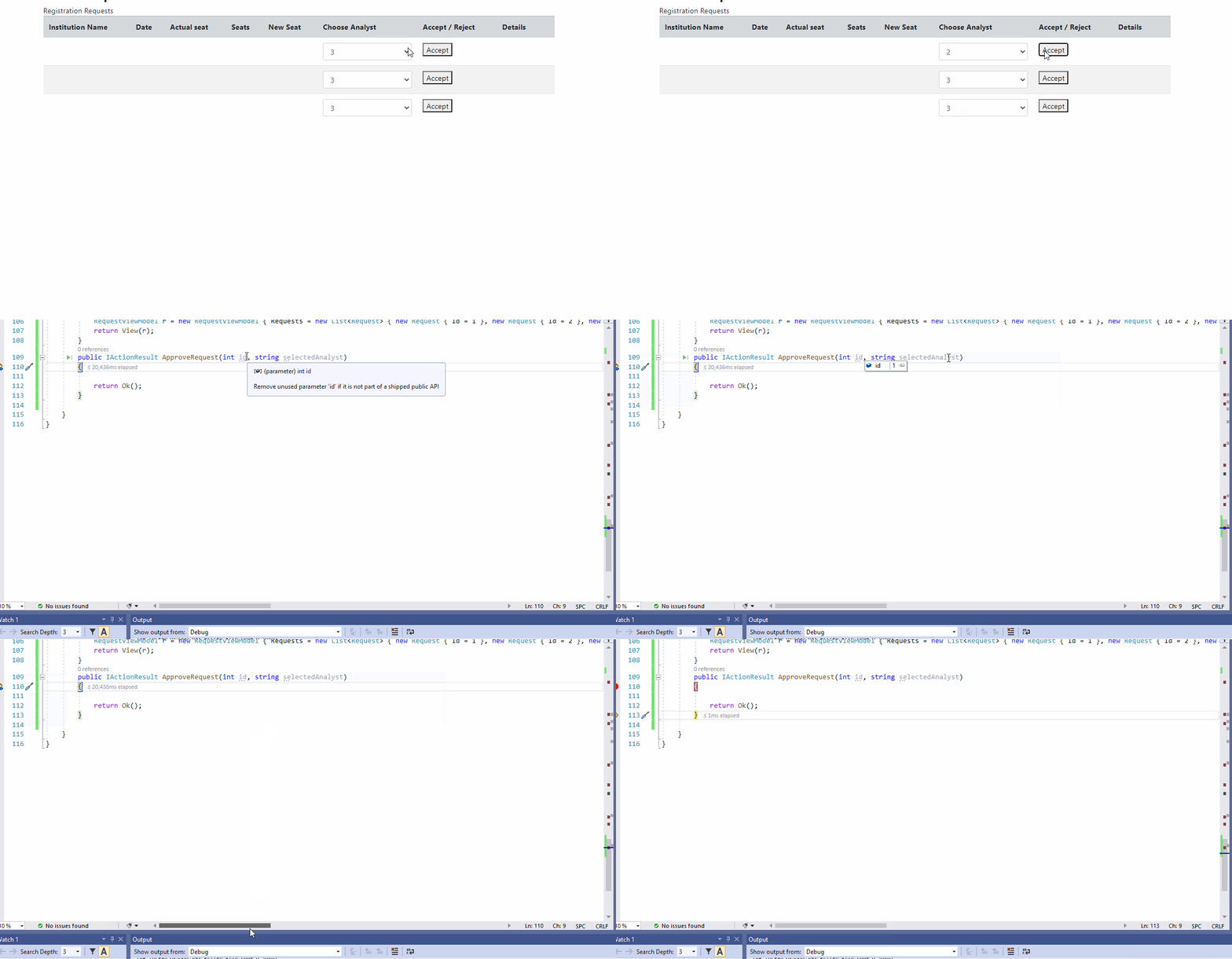
If you want to pass @item.id and $(‘#selectedAnalyst_’ + id).val() to controller with form,you can do like this.Here is a demo worked(put form outside dropdownlist and button):
          <form method="post"
                      asp-controller="Request"
                      asp-action="ApproveRequest"
                      asp-route-id="@item.Id">
                    <td>
                        <select id="<a href="https://getridbug.com/cdn-cgi/l/email-protection" class="__cf_email__" data-cfemail="9ae9fff6fff9eefffedbf4fbf6e3e9eec5daf3eefff7b4d3fe">[email protected]</a>" asp-for="selectedAnalyst" class="form-control">
                            <option selected value="">--- Choose ---</option>
                            <option selected value="1">1</option>
                            <option selected value="2">2</option>
                            <option selected value="3">3</option>

                        </select>
                    </td>
                    <td>

                        <button type="submit">Accept</button>
                    </td>
          </form>
Controller(change Analystid to selectedAnalyst,so that you can bind asp-for="selectedAnalyst",and if you want to get string parameter,you can change it to string selectedAnalyst):
public IActionResult ApproveRequest(int id,string selectedAnalyst)
        {
            return Ok();
        }
result:
All methods was sourced from stackoverflow.com or stackexchange.com, is licensed under cc by-sa 2.5, cc by-sa 3.0 and cc by-sa 4.0