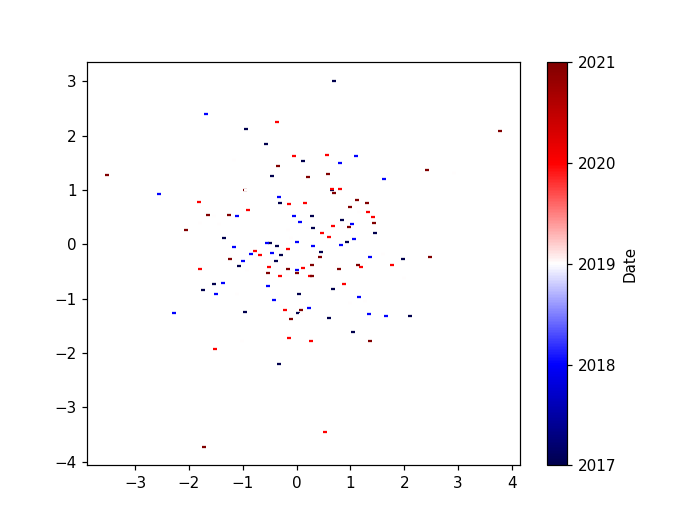
I have a set of coordinates that are arranged per year, and I scatterplot them.
I create a custom colormap that reflects those years, but the issue is I can’t manage to plot the colorbar of that colormap, and replace the ticks by the values of a numpy array of datetime64. I have no idea how to do it since I don’t plot any image (and the examples online are mainly with plt.imshow).
How could I:
- Plot the colorbar with my custom colormap
- Replace the colorbar’s ticks with my dates ?
This is my code:
import matplotlib.dates as mdates
import matplotlib.pyplot as plt

# Create the dates
dates = np.datetime64('2017') + np.arange(5)*np.timedelta64(1, 'Y')

# Create array where the dates are the 2nd dimension
arr = np.random.randn(3,5,10,2)
colors = cm.seismic(np.linspace(0,1, num=arr.shape[1]))
fig,ax = plt.subplots()

# Iterate through the 1st and 2nd dimension
for g in range(0,arr.shape[0]):
              for i in range(0,arr.shape[1]):
                plot = plt.scatter(arr[g,i,:,0],arr[g,i,:,1], s = 10, marker = '_', color = colors)

# Attempt to plot the colorbar and replace ticks by the years
cb = plt.colorbar()
loc = mdates.AutoDateLocator()
cb.ax.yaxis.set_major_locator(loc)
cb.ax.yaxis.set_major_formatter(mdates.ConciseDateFormatter(loc))

colors
Answers:
Thank you for visiting the Q&A section on Magenaut. Please note that all the answers may not help you solve the issue immediately. So please treat them as advisements. If you found the post helpful (or not), leave a comment & I’ll get back to you as soon as possible.
Method 1
import matplotlib.dates as mdates
import matplotlib.pyplot as plt
import matplotlib.cm as cm
from matplotlib.colors import Normalize
import numpy as np

# Create the dates
dates = np.datetime64('2017') + np.arange(5)*np.timedelta64(1, 'Y')

# Create array where the dates are the 2nd dimension
arr = np.random.randn(3,5,10,2)
values = np.linspace(0,1, num=arr.shape[1])

# create a normalizer
norm = Normalize(vmin=values.min(), vmax=values.max())
# normalize values
norm_values = norm(values)
# choose a colormap
cmap = cm.seismic
# create colors
colors = cmap(norm_values)
# map values to a colorbar
mappable = cm.ScalarMappable(norm=norm, cmap=cmap)
mappable.set_array(values)

fig, ax = plt.subplots()

# Iterate through the 1st and 2nd dimension
for g in range(0,arr.shape[0]):
              for i in range(0,arr.shape[1]):
                plot = plt.scatter(arr[g,i,:,0],arr[g,i,:,1], s = 10, marker = '_', color = colors[i])

# replace ticks by the years
cb = fig.colorbar(mappable, ticks=values)
cb.ax.set_yticklabels(dates)
cb.set_label("Date")
All methods was sourced from stackoverflow.com or stackexchange.com, is licensed under cc by-sa 2.5, cc by-sa 3.0 and cc by-sa 4.0