Assuming i have a DataFrame that looks like this:
Hour | V1 | V2 | A1 | A2
 0   | 15 | 13 | 25 | 37
 1   | 26 | 52 | 21 | 45
 2   | 18 | 45 | 45 | 25
 3   | 65 | 38 | 98 | 14
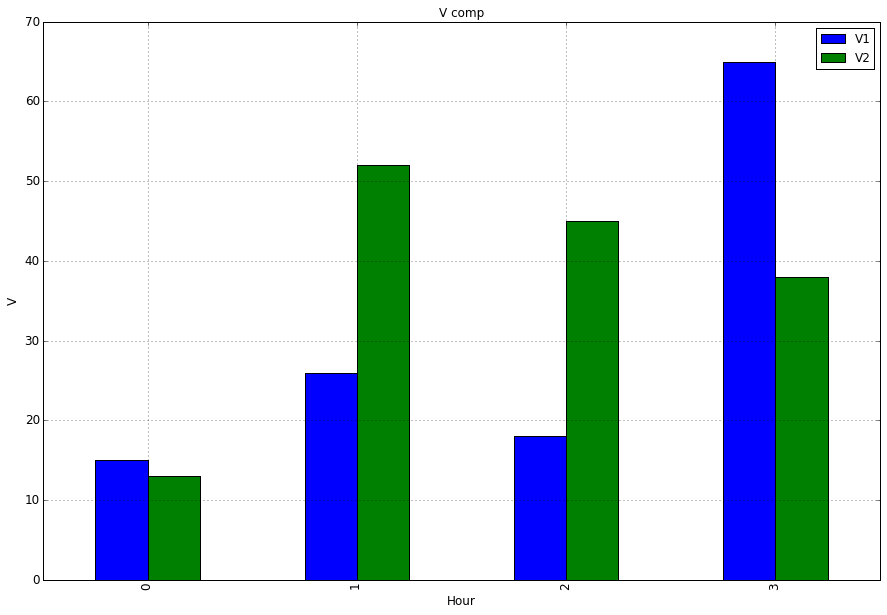
Im trying to create a bar plot to compare columns V1 and V2 by the Hour.
When I do:
import matplotlib.pyplot as plt
ax = df.plot(kind='bar', title ="V comp",figsize=(15,10),legend=True, fontsize=12)
ax.set_xlabel("Hour",fontsize=12)
ax.set_ylabel("V",fontsize=12)
I get a plot and a legend with all the columns’ values and names. How can I modify my code so the plot and legend only displays the columns V1 and V2
Answers:
Thank you for visiting the Q&A section on Magenaut. Please note that all the answers may not help you solve the issue immediately. So please treat them as advisements. If you found the post helpful (or not), leave a comment & I’ll get back to you as soon as possible.
Method 1
To plot just a selection of your columns you can select the columns of interest by passing a list to the subscript operator:
ax = df[['V1','V2']].plot(kind='bar', title ="V comp", figsize=(15, 10), legend=True, fontsize=12)
What you tried was df['V1','V2'] this will raise a KeyError as correctly no column exists with that label, although it looks funny at first you have to consider that your are passing a list hence the double square brackets [[]].
import matplotlib.pyplot as plt
ax = df[['V1','V2']].plot(kind='bar', title ="V comp", figsize=(15, 10), legend=True, fontsize=12)
ax.set_xlabel("Hour", fontsize=12)
ax.set_ylabel("V", fontsize=12)
plt.show()
All methods was sourced from stackoverflow.com or stackexchange.com, is licensed under cc by-sa 2.5, cc by-sa 3.0 and cc by-sa 4.0