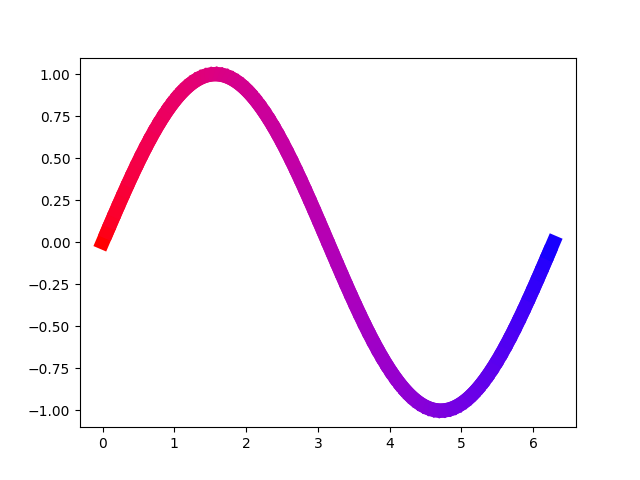
I want to start the curve with one color and progressively blend into another color until the end. The following function in my MCVE works, but surely, there has to be a better way I haven’t found out about, yet?!
import numpy as np
import matplotlib.pyplot as plt

def colorlist(color1, color2, num):
    """Generate list of num colors blending from color1 to color2"""
    result = [np.array(color1), np.array(color2)]
    while len(result) < num:
        temp = [result[0]]
        for i in range(len(result)-1):
            temp.append(np.sqrt((result[i]**2+result[i+1]**2)/2))
            temp.append(result[i+1])
        result = temp
    indices = np.linspace(0, len(result)-1, num).round().astype(int)
    return [result[i] for i in indices]

x = np.linspace(0, 2*np.pi, 100)
y = np.sin(x)
colors = colorlist((1, 0, 0), (0, 0, 1), len(x))

for i in range(len(x)-1):
    xi = x[i:i+1+1]
    yi = y[i:i+1+1]
    ci = colors[i]
    plt.plot(xi, yi, color=ci, linestyle='solid', linewidth='10')

plt.show()
Answers:
Thank you for visiting the Q&A section on Magenaut. Please note that all the answers may not help you solve the issue immediately. So please treat them as advisements. If you found the post helpful (or not), leave a comment & I’ll get back to you as soon as possible.
Method 1
Not sure what “better way” refers to. A solution with less code, which would draw faster is the use of a LineCollection together with a colormap.
A colormap can be defined by two colors and any colors in between are automatically interpolated.
cmap = matplotlib.colors.LinearSegmentedColormap.from_list("", [(1, 0, 0), (0, 0, 1)])
A LineCollection can be used to plot a lot of lines at once. Being a ScalarMappable it can use a colormap to colorize each line differently according to some array – in this case one may just use the x values for that purpose.
import numpy as np
import matplotlib.pyplot as plt
from matplotlib.collections import LineCollection
from matplotlib.colors import LinearSegmentedColormap

x = np.linspace(0, 2*np.pi, 100)
y = np.sin(x)

cmap = LinearSegmentedColormap.from_list("", [(1, 0, 0), (0, 0, 1)])

points = np.array([x, y]).T.reshape(-1,1,2)
segments = np.concatenate([points[:-1],points[1:]], axis=1)

lc = LineCollection(segments, cmap=cmap, linewidth=10)
lc.set_array(x)
plt.gca().add_collection(lc)
plt.gca().autoscale()
plt.show()
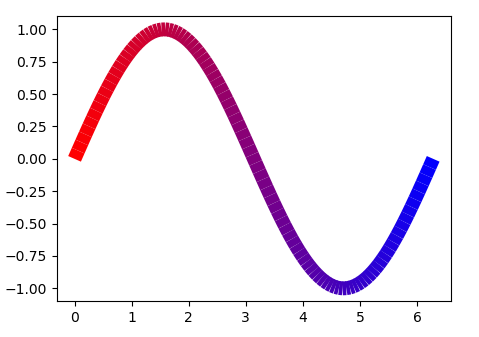
The drawback of this solution as can be see in the picture is that the individual lines are not well connected.
So to circumvent this, one may plot those points overlapping, using
segments = np.concatenate([points[:-2],points[1:-1], points[2:]], axis=1)
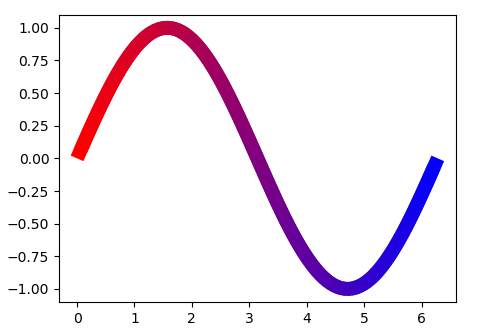
In the above the color is linearly interpolated between the two given colors. The plot therefore looks different than the one from the question using some custom interpolation.
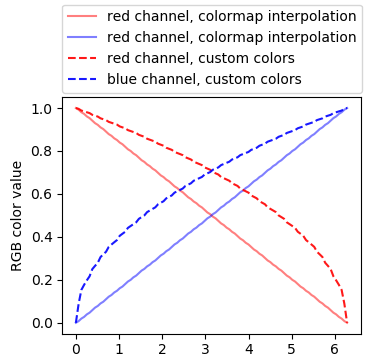
To obtain the same colors as in the question, you may use the same function to create the colors used in the colormap for the LineCollection. If the aim is to simplify this function you may directly calculate the values as the square root of the color difference in the channels.
import numpy as np
import matplotlib.pyplot as plt
from matplotlib.collections import LineCollection
from matplotlib.colors import LinearSegmentedColormap

x = np.linspace(0, 2*np.pi, 100)
y = np.sin(x)

def colorlist2(c1, c2, num):
    l = np.linspace(0,1,num)
    a = np.abs(np.array(c1)-np.array(c2))
    m = np.min([c1,c2], axis=0)
    s  = np.sign(np.array(c2)-np.array(c1)).astype(int)
    s[s==0] =1
    r = np.sqrt(np.c_[(l*a[0]+m[0])[::s[0]],(l*a[1]+m[1])[::s[1]],(l*a[2]+m[2])[::s[2]]])
    return r

cmap = LinearSegmentedColormap.from_list("", colorlist2((1, 0, 0), (0, 0, 1),100))

points = np.array([x, y]).T.reshape(-1,1,2)
segments = np.concatenate([points[:-2],points[1:-1], points[2:]], axis=1)

lc = LineCollection(segments, cmap=cmap, linewidth=10)
lc.set_array(x)
plt.gca().add_collection(lc)
plt.gca().autoscale()
plt.show()
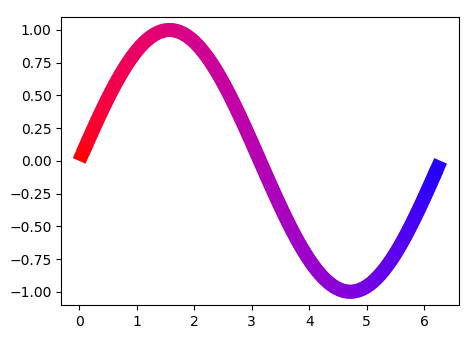
Method 2
In response to a comment above: If you want to change the color depending on the y value, you can use the following code:
import numpy as np
import matplotlib.pyplot as plt
from matplotlib.collections import LineCollection
from matplotlib.colors import LinearSegmentedColormap

x = np.linspace(0, 2 * np.pi, 100)
y = np.sin(x)
ynorm = (y - y.min()) / (y.max() - y.min())


def colorlist2(c1, c2, num):
    l = np.linspace(0, 1, num)
    a = np.abs(np.array(c1) - np.array(c2))
    m = np.min([c1, c2], axis=0)
    s = np.sign(np.array(c2) - np.array(c1)).astype(int)
    s[s == 0] = 1
    r = np.sqrt(np.c_[(l * a[0] + m[0])[::s[0]],
                      (l * a[1] + m[1])[::s[1]], (l * a[2] + m[2])[::s[2]]])
    return r


cmap = LinearSegmentedColormap.from_list(
    "", colorlist2((1, 0, 0), (0, 0, 1), 100))
colors = [cmap(k) for k in ynorm[:-1]]

points = np.array([x, y]).T.reshape(-1, 1, 2)
segments = np.concatenate([points[:-2], points[1:-1], points[2:]], axis=1)

lc = LineCollection(segments, colors=colors, linewidth=10)
lc.set_array(x)
plt.gca().add_collection(lc)
plt.gca().autoscale()
plt.show()
This will output this graph:
Graph with color depending on y value
All methods was sourced from stackoverflow.com or stackexchange.com, is licensed under cc by-sa 2.5, cc by-sa 3.0 and cc by-sa 4.0