I have a temperature file with many years temperature records, in a format as below:
2012-04-12,16:13:09,20.6
2012-04-12,17:13:09,20.9
2012-04-12,18:13:09,20.6
2007-05-12,19:13:09,5.4
2007-05-12,20:13:09,20.6
2007-05-12,20:13:09,20.6
2005-08-11,11:13:09,20.6
2005-08-11,11:13:09,17.5
2005-08-13,07:13:09,20.6
2006-04-13,01:13:09,20.6
Every year has different numbers, time of the records, so the pandas datetimeindices are all different.
I want to plot the different year’s data in the same figure for comparing . The X-axis is Jan to Dec, the Y-axis is temperature. How should I go about doing this?
Answers:
Thank you for visiting the Q&A section on Magenaut. Please note that all the answers may not help you solve the issue immediately. So please treat them as advisements. If you found the post helpful (or not), leave a comment & I’ll get back to you as soon as possible.
Method 1
Try:
ax = df1.plot()
df2.plot(ax=ax)
Method 2
If you a running Jupyter/Ipython notebook and having problems using;
ax = df1.plot()
df2.plot(ax=ax)
Run the command inside of the same cell!! It wont, for some reason, work when they are separated into sequential cells. For me at least.
Method 3
Although Chang’s answer explains how to plot multiple times on the same figure, in this case you might be better off in this case using a groupby and unstacking:
(Assuming you have this in dataframe, with datetime index already)
In [1]: df
Out[1]:
            value
datetime
2010-01-01      1
2010-02-01      1
2009-01-01      1

# create additional month and year columns for convenience
df['Month'] = map(lambda x: x.month, df.index)
df['Year'] = map(lambda x: x.year, df.index)

In [5]: df.groupby(['Month','Year']).mean().unstack()
Out[5]:
       value
Year    2009  2010
Month
1          1     1
2        NaN     1
Now it’s easy to plot (each year as a separate line):
df.groupby(['Month','Year']).mean().unstack().plot()
Method 4
To do this for multiple dataframes, you can do a for loop over them:
fig = plt.figure(num=None, figsize=(10, 8))
ax = dict_of_dfs['FOO'].column.plot()
for BAR in dict_of_dfs.keys():
    if BAR == 'FOO':
        pass
    else:
        dict_of_dfs[BAR].column.plot(ax=ax)
Method 5
Just to enhance @adivis12 answer, you don’t need to do the if statement. Put it like this:
fig, ax = plt.subplots()
for BAR in dict_of_dfs.keys():
    dict_of_dfs[BAR].plot(ax=ax)
Method 6
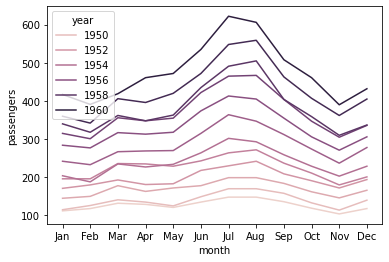
You can make use of the hue parameter in seaborn. For example:
import seaborn as sns
df = sns.load_dataset('flights')

     year month  passengers
0    1949   Jan         112
1    1949   Feb         118
2    1949   Mar         132
3    1949   Apr         129
4    1949   May         121
..    ...   ...         ...
139  1960   Aug         606
140  1960   Sep         508
141  1960   Oct         461
142  1960   Nov         390
143  1960   Dec         432

sns.lineplot(x='month', y='passengers', hue='year', data=df)
All methods was sourced from stackoverflow.com or stackexchange.com, is licensed under cc by-sa 2.5, cc by-sa 3.0 and cc by-sa 4.0