I search how to plot something with less instruction as possible with Matplotlib but I don’t find any help for this in the documentation.
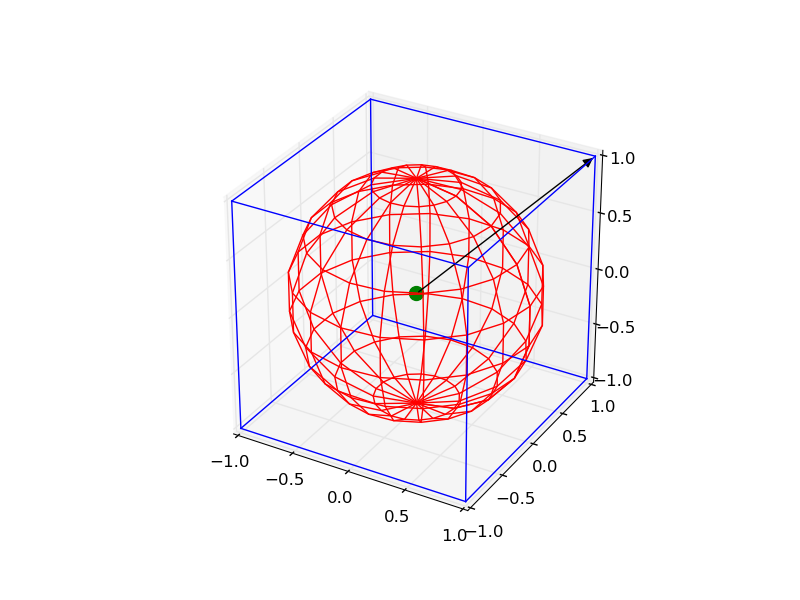
I want to plot the following things:
- a wireframe cube centered in 0 with a side length of 2
- a “wireframe” sphere centered in 0 with a radius of 1
- a point at coordinates [0, 0, 0]
- a vector that starts at this point and goes to [1, 1, 1]
How to do that?
Answers:
Thank you for visiting the Q&A section on Magenaut. Please note that all the answers may not help you solve the issue immediately. So please treat them as advisements. If you found the post helpful (or not), leave a comment & I’ll get back to you as soon as possible.
Method 1
It is a little complicated, but you can draw all the objects by the following code:
from mpl_toolkits.mplot3d import Axes3D
import matplotlib.pyplot as plt
import numpy as np
from itertools import product, combinations


fig = plt.figure()
ax = fig.gca(projection='3d')
ax.set_aspect("equal")

# draw cube
r = [-1, 1]
for s, e in combinations(np.array(list(product(r, r, r))), 2):
    if np.sum(np.abs(s-e)) == r[1]-r[0]:
        ax.plot3D(*zip(s, e), color="b")

# draw sphere
u, v = np.mgrid[0:2*np.pi:20j, 0:np.pi:10j]
x = np.cos(u)*np.sin(v)
y = np.sin(u)*np.sin(v)
z = np.cos(v)
ax.plot_wireframe(x, y, z, color="r")

# draw a point
ax.scatter([0], [0], [0], color="g", s=100)

# draw a vector
from matplotlib.patches import FancyArrowPatch
from mpl_toolkits.mplot3d import proj3d


class Arrow3D(FancyArrowPatch):

    def __init__(self, xs, ys, zs, *args, **kwargs):
        FancyArrowPatch.__init__(self, (0, 0), (0, 0), *args, **kwargs)
        self._verts3d = xs, ys, zs

    def draw(self, renderer):
        xs3d, ys3d, zs3d = self._verts3d
        xs, ys, zs = proj3d.proj_transform(xs3d, ys3d, zs3d, renderer.M)
        self.set_positions((xs[0], ys[0]), (xs[1], ys[1]))
        FancyArrowPatch.draw(self, renderer)

a = Arrow3D([0, 1], [0, 1], [0, 1], mutation_scale=20,
            lw=1, arrowstyle="-|>", color="k")
ax.add_artist(a)
plt.show()
Method 2
For drawing just the arrow, there is an easier method:-
from mpl_toolkits.mplot3d import Axes3D
import matplotlib.pyplot as plt
fig = plt.figure()
ax = fig.gca(projection='3d')
ax.set_aspect("equal")

#draw the arrow
ax.quiver(0,0,0,1,1,1,length=1.0)

plt.show()
quiver can actually be used to plot multiple vectors at one go. The usage is as follows:- [ from http://matplotlib.org/mpl_toolkits/mplot3d/tutorial.html?highlight=quiver#mpl_toolkits.mplot3d.Axes3D.quiver]
quiver(X, Y, Z, U, V, W, **kwargs)
Arguments:
X, Y, Z:
The x, y and z coordinates of the arrow locations
U, V, W:
The x, y and z components of the arrow vectors
The arguments could be array-like or scalars.
Keyword arguments:
length: [1.0 | float]
The length of each quiver, default to 1.0, the unit is the same with the axes
arrow_length_ratio: [0.3 | float]
The ratio of the arrow head with respect to the quiver, default to 0.3
pivot: [ ‘tail’ | ‘middle’ | ‘tip’ ]
The part of the arrow that is at the grid point; the arrow rotates about this point, hence the name pivot. Default is ‘tail’
normalize: [False | True]
When True, all of the arrows will be the same length. This defaults to False, where the arrows will be different lengths depending on the values of u,v,w.
Method 3
My answer is an amalgamation of the above two with extension to drawing sphere of user-defined opacity and some annotation. It finds application in b-vector visualization on a sphere for magnetic resonance image (MRI). Hope you find it useful:
from mpl_toolkits.mplot3d import Axes3D
import matplotlib.pyplot as plt
import numpy as np

fig = plt.figure()
ax = fig.gca(projection='3d')

# draw sphere
u, v = np.mgrid[0:2*np.pi:50j, 0:np.pi:50j]
x = np.cos(u)*np.sin(v)
y = np.sin(u)*np.sin(v)
z = np.cos(v)
# alpha controls opacity
ax.plot_surface(x, y, z, color="g", alpha=0.3)


# a random array of 3D coordinates in [-1,1]
bvecs= np.random.randn(20,3)

# tails of the arrows
tails= np.zeros(len(bvecs))

# heads of the arrows with adjusted arrow head length
ax.quiver(tails,tails,tails,bvecs[:,0], bvecs[:,1], bvecs[:,2],
          length=1.0, normalize=True, color='r', arrow_length_ratio=0.15)

ax.set_xlabel('X-axis')
ax.set_ylabel('Y-axis')
ax.set_zlabel('Z-axis')

ax.set_title('b-vectors on unit sphere')

plt.show()
All methods was sourced from stackoverflow.com or stackexchange.com, is licensed under cc by-sa 2.5, cc by-sa 3.0 and cc by-sa 4.0