I have a data frame with categorical data:
     colour  direction
1    red     up
2    blue    up
3    green   down
4    red     left
5    red     right
6    yellow  down
7    blue    down
I want to generate some graphs, like pie charts and histograms based on the categories. Is it possible without creating dummy numeric variables? Something like
df.plot(kind='hist')
Answers:
Thank you for visiting the Q&A section on Magenaut. Please note that all the answers may not help you solve the issue immediately. So please treat them as advisements. If you found the post helpful (or not), leave a comment & I’ll get back to you as soon as possible.
Method 1
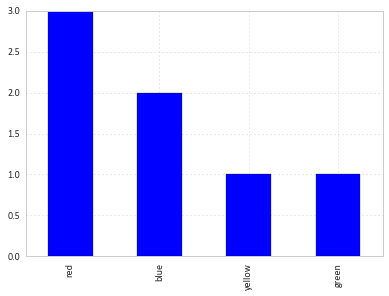
You can simply use value_counts on the series:
df['colour'].value_counts().plot(kind='bar')
Method 2
You might find useful mosaic plot from statsmodels. Which can also give statistical highlighting for the variances.
from statsmodels.graphics.mosaicplot import mosaic
plt.rcParams['font.size'] = 16.0
mosaic(df, ['direction', 'colour']);
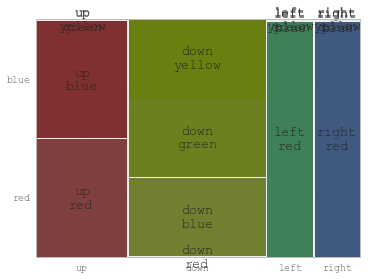
But beware of the 0 sized cell – they will cause problems with labels.
See this answer for details
Method 3
like this :
df.groupby('colour').size().plot(kind='bar')
Method 4
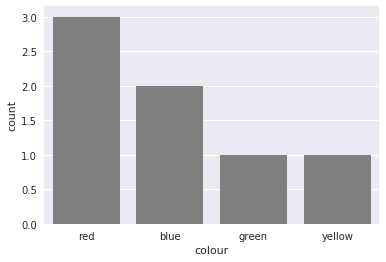
You could also use countplot from seaborn. This package builds on pandas to create a high level plotting interface. It gives you good styling and correct axis labels for free.
import pandas as pd
import seaborn as sns
sns.set()

df = pd.DataFrame({'colour': ['red', 'blue', 'green', 'red', 'red', 'yellow', 'blue'],
                   'direction': ['up', 'up', 'down', 'left', 'right', 'down', 'down']})
sns.countplot(df['colour'], color='gray')
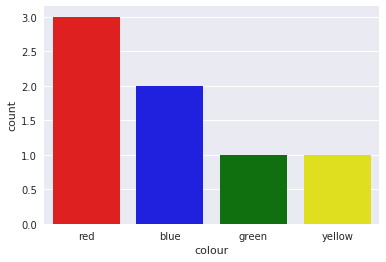
It also supports coloring the bars in the right color with a little trick
sns.countplot(df['colour'],
              palette={color: color for color in df['colour'].unique()})
Method 5
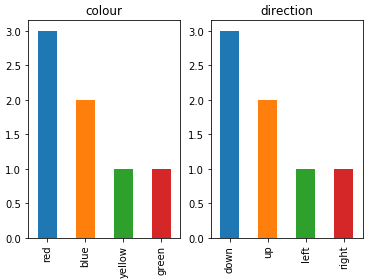
To plot multiple categorical features as bar charts on the same plot, I would suggest:
import pandas as pd
import matplotlib.pyplot as plt

df = pd.DataFrame(
    {
        "colour": ["red", "blue", "green", "red", "red", "yellow", "blue"],
        "direction": ["up", "up", "down", "left", "right", "down", "down"],
    }
)

categorical_features = ["colour", "direction"]
fig, ax = plt.subplots(1, len(categorical_features))
for i, categorical_feature in enumerate(df[categorical_features]):
    df[categorical_feature].value_counts().plot("bar", ax=ax[i]).set_title(categorical_feature)
fig.show()
Method 6
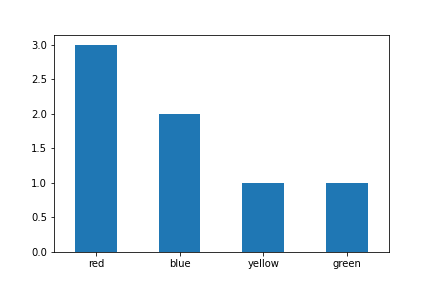
You can simply use value_counts with sort option set to False. This will preserve ordering of the categories
df['colour'].value_counts(sort=False).plot.bar(rot=0)
Method 7
Roman’s answer is very helpful and correct but in latest version you also need to specify kind as the parameter’s order can change.
import pandas as pd
import matplotlib.pyplot as plt

df = pd.DataFrame(
    {
    "colour": ["red", "blue", "green", "red", "red", "yellow", "blue"],
    "direction": ["up", "up", "down", "left", "right", "down", "down"],
    }
)

categorical_features = ["colour", "direction"]
fig, ax = plt.subplots(1, len(categorical_features))
for i, categorical_feature in enumerate(df[categorical_features]):
    df[categorical_feature].value_counts().plot(kind="bar", ax=ax[i]).set_title(categorical_feature)
fig.show()
Method 8
Using plotly
import plotly.express as px
px.bar(df["colour"].value_counts())
All methods was sourced from stackoverflow.com or stackexchange.com, is licensed under cc by-sa 2.5, cc by-sa 3.0 and cc by-sa 4.0