I have a dataframe that looks like the following
   color  x   y
0    red  0   0
1    red  1   1
2    red  2   2
3    red  3   3
4    red  4   4
5    red  5   5
6    red  6   6
7    red  7   7
8    red  8   8
9    red  9   9
10  blue  0   0
11  blue  1   1
12  blue  2   4
13  blue  3   9
14  blue  4  16
15  blue  5  25
16  blue  6  36
17  blue  7  49
18  blue  8  64
19  blue  9  81
I ultimately want two lines, one blue, one red. The red line should essentially be y=x and the blue line should be y=x^2
When I do the following:
df.plot(x='x', y='y')
The output is this:

Is there a way to make pandas know that there are two sets? And group them accordingly. I’d like to be able to specify the column color as the set differentiator
Answers:
Thank you for visiting the Q&A section on Magenaut. Please note that all the answers may not help you solve the issue immediately. So please treat them as advisements. If you found the post helpful (or not), leave a comment & I’ll get back to you as soon as possible.
Method 1
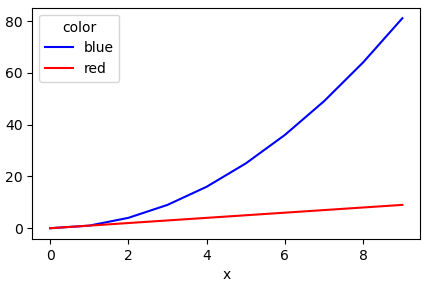
Another simple way is to use the pandas.DataFrame.pivot function to format the data.
Use pandas.DataFrame.plot to plot. Providing the colors in the 'color' column exist in matplotlib: List of named colors, they can be passed to the color parameter.
# sample data
df = pd.DataFrame([['red', 0, 0], ['red', 1, 1], ['red', 2, 2], ['red', 3, 3], ['red', 4, 4], ['red', 5, 5], ['red', 6, 6], ['red', 7, 7], ['red', 8, 8], ['red', 9, 9], ['blue', 0, 0], ['blue', 1, 1], ['blue', 2, 4], ['blue', 3, 9], ['blue', 4, 16], ['blue', 5, 25], ['blue', 6, 36], ['blue', 7, 49], ['blue', 8, 64], ['blue', 9, 81]], columns=['color', 'x', 'y'])

# pivot the data into the correct shape
df = df.pivot(index='x', columns='color', values='y')

# display(df)
color  blue  red
x
0         0    0
1         1    1
2         4    2
3         9    3
4        16    4
5        25    5
6        36    6
7        49    7
8        64    8
9        81    9

# plot the pivoted dataframe; if the column names aren't colors, remove color=df.columns
df.plot(color=df.columns, figsize=(5, 3))
Method 2
You could use groupby to split the DataFrame into subgroups according to the color:
for key, grp in df.groupby(['color']):
import numpy as np
import pandas as pd
import matplotlib.pyplot as plt

df = pd.read_table('data', sep='s+')
fig, ax = plt.subplots()

for key, grp in df.groupby(['color']):
    ax = grp.plot(ax=ax, kind='line', x='x', y='y', c=key, label=key)

plt.legend(loc='best')
plt.show()
yields

Method 3
If you have seaborn installed, an easier method that does not require you to perform pivot:
import seaborn as sns

sns.lineplot(data=df, x='x', y='y', hue='color')
Method 4
You can also try the following code to plot multiple lines in different colors with pandas data frame.
import matplotlib.pyplot as plt
import matplotlib as mpl
import numpy as np
from pandas import DataFrame

value1 = [10, 20, 30, 40, 50]
value2 = [5, 10, 15, 20, 25]
value3 = [8, 9, 10, 15, 20]

results1 = DataFrame({'SAC': value1, 'TD3': value2, 'DDPG': value3})

results1.plot()
plt.legend(loc='lower right')
plt.xlabel("Episode")
plt.ylabel("Rewards")
plt.show()
Output:

Method 5
The most general way is to plot the different color based on the color group. That is, we use Dataframe.groupby to group the colors and then plot the data on the relevant axes.
For example
import numpy as np, pandas as pd, matplotlib.pyplot as plt
n = 1000
xy = np.random.rand(n,  2) + np.random.rand(n)[:, None]
color = np.random.randint(0, 3, size = n)
data = dict(x = xy[:, 0], y = xy[:, 1], color = color)
df = pd.DataFrame(data)

fig, ax = plt.subplots()
for labels, dfi in df.groupby("color"):
    dfi.plot(ax = ax, x = 'x', y = 'y', label = labels)
ax.legend(title = 'color')
fig.show()

Method 6
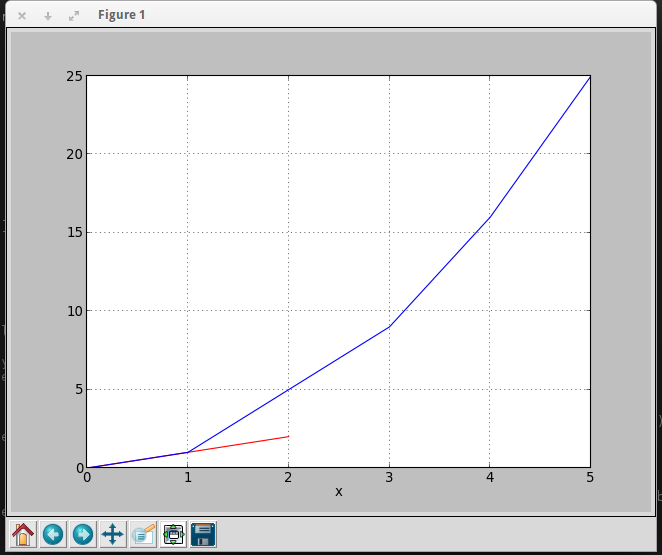
You can use this code to get your desire output
import pandas as pd
import matplotlib.pyplot as plt
df = pd.DataFrame({'color': ['red','red','red','blue','blue','blue'], 'x': [0,1,2,3,4,5],'y': [0,1,2,9,16,25]})
print df

  color  x   y
0   red  0   0
1   red  1   1
2   red  2   2
3  blue  3   9
4  blue  4  16
5  blue  5  25
To plot graph
a = df.iloc[[i for i in xrange(0,len(df)) if df['x'][i]==df['y'][i]]].plot(x='x',y='y',color = 'red')
df.iloc[[i for i in xrange(0,len(df)) if df['y'][i]== df['x'][i]**2]].plot(x='x',y='y',color = 'blue',ax=a)

plt.show()
Output
All methods was sourced from stackoverflow.com or stackexchange.com, is licensed under cc by-sa 2.5, cc by-sa 3.0 and cc by-sa 4.0