it may seem to be simple problem to many of you, but want i am trying to do is i am reading a text file on a click event using StreamReader (ASP.net & C#) after reading that text file i am splitting each line with ‘,’ delimiter and then each part of it i am storing in Datatable's column and then binding the datatable to my gridview, my problem is i have written the code but i m getting empty gridview like this
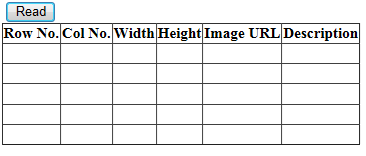
Gridviews Column header i have created from designer with autogeneratecolumns="false"
my code is
protected void readfile_Click(object sender, EventArgs e)
{
    string line;
    DataTable dt = new DataTable();
    using (StreamReader sr = new StreamReader(@"D:Tempfilereadreadtext.txt"))
    {
        while ((line = sr.ReadLine()) != null)
        {
            string[] parts = line.Split(',');
            dt.Rows.Add();
            for (int i = 0; i < parts.Length; i++)
            {
                dt.Columns.Add();
                dt.Rows[0][i] = parts[i];
                MyGridView.DataSource = dt;
                MyGridView.DataBind();
            }
        }
        sr.Close();
    }
my text file has data
1,1,4,2,"#",Description1
5,5,4,2,"#",Description2
3,3,6,3,"#",Description3
2,2,4,2,"#",Description4
4,5,4,2,"#",Description5
Hope you got it what i am trying to ask.
Answers:
Thank you for visiting the Q&A section on Magenaut. Please note that all the answers may not help you solve the issue immediately. So please treat them as advisements. If you found the post helpful (or not), leave a comment & I’ll get back to you as soon as possible.
Method 1
How about something like this:
    protected void readfile_Click(object sender, EventArgs e)
    {
        DataTable table = new DataTable();
        table.Columns.Add("Row No.");
        table.Columns.Add("Col No.");
        table.Columns.Add("Width");
        table.Columns.Add("Height");
        table.Columns.Add("Image URL");
        table.Columns.Add("Description");

        using (StreamReader sr = new StreamReader(@"D:Tempfilereadreadtext.txt"))
        {
            while (!sr.EndOfStream)
            {
                string[] parts = sr.ReadLine().Split(',');
                table.Rows.Add(parts[0], parts[1], parts[2], parts[3], parts[4], parts[5]);
            }
        }
        MyGridView.DataSource = table;
        MyGridView.DataBind();
    }
Method 2
Add columns to datatable using code below
DataTable dt = new DataTable();
dt.Columns.Add("Row No", typeof(Int32));
dt.Columns.Add("Col No", typeof(Int32));
dt.Columns.Add("Width", typeof(Int32));
dt.Columns.Add("Height", typeof(Int32));
dt.Columns.Add("ImageUrl", typeof(String));
dt.Columns.Add("Description", typeof(String));
And bind datatable (dt) after you populate all rows in datatable, after while loop
using (StreamReader sr = new StreamReader(@"D:Tempfilereadreadtext.txt"))
{
    while ((line = sr.ReadLine()) != null)
    {
        string[] parts = line.Split(',');
        var dr = dt.NewRow(); //use newrow to create new row
        for (int i = 0; i < parts.Length; i++)
        {
            dr[i] = parts[i];
        }

        dt.Rows.Add(dr); //add row to datatable now
    }
    sr.Close();
}
//bind datatable to Gridview after we load file into dt
MyGridView.DataSource = dt;
MyGridView.DataBind();
Method 3
- You should move your code with adding the
DataColumnoutside thefor-loop - You should create new
DataRowusingDataTable.NewRowmethod - You should call data binding methods only once, and after the loops.
Your code should be something like this:
DataTable dt = new DataTable();
dt.Columns.Add("Row No", typeof(Int32));
dt.Columns.Add("Col No", typeof(Int32));
dt.Columns.Add("Width", typeof(Int32));
dt.Columns.Add("Height", typeof(Int32));
dt.Columns.Add("ImageUrl", typeof(String));
dt.Columns.Add("Description", typeof(String));

using (StreamReader sr = new StreamReader(@"D:Tempfilereadreadtext.txt"))
{
    while ((line = sr.ReadLine()) != null)
    {
        string[] parts = line.Split(',');
        var row = dt.NewRow();
        for (int i = 0; i < parts.Length; i++)
        {
            row[i] = parts[i];
        }
        // important thing!
        dt.Rows.Add(row);
    }
    sr.Close();
}
MyGridView.DataSource = dt;
MyGridView.DataBind();
All methods was sourced from stackoverflow.com or stackexchange.com, is licensed under cc by-sa 2.5, cc by-sa 3.0 and cc by-sa 4.0