I have a plugin which creates some options in wp_options, but also creates custom post types and is used to populate that post type. Upon install it makes sense to remove the data in wp_options, but with regards to the populated post type, there should be an option for the user to choose whether he wants to keep that data or not.
Ideally I would like a popup when he hits the uninstall link, asking if he wants to delete just the plugin files and options, or delete everything. How can I do such a popup?
Answers:
Thank you for visiting the Q&A section on Magenaut. Please note that all the answers may not help you solve the issue immediately. So please treat them as advisements. If you found the post helpful (or not), leave a comment & I’ll get back to you as soon as possible.
Method 1
How about something similar to this:
function wpse65611_script() {
    wp_enqueue_style( 'wp-pointer' );
    wp_enqueue_script( 'wp-pointer' );
    wp_enqueue_script( 'utils' ); // for user settings
?>
    <script type="text/javascript">
    jQuery('#embed-github-gist .delete a').click(function(){
            jQuery('#embed-github-gist .delete a').pointer({
                content: '<h3>Delete this or delete everything?</h3><p><a id="this" class="primary button" href="url1" rel="nofollow noreferrer noopener">Delete data</a> <a id="everything" class="button" href="'+jQuery('#embed-github-gist .delete a').attr('href')+'" rel="nofollow noreferrer noopener">Delete plugin</a></p>',
                position: {
                    my: 'left top',
                    at: 'center bottom',
                    offset: '-1 0'
                },
                close: function() {
                    //
                }
            }).pointer('open');
return false;
        });
    </script><?php
}
add_action( 'admin_footer', 'wpse65611_script' );
Which results in this:
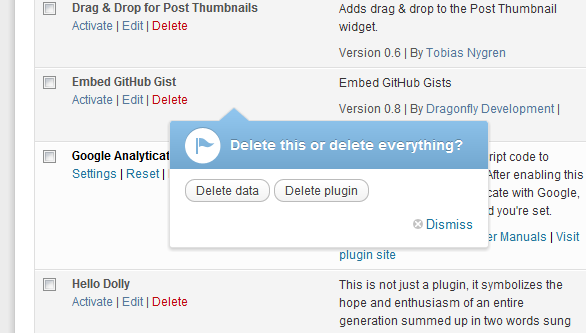
Replace url1 with the url that would delete just the data.
Note that this will not run if you put it in the plugin and the plugin is deactivated, putting it in another plugin or in a theme would work but it would be bad practice
Also replace the ID of the embed github gist plugin with your own
Method 2
function wpse65611_confirm_uninstall()
{
    ?>
    <form>
        <input type="button" onclick="wpse65611_confirmation()" value="Delete Data?">
    </form>
    <?php
}

function wpse65611_script()
{
<script type="text/javascript">
    function wpse65611_confirmation()
    {
        var answer = confirm( "Delete Data?" );
        if ( answer )
        {
            window.location = "<?php admin_url( 'plugins.php?delete=data' ); ?>";
        }
        else
        {
            window.location = "<?php admin_url( 'plugins.php' ); ?>";
        }
    }
</script>
}
add_action( 'admin_footer', 'wpse65611_confirmation' );
All methods was sourced from stackoverflow.com or stackexchange.com, is licensed under cc by-sa 2.5, cc by-sa 3.0 and cc by-sa 4.0