I have dataframe like this:
df_meshX_min_select = pd.DataFrame({
'Number of Elements'  : [5674, 8810,13366,19751,36491],
'Time (a)'            : [42.14, 51.14, 55.64, 55.14, 56.64],
'Different Result(Temperature)' : [0.083849, 0.057309, 0.055333, 0.060516, 0.035343]})
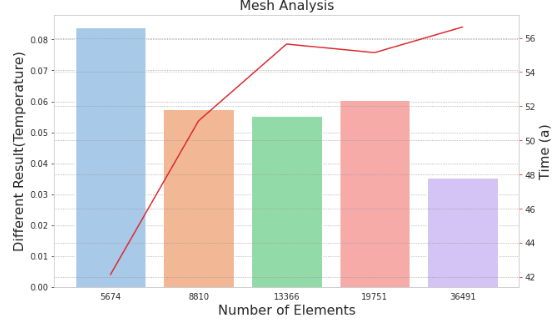
and I tried to combine bar plot (number of elements Vs Different result) and line plot (Number of elements Vs Time) in the same figure, but I found the following problem like this:
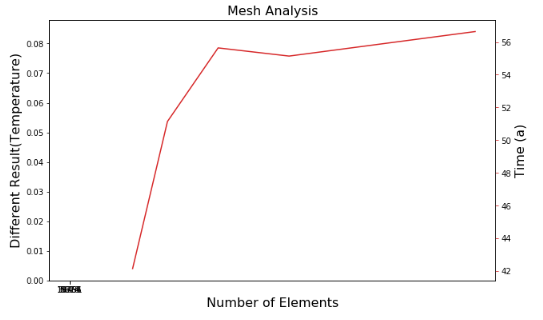
it seems that x_value doesn’t match when combining 2 plots, but if you see the data frame, the x value is exactly the same value.
My expectation is combining these 2 plots into 1 figure:
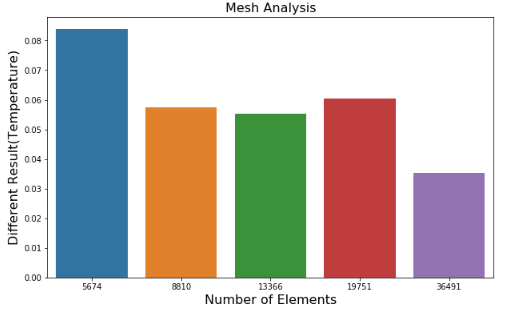
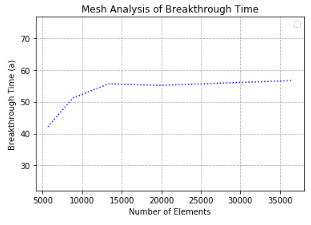
and this is the code that I made:
import numpy as np
import pandas as pd
import seaborn as sns
import matplotlib.pyplot as plt
import matplotlib.ticker as ticker

df_meshX_min_select = pd.DataFrame({
    'Number of Elements'  : [5674, 8810,13366,19751,36491],
    'Time (a)'            : [42.14, 51.14, 55.64, 55.14, 56.64],
    'Different Result(Temperature)' : [0.083849, 0.057309, 0.055333, 0.060516, 0.035343]})

x1= df_meshX_min_select["Number of Elements"]
t1= df_meshX_min_select["Time (a)"]
T1= df_meshX_min_select["Different Result(Temperature)"]

#Create combo chart
fig, ax1 = plt.subplots(figsize=(10,6))
color = 'tab:green'
#bar plot creation
ax1.set_title('Mesh Analysis', fontsize=16)
ax1.set_xlabel('Number of elements', fontsize=16)
ax1.set_ylabel('Different Result(Temperature)', fontsize=16)
ax1 = sns.barplot(x='Number of Elements', y='Different Result(Temperature)', data = df_meshX_min_select)
ax1.tick_params(axis='y')

#specify we want to share the same x-axis
ax2 = ax1.twinx()
color = 'tab:red'
#line plot creation
ax2.set_ylabel('Time (a)', fontsize=16)
ax2 = sns.lineplot(x='Number of Elements', y='Time (a)', data = df_meshX_min_select, sort=False, color=color, ax=ax2)
ax2.tick_params(axis='y', color=color)
#show plot


plt.show()
Anyone can help me, please?
Answers:
Thank you for visiting the Q&A section on Magenaut. Please note that all the answers may not help you solve the issue immediately. So please treat them as advisements. If you found the post helpful (or not), leave a comment & I’ll get back to you as soon as possible.
Method 1
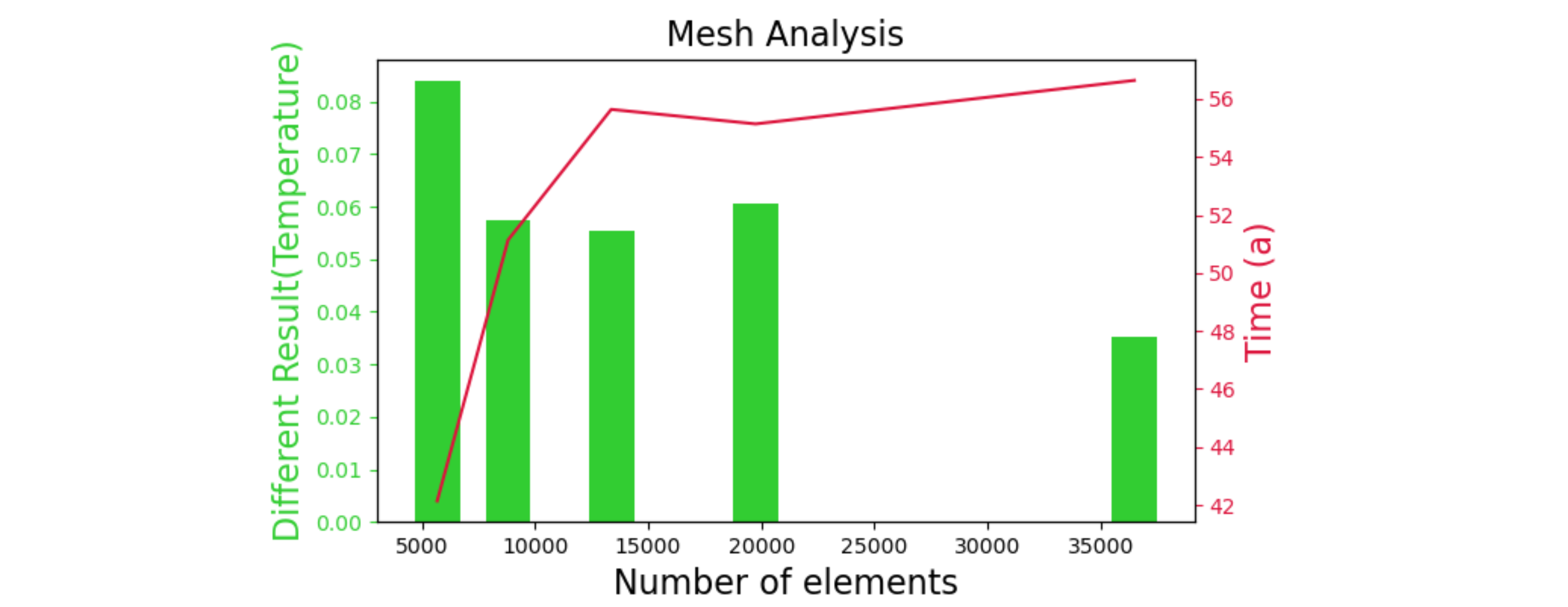
Seaborn and pandas use a categorical x-axis for bar plots (internally numbered 0,1,2,…) and floating-point numbers for a line plot. Note that your x-values aren’t evenly spaced, so either the bars would have weird distances between them, or wouldn’t align with the x-values from the line plot.
Here is a solution using standard matplotlib to combine both graphs.
import numpy as np
import pandas as pd
import matplotlib.pyplot as plt
import matplotlib.ticker as ticker

df_meshx_min_select = pd.DataFrame({
    'number of elements': [5674, 8810, 13366, 19751, 36491],
    'time (a)': [42.14, 51.14, 55.64, 55.14, 56.64],
    'different result(temperature)': [0.083849, 0.057309, 0.055333, 0.060516, 0.035343]})
x1 = df_meshx_min_select["number of elements"]
t1 = df_meshx_min_select["time (a)"]
d1 = df_meshx_min_select["different result(temperature)"]

fig, ax1 = plt.subplots(figsize=(10, 6))
color = 'limegreen'
ax1.set_title('mesh analysis', fontsize=16)
ax1.set_xlabel('number of elements', fontsize=16)
ax1.set_ylabel('different result(temperature)', fontsize=16, color=color)
ax1.bar(x1, height=d1, width=2000, color=color)
ax1.tick_params(axis='y', colors=color)

ax2 = ax1.twinx()  # share the x-axis, new y-axis
color = 'crimson'
ax2.set_ylabel('time (a)', fontsize=16, color=color)
ax2.plot(x1, t1, color=color)
ax2.tick_params(axis='y', colors=color)

plt.show()
Method 2
I was plotting a boxplot with a lineplot and I had the same problem even my two x-axes are identical, so I solved converting my x-axis feature to type string:
df_meshX_min_select['Number of Elements'] = df_meshX_min_select['Number of Elements'].astype('string')
This way the plot works using seaborn:
All methods was sourced from stackoverflow.com or stackexchange.com, is licensed under cc by-sa 2.5, cc by-sa 3.0 and cc by-sa 4.0