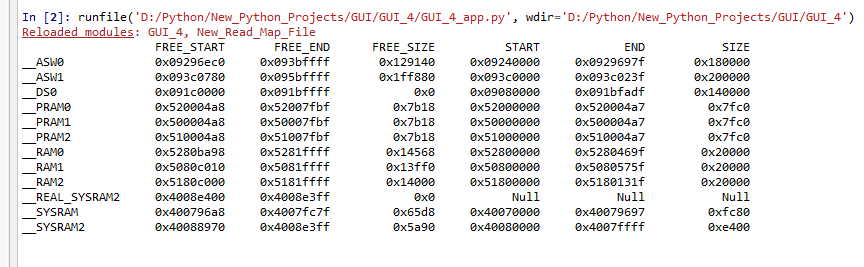
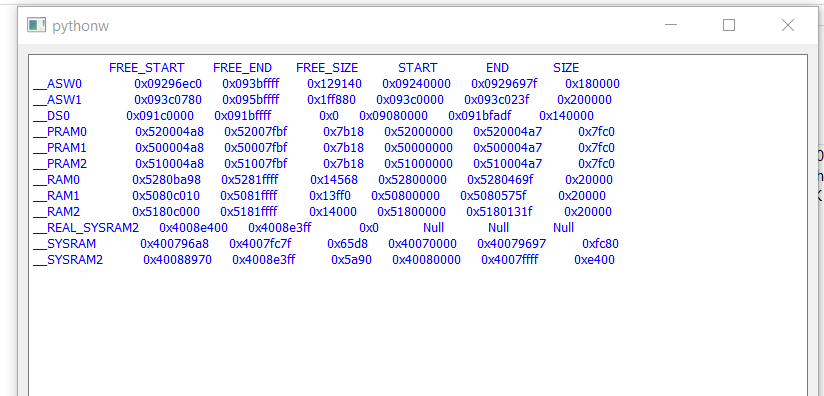
I am trying to make a simple GUI console using PyQt5. On trying to print the text using QTextBrowser – setText, it loses alignment and looks bad. but the text is aligned in my python console
I am using the setText function to display my data frame.
On changing the justify parameter of df.to_string(), i am able to see the changed alignment in the python console, but this is not reflected in my Qt console.
Code :
import sys
from GUI_4 import Ui_MainWindow
from PyQt5 import QtCore, QtGui, QtWidgets
import New_Read_Map_File

def window():
    app = QtWidgets.QApplication(sys.argv)
    MainWindow = QtWidgets.QWidget()
    label = QtWidgets.QTextBrowser(MainWindow)
    label.setStyleSheet('color: blue')
    MainWindow.setGeometry(600,150,800,800)
    label.setGeometry(10,10,780,780)
    GetData()
    label.setText(DisplayData)
    MainWindow.show()
    sys.exit(app.exec_())

def GetData():
    global DisplayData
    New_Read_Map_File.read_MapFile_main()
    DisplayData = (New_Read_Map_File.df.to_string(col_space = 14,justify = "justify"))
    print(DisplayData)


window()
Expected Alignment
Observed Qt GUI
Answers:
Thank you for visiting the Q&A section on Magenaut. Please note that all the answers may not help you solve the issue immediately. So please treat them as advisements. If you found the post helpful (or not), leave a comment & I’ll get back to you as soon as possible.
Method 1
The problem is caused by the font, in the case of consoles and many IDES use a monospaced font.
For example, if you use the Monospace font:
import numpy as np
import pandas as pd
from PyQt5 import QtCore, QtGui, QtWidgets

def pandas_to_str():
    df = pd.DataFrame({
        'A' : 1.,
        'B' : pd.Timestamp('20130102'),
        'C' : pd.Series(1,index=list(range(4)),dtype='float32'),
        'D' : np.array([3] * 4,dtype='int32'),
        'E' : pd.Categorical(["test","train","test","train"]),
        'F' : 'foo' })
    return df.to_string(col_space =14,justify = "justify")

if __name__ == '__main__':
    import sys

    app = QtWidgets.QApplication(sys.argv)
    w = QtWidgets.QTextBrowser()
    w.setStyleSheet('color: blue')
    w.setFont(QtGui.QFont("Monospace"))
    w.setWordWrapMode(QtGui.QTextOption.NoWrap)
    w.setText(pandas_to_str())
    w.showMaximized()
    sys.exit(app.exec_())

All methods was sourced from stackoverflow.com or stackexchange.com, is licensed under cc by-sa 2.5, cc by-sa 3.0 and cc by-sa 4.0