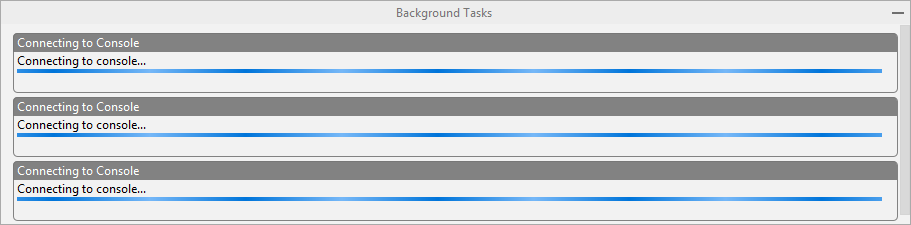
I created anaconda environment with Python=3.7 and have trouble with the error of _ssl and DLL. When I tried to get back to my base environment, I have trouble getting the background processes to complete as shown in the figure below, this goes on forever.
The error:
C:UsersabhilAppDataLocalContinuumanaconda3envsHeisenbergPy37python.exe "C:Program FilesJetBrainsPyCharm Community Edition 2018.1.1helperspydevpydevconsole.py" --mode=client --port=63950
Traceback (most recent call last):
  File "C:Program FilesJetBrainsPyCharm Community Edition 2018.1.1helperspydevpydevconsole.py", line 5, in <module>
    from _pydev_comm.rpc import make_rpc_client, start_rpc_server, start_rpc_server_and_make_client
  File "C:Program FilesJetBrainsPyCharm Community Edition 2018.1.1helperspydev_pydev_commrpc.py", line 4, in <module>
    from _pydev_comm.server import TSingleThreadedServer
  File "C:Program FilesJetBrainsPyCharm Community Edition 2018.1.1helperspydev_pydev_commserver.py", line 4, in <module>
    from _shaded_thriftpy.server import TServer
  File "C:Program FilesJetBrainsPyCharm Community Edition 2018.1.1helpersthird_partythriftpy_shaded_thriftpyserver.py", line 9, in <module>
    from _shaded_thriftpy.transport import (
  File "C:Program FilesJetBrainsPyCharm Community Edition 2018.1.1helpersthird_partythriftpy_shaded_thriftpytransport__init__.py", line 57, in <module>
    from .sslsocket import TSSLSocket, TSSLServerSocket  # noqa
  File "C:Program FilesJetBrainsPyCharm Community Edition 2018.1.1helpersthird_partythriftpy_shaded_thriftpytransportsslsocket.py", line 7, in <module>
    import ssl
  File "C:UsersabhilAppDataLocalContinuumanaconda3envsHeisenbergPy37libssl.py", line 98, in <module>
    import _ssl             # if we can't import it, let the error propagate
ImportError: DLL load failed: The specified module could not be found.
Process finished with exit code 1
All packages installed with
conda create -n anaconda python=3.7
C:WINDOWSsystem32>conda list # packages in environment at C:UsersabhilAppDataLocalContinuumanaconda3envsHeisenbergPy37: # # Name Version Build Channel alabaster 0.7.12 py37_0 anaconda 2018.12 py37_0 anaconda-client 1.7.2 py37_0 anaconda-project 0.8.2 py37_0 asn1crypto 0.24.0 py37_0 astroid 2.1.0 py37_0 astropy 3.1 py37he774522_0 atomicwrites 1.2.1 py37_0 attrs 18.2.0 py37h28b3542_0 babel 2.6.0 py37_0 backcall 0.1.0 py37_0 backports 1.0 py37_1 backports.os 0.1.1 py37_0 backports.shutil_get_terminal_size 1.0.0 py37_2 beautifulsoup4 4.6.3 py37_0 bitarray 0.8.3 py37hfa6e2cd_0 bkcharts 0.2 py37_0 blas 1.0 mkl blaze 0.11.3 py37_0 bleach 3.0.2 py37_0 blosc 1.14.4 he51fdeb_0 bokeh 1.0.2 py37_0 boto 2.49.0 py37_0 bottleneck 1.2.1 py37h452e1ab_1 bzip2 1.0.6 hfa6e2cd_5 ca-certificates 2018.03.07 0 certifi 2018.11.29 py37_0 cffi 1.11.5 py37h74b6da3_1 chardet 3.0.4 py37_1 click 7.0 py37_0 cloudpickle 0.6.1 py37_0 clyent 1.2.2 py37_1 colorama 0.4.1 py37_0 comtypes 1.1.7 py37_0 console_shortcut 0.1.1 3 contextlib2 0.5.5 py37_0 cryptography 2.4.2 py37h7a1dbc1_0 curl 7.63.0 h2a8f88b_1000 cycler 0.10.0 py37_0 cython 0.29.2 py37ha925a31_0 cytoolz 0.9.0.1 py37hfa6e2cd_1 dask 1.0.0 py37_0 dask-core 1.0.0 py37_0 datashape 0.5.4 py37_1 decorator 4.3.0 py37_0 defusedxml 0.5.0 py37_1 distributed 1.25.1 py37_0 docutils 0.14 py37_0 entrypoints 0.2.3 py37_2 et_xmlfile 1.0.1 py37_0 fastcache 1.0.2 py37hfa6e2cd_2 filelock 3.0.10 py37_0 flask 1.0.2 py37_1 flask-cors 3.0.7 py37_0 freetype 2.9.1 ha9979f8_1 get_terminal_size 1.0.0 h38e98db_0 gevent 1.3.7 py37he774522_1 glob2 0.6 py37_1 greenlet 0.4.15 py37hfa6e2cd_0 h5py 2.8.0 py37h3bdd7fb_2 hdf5 1.10.2 hac2f561_1 heapdict 1.0.0 py37_2 html5lib 1.0.1 py37_0 icc_rt 2019.0.0 h0cc432a_1 icu 58.2 ha66f8fd_1 idna 2.8 py37_0 imageio 2.4.1 py37_0 imagesize 1.1.0 py37_0 importlib_metadata 0.6 py37_0 intel-openmp 2019.1 144 ipykernel 5.1.0 py37h39e3cac_0 ipython 7.2.0 py37h39e3cac_0 ipython_genutils 0.2.0 py37_0 ipywidgets 7.4.2 py37_0 isort 4.3.4 py37_0 itsdangerous 1.1.0 py37_0 jdcal 1.4 py37_0 jedi 0.13.2 py37_0 jinja2 2.10 py37_0 jpeg 9b hb83a4c4_2 jsonschema 2.6.0 py37_0 jupyter 1.0.0 py37_7 jupyter_client 5.2.4 py37_0 jupyter_console 6.0.0 py37_0 jupyter_core 4.4.0 py37_0 jupyterlab 0.35.3 py37_0 jupyterlab_server 0.2.0 py37_0 keyring 17.0.0 py37_0 kiwisolver 1.0.1 py37h6538335_0 krb5 1.16.1 hc04afaa_7 lazy-object-proxy 1.3.1 py37hfa6e2cd_2 libarchive 3.3.3 h0643e63_5 libcurl 7.63.0 h2a8f88b_1000 libiconv 1.15 h1df5818_7 libpng 1.6.35 h2a8f88b_0 libsodium 1.0.16 h9d3ae62_0 libssh2 1.8.0 h7a1dbc1_4 libtiff 4.0.9 h36446d0_2 libxml2 2.9.8 hadb2253_1 libxslt 1.1.32 hf6f1972_0 llvmlite 0.26.0 py37ha925a31_0 locket 0.2.0 py37_1 lxml 4.2.5 py37hef2cd61_0 lz4-c 1.8.1.2 h2fa13f4_0 lzo 2.10 h6df0209_2 m2w64-gcc-libgfortran 5.3.0 6 m2w64-gcc-libs 5.3.0 7 m2w64-gcc-libs-core 5.3.0 7 m2w64-gmp 6.1.0 2 m2w64-libwinpthread-git 5.0.0.4634.697f757 2 markupsafe 1.1.0 py37he774522_0 matplotlib 3.0.2 py37hc8f65d3_0 mccabe 0.6.1 py37_1 menuinst 1.4.14 py37hfa6e2cd_0 mistune 0.8.4 py37he774522_0 mkl 2019.1 144 mkl-service 1.1.2 py37hb782905_5 mkl_fft 1.0.6 py37h6288b17_0 mkl_random 1.0.2 py37h343c172_0 more-itertools 4.3.0 py37_0 mpmath 1.1.0 py37_0 msgpack-python 0.5.6 py37he980bc4_1 msys2-conda-epoch 20160418 1 multipledispatch 0.6.0 py37_0 nbconvert 5.4.0 py37_1 nbformat 4.4.0 py37_0 networkx 2.2 py37_1 nltk 3.4 py37_1 nose 1.3.7 py37_2 notebook 5.7.4 py37_0 numba 0.41.0 py37hf9181ef_0 numexpr 2.6.8 py37hdce8814_0 numpy 1.15.4 py37h19fb1c0_0 numpy-base 1.15.4 py37hc3f5095_0 numpydoc 0.8.0 py37_0 odo 0.5.1 py37_0 olefile 0.46 py37_0 openpyxl 2.5.12 py37_0 openssl 1.1.1a he774522_0 packaging 18.0 py37_0 pandas 0.23.4 py37h830ac7b_0 pandoc 1.19.2.1 hb2460c7_1 pandocfilters 1.4.2 py37_1 parso 0.3.1 py37_0 partd 0.3.9 py37_0 path.py 11.5.0 py37_0 pathlib2 2.3.3 py37_0 patsy 0.5.1 py37_0 pep8 1.7.1 py37_0 pickleshare 0.7.5 py37_0 pillow 5.3.0 py37hdc69c19_0 pip 18.1 py37_0 pkginfo 1.4.2 py37_1 pluggy 0.8.0 py37_0 ply 3.11 py37_0 prometheus_client 0.5.0 py37_0 prompt_toolkit 2.0.7 py37_0 psutil 5.4.8 py37he774522_0 py 1.7.0 py37_0 pycodestyle 2.4.0 py37_0 pycosat 0.6.3 py37hfa6e2cd_0 pycparser 2.19 py37_0 pycrypto 2.6.1 py37hfa6e2cd_9 pycurl 7.43.0.2 py37h7a1dbc1_0 pyflakes 2.0.0 py37_0 pygments 2.3.1 py37_0 pylint 2.2.2 py37_0 pyodbc 4.0.25 py37ha925a31_0 pyopenssl 18.0.0 py37_0 pyparsing 2.3.0 py37_0 pyqt 5.9.2 py37h6538335_2 pysocks 1.6.8 py37_0 pytables 3.4.4 py37he6f6034_0 pytest 4.0.2 py37_0 pytest-arraydiff 0.3 py37h39e3cac_0 pytest-astropy 0.5.0 py37_0 pytest-doctestplus 0.2.0 py37_0 pytest-openfiles 0.3.1 py37_0 pytest-remotedata 0.3.1 py37_0 python 3.7.1 h8c8aaf0_6 python-dateutil 2.7.5 py37_0 python-libarchive-c 2.8 py37_6 pytz 2018.7 py37_0 pywavelets 1.0.1 py37h8c2d366_0 pywin32 223 py37hfa6e2cd_1 pywinpty 0.5.5 py37_1000 pyyaml 3.13 py37hfa6e2cd_0 pyzmq 17.1.2 py37hfa6e2cd_0 qt 5.9.7 vc14h73c81de_0 qtawesome 0.5.3 py37_0 qtconsole 4.4.3 py37_0 qtpy 1.5.2 py37_0 requests 2.21.0 py37_0 rope 0.11.0 py37_0 ruamel_yaml 0.15.46 py37hfa6e2cd_0 scikit-image 0.14.1 py37ha925a31_0 scikit-learn 0.20.1 py37h343c172_0 scipy 1.1.0 py37h29ff71c_2 seaborn 0.9.0 py37_0 send2trash 1.5.0 py37_0 setuptools 40.6.3 py37_0 simplegeneric 0.8.1 py37_2 singledispatch 3.4.0.3 py37_0 sip 4.19.8 py37h6538335_0 six 1.12.0 py37_0 snappy 1.1.7 h777316e_3 snowballstemmer 1.2.1 py37_0 sortedcollections 1.0.1 py37_0 sortedcontainers 2.1.0 py37_0 sphinx 1.8.2 py37_0 sphinxcontrib 1.0 py37_1 sphinxcontrib-websupport 1.1.0 py37_1 spyder 3.3.2 py37_0 spyder-kernels 0.3.0 py37_0 sqlalchemy 1.2.15 py37he774522_0 sqlite 3.26.0 he774522_0 statsmodels 0.9.0 py37h452e1ab_0 sympy 1.3 py37_0 tblib 1.3.2 py37_0 terminado 0.8.1 py37_1 testpath 0.4.2 py37_0 tk 8.6.8 hfa6e2cd_0 toolz 0.9.0 py37_0 tornado 5.1.1 py37hfa6e2cd_0 tqdm 4.28.1 py37h28b3542_0 traitlets 4.3.2 py37_0 unicodecsv 0.14.1 py37_0 urllib3 1.24.1 py37_0 vc 14.1 h0510ff6_4 vs2015_runtime 14.15.26706 h3a45250_0 wcwidth 0.1.7 py37_0 webencodings 0.5.1 py37_1 werkzeug 0.14.1 py37_0 wheel 0.32.3 py37_0 widgetsnbextension 3.4.2 py37_0 win_inet_pton 1.0.1 py37_1 win_unicode_console 0.5 py37_0 wincertstore 0.2 py37_0 winpty 0.4.3 4 wrapt 1.10.11 py37hfa6e2cd_2 xlrd 1.2.0 py37_0 xlsxwriter 1.1.2 py37_0 xlwings 0.15.1 py37_0 xlwt 1.3.0 py37_0 xz 5.2.4 h2fa13f4_4 yaml 0.1.7 hc54c509_2 zeromq 4.2.5 he025d50_1 zict 0.1.3 py37_0 zlib 1.2.11 h62dcd97_3 zstd 1.3.7 h508b16e_0
Answers:
Thank you for visiting the Q&A section on Magenaut. Please note that all the answers may not help you solve the issue immediately. So please treat them as advisements. If you found the post helpful (or not), leave a comment & I’ll get back to you as soon as possible.
Method 1
I have answerd this here, to my understanding this error is caused by the missing/misplacement of libcrypto file in anaconda3/DLLs folder:
From
anaconda3Librarybincopy below files and paste them inanaconda3/DLLs:
-   libcrypto-1_1-x64.dll
-   libssl-1_1-x64.dll
Method 2
This can be fixed by manually adding in the PATH variables in PyCharm to the console.
- Open your Anaconda cmd
- Activate your Conda environment
- Get the full PATH value by typing
echo %PATH%- if you are on Windows 7/can’t copy the output, cd the cmd to your desktop and type
echo %PATH% > path_val.txt - this will create a txt file so you can copy/paste the values easier.
- if you are on Windows 7/can’t copy the output, cd the cmd to your desktop and type
- In PyCharm, go to Settings -> Build, Execution, Deployment -> Console -> Python Console -> click the folder on the right of Environment variables.
- Click the plus button to add a new Environment Variable
- The name should be
PATH - The value is the entire output from the
echo %PATH%command above.
- The name should be
- Click OK, then apply.
Method 3
You can try to set system environment variables, like “C:PythonAnaconda3;C:PythonAnaconda3Scripts;
C:PythonAnaconda3Librarybin;”.
Only “C:PythonAnaconda3Scripts;” is not enough, and it works to me.
Method 4
I had the same issue on Windows 10 Pro x64 and PyCharm CE 2018.3
A solution that worked for me: Re-install Anaconda3 for all users (with Admin priveledges) and choose “add python.exe to Path” (even though it is nor recommended). Then PyCharm connected successfully without this error.
A work around that also worked: Use another environment (pyenv or conda). It worked for me when I faced the same issue on
Some other suggestions I saw on Internet:
run Anaconda3Scripts>conda update --all
but this threw the HTTP connection error rises, which might be related.
Method 5
if running under a virtual env (i.e. your have issued the command: conda activate <env_name>)
The files (libcrypto-1_1-x64.dll and libssl-1_1-x64.dll) to copy are found under:
C:USER<username>.condaenvs<env_name>Librarybin
They have to be copied into:
C:USER<username>.condaenvs<env_name>DLLs
Method 6
None of the above worked for me, but instead it was a problem with OpenSSL on Windows 10 Enterprise. I fixed it by downloading and installing OpenSSL from here: https://slproweb.com/products/Win32OpenSSL.html
Method 7
In my case the error was a result of spinning pipenv from non-base conda env. Setting variable in PyCharm or moving files in base anaconda structure didn’t help, because PyCharm looked for these DLLs in my conda env in the middle.
So I had to move files from base conda structure:
C:Users<username>AppDataLocalContinuumanaconda3Librarybin
To my conda env from which I spinned the final Pipenv I use in PyCharm:
C:Users<username>AppDataLocalContinuumanaconda3envs<conda_env_name>DLLs
The files I had to move to have IPython work correctly:
libcrypto-1_1-x64.dll
libssl-1_1-x64.dll
sqlite3.dll
sqlite3.exe
The reason is that not all libraries/binaries are propagated to the virtual envs. Virtual envs are able to find these files in “root Python”. Venvs stay lighter thanks to not copying them.
However, PyCharm gets confused in a setup such as mine, and treats the conda env in the middle as a “root Python”, and can’t find the libraries/bins. This problem can potentially make itself apparent with other dlls or bins.
It may be worth to move all missing files this way.
Method 8
another solution: edit python3.7’s site.py(in Lib dir):
from os.path import join, abspath, dirname
base_path = dirname(dirname(abspath(__file__)))
os.environ['PATH'] = '%s%s' % (
    os.environ['PATH'],
    join(base_path, 'Library', 'bin'),
)
Method 9
Thanks for the answer!
This works definately.
I have answerd this here, to my understanding this error is caused by the missing/misplacement of libcrypto file in anaconda3/DLLs folder:
From anaconda3Librarybin copy below files and paste them in anaconda3/DLLs:
- libcrypto-1_1-x64.dll
- libssl-1_1-x64.dll
Method 10
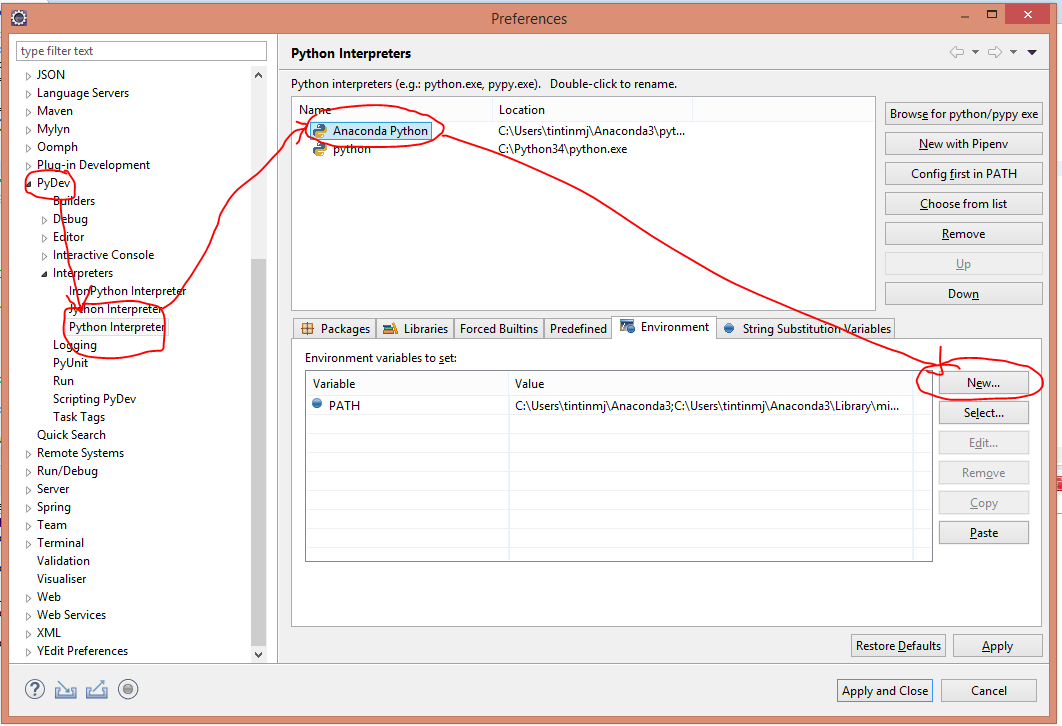
Incase someone is searching for Eclipse PyDev, It’s same as Rob’s answer.
No. 4 can be found at Window -> Preferences -> PyDev -> Interpreters -> Python Interpreters -> Environment -> Click New and add PATH
Method 11
I have updated to Python 3.8 (with miniconda) and it did not work with Pycharm generating “anaconda-environment-import-ssl-dll-load-fail-error”. I have tried several proposals here and tweaked env variables in different way w/o much success.
Finally I have updated to Pycharm 2020.2.3 and it worked like a charm, no tweaks ..
Method 12
I had the same issue and my main IDE is Sublime Text 4.
Environment: Windows 10 with Anaconda
What I needed: from cryptography.fernet import Fernet
The marked solution was unachievable for me and the following answer solved it right away:
pip install --upgrade pip
pip uninstall pyopenssl cryptography
pip install pyopenssl cryptography
Validate with:
python -v -c “from OpenSSL import SSL”
Source: https://groups.google.com/g/qatrack/c/24RB6hesOko?pli=1
All methods was sourced from stackoverflow.com or stackexchange.com, is licensed under cc by-sa 2.5, cc by-sa 3.0 and cc by-sa 4.0