I simplified my code for better understanding.
here is the problem :
case 1:
# -*- coding: utf-8 -*-

text = "چرا کار نمیکنی؟" # also using u"...." results the same
print(text)
output:
UnicodeEncodeError: 'charmap' codec can't encode characters in position 0-2: character maps to <undefined>
case 2:
text = "چرا کار نمیکنی؟".encode("utf-8")
print(text)
there is no output.
case 3:
import sys

text = "چرا کار نمیکنی؟".encode("utf-8")
sys.stdout.buffer.write(text)
output:
چرا کار نمیکنی؟
I know that case 3 works somehow , but I want to use other functions like print() , write(str()) , ….
I also read the documentation of python 3 regarding to Unicode here.
and also read dozens of Q&A in stackoverflow.
and here is a long article explaining the problem and answer for python 2.X
the simple question is:
how to print non-ASCII characters like Farsi or Arabic using python print() function?
update 1 :
as it is suggested from many guys that the problem is concerned with the terminal I tested the case :
case 4 :
text = "چرا کار نمیکنی؟" .encode("utf-8")# also using u"...." results the same
print(text)
terminal :
python persian_encoding.py > test.txt
test.txt :
b'xdax86xd8xb1xd8xa7 xdaxa9xd8xa7xd8xb1 xd9x86xd9x85xdbx8cxdaxa9xd9x86xdbx8cxd8x9f'
very important update:
after a while playing around with this issue, finally I found another workaround to make cmd.exe do the job (without needing third party softwares like ConEmu or …):
a little explanation first:
our main problem does not concern Python. it’s a problem with the Command Prompt character set in Windows(for complete explanation check out Arman’s Answer)
so … if you change the character set of Windows Command Prompt to UTF-8 instead of default ascii , then the Command Prompt will be able to interact with UTF-8 characters(like Farsi or Arabic) this solution does not guarantee good representation of characters(as they will be printed out like little squares), but it’s a good solution if you want to have file I/O in python with UTF-8 characters.
Steps:
before starting python from command line , type:
chcp 65001
now run your python code as always.
python testcode.py
result in case 1:
?????? ??? ??????
it runs without errors.
screenshot:
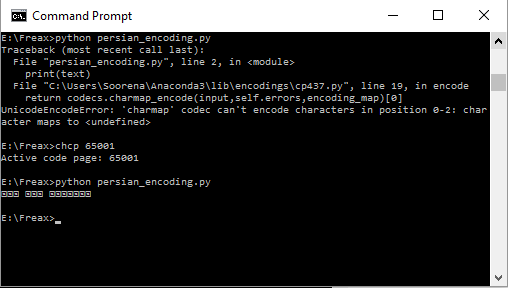
for more information about how to set 65001 as the default character set check this out.
Answers:
Thank you for visiting the Q&A section on Magenaut. Please note that all the answers may not help you solve the issue immediately. So please treat them as advisements. If you found the post helpful (or not), leave a comment & I’ll get back to you as soon as possible.
Method 1
Your code is correct as it works on my computer with both Python 2 and 3 (I’m on OS X):
~$ python -c 'print "تست"'
تست
~$ python3 -c 'print("تست")'
تست
The problem is with your terminal that can not output unicode characters. You could verify it by redirecting your output to a file like python3 my_file.py > test.txt and open the file using an editor.
If you are on Windows you could use a terminal like Console2 or ConEmu that renders unicode better than Windows prompt.
You may encounter errors with these terminals too because of wrong code-pages/encodings of Windows. There is a small python package that fixes them (sets them correctly):
1- Install this pip install win-unicode-console
2- Put this at the top of your python file:
try:
    # Fix UTF8 output issues on Windows console.
    # Does nothing if package is not installed
    from win_unicode_console import enable
    enable()
except ImportError:
    pass
If you got errors when redirecting to a file, you may fix it by settings io encoding:
On Windows command line:
SET PYTHONIOENCODING=utf-8
On Linux/OS X terminal:
export PYTHONIOENCODING=utf-8
Some points
- There is no need to use
u"aaa"syntax in python 3. Strings literals are unicode by default. - Default coding of files is UTF8 in python 3 so coding declaration comment (e.g.
# -*- coding: utf-8 -*-) is not needed.
Method 2
The output will depend basically on which platform&terminal you run your code. Let’s examine the below snippet for different windows terminals running either with 2.x or 3.x:
# -*- coding: utf-8 -*-
import sys

def case1(text):
    print(text)

def case2(text):
    print(text.encode("utf-8"))

def case3(text):
    sys.stdout.buffer.write(text.encode("utf-8"))

if __name__ == "__main__":
    text = "چرا کار نمیکنی؟"

    for case in [case1, case2, case3]:
        try:
            print("Running {0}".format(case.__name__))
            case(text)
        except Exception as e:
            print(e)

        print('-'*80)
Results
Python 2.x
Sublime Text 3 3122

    Running case1
    'charmap' codec can't encode characters in position 0-2: character maps to <undefined>
    --------------------------------------------------------------------------------
    Running case2
    b'xdax86xd8xb1xd8xa7 xdaxa9xd8xa7xd8xb1 xd9x86xd9x85xdbx8cxdaxa9xd9x86xdbx8cxd8x9f'
    --------------------------------------------------------------------------------
    Running case3
    چرا کار نمیکنی؟--------------------------------------------------------------------------------
ConEmu v151205
    Running case1
    ┌åÏ▒Ϻ ┌®ÏºÏ▒ ┘å┘à█î┌®┘å█îσ
    --------------------------------------------------------------------------------
    Running case2
    'ascii' codec can't decode byte 0xda in position 0: ordinal not in range(128)
    --------------------------------------------------------------------------------
    Running case3
    'file' object has no attribute 'buffer'
    --------------------------------------------------------------------------------
Windows Command Prompt
    Running case1
    ┌åÏ▒Ϻ ┌®ÏºÏ▒ ┘å┘à█î┌®┘å█îσ
    --------------------------------------------------------------------------------

    Running case2
    'ascii' codec can't decode byte 0xda in position 0: ordinal not in range(128)
    --------------------------------------------------------------------------------

    Running case3
    'file' object has no attribute 'buffer'
    --------------------------------------------------------------------------------
Python 3.x
Sublime Text 3 3122

    Running case1
    'charmap' codec can't encode characters in position 0-2: character maps to <undefined>
    --------------------------------------------------------------------------------
    Running case2
    b'xdax86xd8xb1xd8xa7 xdaxa9xd8xa7xd8xb1 xd9x86xd9x85xdbx8cxdaxa9xd9x86xdbx8cxd8x9f'
    --------------------------------------------------------------------------------
    Running case3
    چرا کار نمیکنی؟--------------------------------------------------------------------------------
ConEmu v151205
    Running case1
    'charmap' codec can't encode characters in position 0-2: character maps to <undefined>
    --------------------------------------------------------------------------------
    Running case2
    b'xdax86xd8xb1xd8xa7 xdaxa9xd8xa7xd8xb1 xd9x86xd9x85xdbx8cxdaxa9xd9x86xdbx8cxd8x9f'
    --------------------------------------------------------------------------------
    Running case3
    ┌åÏ▒Ϻ ┌®ÏºÏ▒ ┘å┘à█î┌®┘å█îσ--------------------------------------------------------------------------------
Windows Command Prompt
    Running case1
    'charmap' codec can't encode characters in position 0-2: character maps to <unde
    fined>
    --------------------------------------------------------------------------------

    Running case2
    b'xdax86xd8xb1xd8xa7 xdaxa9xd8xa7xd8xb1 xd9x86xd9x85xdbx8cxda
    xa9xd9x86xdbx8cxd8x9f'
    --------------------------------------------------------------------------------

    Running case3
    ┌åÏ▒Ϻ ┌®ÏºÏ▒ ┘å┘à█î┌®┘å█îσ----------------------------------------------------
    ----------------------------
As you can see just using sublime text3 terminal (case3) worked alright. The other terminals didn’t support persian. The main point here is, it depends which terminal & platform you’re using.
Solution (ConEmu specific)
Modern terminals like ConEmu allows you to work with UTF8-Encoding as explained here, so, let’s try:
chcp 65001 & cmd
And then running again the script against 2.x & 3.x:
Python2.x
Running case1
��را کار نمیکنی؟[Errno 0] Error
--------------------------------------------------------------------------------
Running case2
'ascii' codec can't decode byte 0xda in position 0: ordinal not in range(128)
--------------------------------------------------------------------------------
Running case3
'file' object has no attribute 'buffer'
--------------------------------------------------------------------------------
Python3.x
Running case1
چرا کار نمیکنی؟
--------------------------------------------------------------------------------
Running case2
b'xdax86xd8xb1xd8xa7 xdaxa9xd8xa7xd8xb1 xd9x86xd9x85xdbx8cxdaxa9xd9x86xdbx8cxd8x9f'
--------------------------------------------------------------------------------
Running case3
چرا کار نمیکنی؟--------------------------------------------------------------------------------
As you can see, now the output was succesfull with python3 case1 (print). So… moral of a fable… learn more about your tools and how to configure them properly for your use-cases 😉
Method 3
I can’t reproduce the problem. Here is my script p.py:
text = "چرا کار نمیکنی؟"
print(text)
And the result of python3 p.py:
چرا کار نمیکنی؟
Are you sure you’re using python 3 ? With python2 p.py:
SyntaxError: Non-ASCII character 'xda' in file p.py on line 1, but no encoding declared; see http://python.org/dev/peps/pep-0263/ for details
Method 4
And if you do the text.encode("utf-8")-part, it will show as b'xdax86xd8xb1xd8xa7 xdaxa9xd8xa7xd8xb1 xd9x86xd9x85xdbx8cxdaxa9xd9x86xdbx8cxd8x9f' (at my machine).
EDIT
Sorry for the edit, but I can’t comment (because not enough reputation)
Even on python 2.7, the print(text) does work. Check out this link here, which I just generated.
All methods was sourced from stackoverflow.com or stackexchange.com, is licensed under cc by-sa 2.5, cc by-sa 3.0 and cc by-sa 4.0