I am having an issue with setting an environment variable on a call to subprocess.Popen. The environment variable does not seem to be getting set. Any suggestions on how to properly set environmental variables for a Python commandline call?
My goal is to run a script that uses an environmental variable determined from my Python code:
d = dict(os.environ)
d["TEST_VARIABLE"] = str(1234)
subprocess.Popen('/usr/bin/mybinary', env=d).wait()
but the script reacts as if the variable has never been set
Here is my attempt to test, using Python’s interactive interpreter:
d = dict(os.environ)
d["TEST_VARIABLE"] = str(1234)
subprocess.Popen(['/bin/echo', '$TEST_VARIABLE'], env=d).wait()
and the output is:
"$TEST_VARIABLE"
0
I thought env=d should set the environment for the subprocess, but it apparently does not. Any suggestions on how to correct this issue?
Answers:
Thank you for visiting the Q&A section on Magenaut. Please note that all the answers may not help you solve the issue immediately. So please treat them as advisements. If you found the post helpful (or not), leave a comment & I’ll get back to you as soon as possible.
Method 1
The substitution of environment variables on the command line is done by the shell, not by /bin/echo. So you need to run the command in a shell to get the substitution:
In [22]: subprocess.Popen('/bin/echo $TEST_VARIABLE', shell=True, env=d).wait()
1234
Out[22]: 0
That doesn’t mean the environment variable is not set when shell=False, however. Even without shell=True, the executable does see the enviroment variables set by the env parameter. For example, date is affected by the TZ environment variable:
In [23]: subprocess.Popen(["date"], env={'TZ': 'America/New_York'}).wait()
Wed Oct 29 22:05:52 EDT 2014
Out[23]: 0

In [24]: subprocess.Popen(["date"], env={'TZ': 'Asia/Taipei'}).wait()
Thu Oct 30 10:06:05 CST 2014
Out[24]: 0
Method 2
For Python 3.5 and newer, you can use unpacking generalizations, eg:
env = {
    **os.environ,
    "TEST_VARIABLE": str(1234),
}
subprocess.Popen('/usr/bin/mybinary', env=env).wait()
Method 3
You should use os.environ.copy() to make it work. It creates a copy of the entire environment dictionary which you can then modify before passing it on to the subprocess, without modifying the current process environment.
See this answer.
Method 4
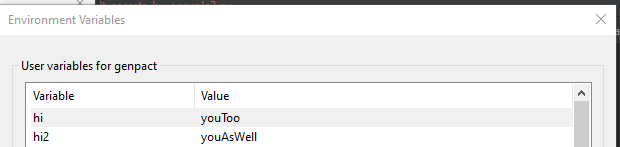
if you want to do it and set them up forever into a user account you can use setx but if you want as global you can use setx /M but for that you might need elevation, (i am using windows as example, (for linux you can use export i think)
in windows
import subprocess
exp = 'setx hi2 "youAsWell"'
subprocess.Popen(exp, shell=True).wait()
after running that you can go to the environments and see how they been added into my user environments
All methods was sourced from stackoverflow.com or stackexchange.com, is licensed under cc by-sa 2.5, cc by-sa 3.0 and cc by-sa 4.0