I am trying to automatically update a scatter plot.
The source of my X and Y values is external, and the data is pushed automatically into my code in a non-predicted time intervals (rounds).
I have only managed to plot all the data when the whole process ended, whereas I am trying to constantly add and plot data into my canvas.
What I DO get (at the end of the whole run) is this:

Whereas, what I am after is this:
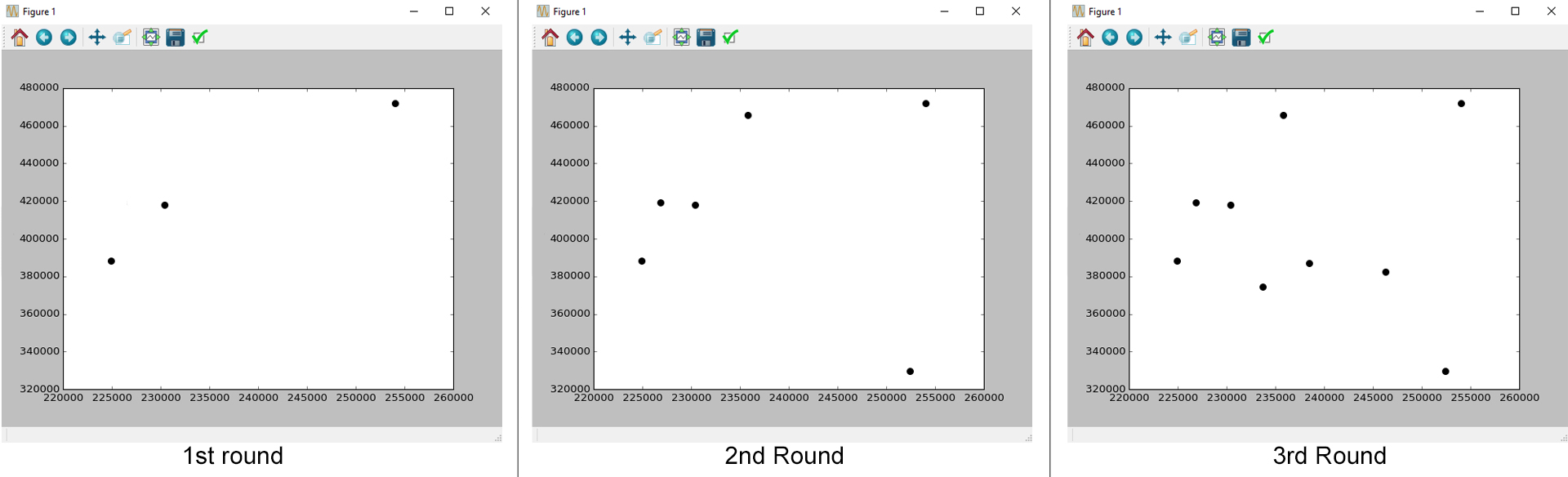
A simplified version of my code:
import matplotlib.pyplot as plt

def read_data():
    #This function gets the values of xAxis and yAxis
    xAxis = [some values]  #these valuers change in each run
    yAxis = [other values] #these valuers change in each run

    plt.scatter(xAxis,yAxis, label  = 'myPlot', color = 'k', s=50)
    plt.xlabel('x')
    plt.ylabel('y')
    plt.show()
Answers:
Thank you for visiting the Q&A section on Magenaut. Please note that all the answers may not help you solve the issue immediately. So please treat them as advisements. If you found the post helpful (or not), leave a comment & I’ll get back to you as soon as possible.
Method 1
There are several ways to animate a matplotlib plot. In the following let’s look at two minimal examples using a scatter plot.
(a) use interactive mode plt.ion()
For an animation to take place we need an event loop. One way of getting the event loop is to use plt.ion() (“interactive on”). One then needs to first draw the figure and can then update the plot in a loop. Inside the loop, we need to draw the canvas and introduce a little pause for the window to process other events (like the mouse interactions etc.). Without this pause the window would freeze. Finally we call plt.waitforbuttonpress() to let the window stay open even after the animation has finished.
import matplotlib.pyplot as plt
import numpy as np

plt.ion()
fig, ax = plt.subplots()
x, y = [],[]
sc = ax.scatter(x,y)
plt.xlim(0,10)
plt.ylim(0,10)

plt.draw()
for i in range(1000):
    x.append(np.random.rand(1)*10)
    y.append(np.random.rand(1)*10)
    sc.set_offsets(np.c_[x,y])
    fig.canvas.draw_idle()
    plt.pause(0.1)

plt.waitforbuttonpress()
(b) using FuncAnimation
Much of the above can be automated using matplotlib.animation.FuncAnimation. The FuncAnimation will take care of the loop and the redrawing and will constantly call a function (in this case animate()) after a given time interval. The animation will only start once plt.show() is called, thereby automatically running in the plot window’s event loop.
import matplotlib.pyplot as plt
import matplotlib.animation
import numpy as np

fig, ax = plt.subplots()
x, y = [],[]
sc = ax.scatter(x,y)
plt.xlim(0,10)
plt.ylim(0,10)

def animate(i):
    x.append(np.random.rand(1)*10)
    y.append(np.random.rand(1)*10)
    sc.set_offsets(np.c_[x,y])

ani = matplotlib.animation.FuncAnimation(fig, animate,
                frames=2, interval=100, repeat=True)
plt.show()
Method 2
From what I understand, you want to update interactively your plot. If so, you can use plot instead of scatter plot and update the data of your plot like this.
import numpy
import matplotlib.pyplot as plt
fig = plt.figure()
axe = fig.add_subplot(111)
X,Y = [],[]
sp, = axe.plot([],[],label='toto',ms=10,color='k',marker='o',ls='')
fig.show()
for iter in range(5):
    X.append(numpy.random.rand())
    Y.append(numpy.random.rand())
    sp.set_data(X,Y)
    axe.set_xlim(min(X),max(X))
    axe.set_ylim(min(Y),max(Y))
    raw_input('...')
    fig.canvas.draw()
If this is the behaviour your are looking for, you just need to create a function appending the data of sp, and get in that function the new points you want to plot (either with I/O management or whatever the communication process you’re using).
I hope it helps.
All methods was sourced from stackoverflow.com or stackexchange.com, is licensed under cc by-sa 2.5, cc by-sa 3.0 and cc by-sa 4.0