I am a beginner with Python. Before I start, here’s my Python folder structure
-project
----src
------model
--------order.py
------hello-world.py
Under src I have a folder named model which has a Python file called order.py which contents follow:
class SellOrder(object):
    def __init__(self,genericName,brandName):
        self.genericName = genericName
        self.brandName = brandName
Next my hello-world.py is inside the src folder, one level above order.py:
import model.order.SellOrder

order = SellOrder("Test","Test")

print order.brandName
Whenever I run python hello-world.py it results in the error
Traceback (most recent call last):
  File "hello-world.py", line 1, in <module>
    import model.order.SellOrder
ImportError: No module named model.order.SellOrder
Is there anything I missed?
Answers:
Thank you for visiting the Q&A section on Magenaut. Please note that all the answers may not help you solve the issue immediately. So please treat them as advisements. If you found the post helpful (or not), leave a comment & I’ll get back to you as soon as possible.
Method 1
All modules in Python have to have a certain directory structure. You can find details here.
Create an empty file called __init__.py under the model directory, such that your directory structure would look something like that:
.
└── project
    └── src
        ├── hello-world.py
        └── model
            ├── __init__.py
            └── order.py
Also in your hello-world.py file change the import statement to the following:
from model.order import SellOrder
That should fix it
P.S.: If you are placing your model directory in some other location (not in the same directory branch), you will have to modify the python path using sys.path.
Method 2
If it’s your root module just add it to PYTHONPATH (PyCharm usually does that)
export PYTHONPATH=$PYTHONPATH:<root module path>
for Docker:
ENV PYTHONPATH="${PYTHONPATH}:<root module path in container>"
Method 3
you need a file named __init__.py (two underscores on each side) in every folder in the hierarchy, so one in src/ and one in model/. This is what python looks for to know that it should access a particular folder. The files are meant to contain initialization instructions but even if you create them empty this will solve it.
Method 4
You need to make sure the module is installed for all versions of python
You can check to see if a module is installed for python by running:
pip uninstall moduleName
If it is installed, it will ask you if you want to delete it or not. My issue was that it was installed for python, but not for python3. To check to see if a module is installed for python3, run:
python3 -m pip uninstall moduleName
After doing this, if you find that a module is not installed for one or both versions, use these two commands to install the module.
- pip install moduleName
- python3 -m pip install moduleName
Method 5
It’s easier if you use this code
python3 -m module.sub_module
For example:
python3 -m entrypoint.settings
Method 6
After trying to add the path using:
pip show
on command prompt and using
sys.path.insert(0, "/home/myname/pythonfiles")
and didn’t work. Also got SSL error when trying to install the module again using conda this time instead of pip.
I simply copied the module that wasn’t found from the path “Mine was in
C:UsersuserAppDataLocalPackagesPythonSoftwareFoundation.Python.3.7_qbz5n2kfra8p0LocalCachelocal-packagesPython37site-packages
so I copied it to 'C:UsersuserAnaconda3Libsite-packages'
Method 7
100% Working solution:
Just add your project root directory to environment variable: PYTHONPATH.
so for the below project structure, just add Rootdir path(For e.g: add E:ProjectsRootdir) in PYTHONPATH.
Rootdir
└── pkg2
    ├── b.py
    ├── c.py
     └── pkg2
      ├── b.py
      ├── c.py
Method 8
I had same error. For those who run python scripts on different servers, please check if the python path is correctly specified in shebang. For me on each server it was located in different dirs.
Method 9
I only use Python as a secondary language and probably made a newbie-error. I had similar problem and my error was calling:
import requests
I got the error
ModuleNotFoundError: No module named 'requests.adapters'; 'requests' is not a package
Turns out the file I created in the same folder named “requests.py” made a conflict. Renaming the file made it work again.
Method 10
If you are using VSCode, what worked for me was I changed the interpreter of my IDE, here is a quick snapshot:
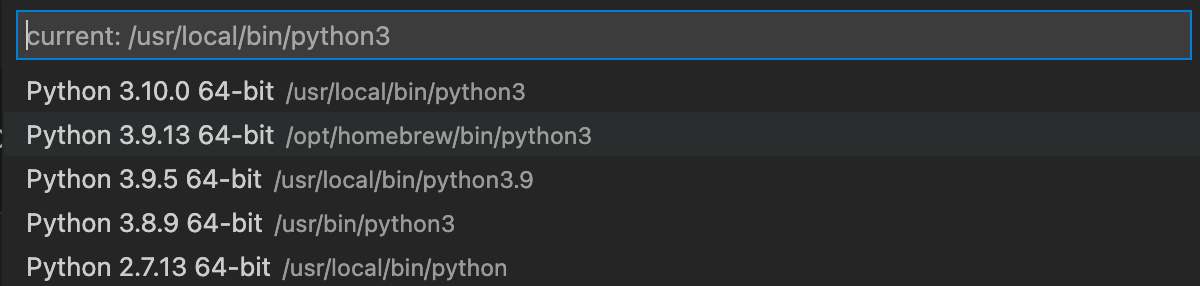
I install my packages through pip3, it appears to be like my Homebrew handles all of the packages I installed previously, so that’s the tweak I had to make!!
Method 11
if you are using python 3 then try the below command. I was facing similar issue , this fixed my problem
pip3 install
Method 12
you need to import the function so the program know what that is here is example:
import os
import pyttsx3
i had the same problem first then i import the function and it work so i would really recommend to try it
All methods was sourced from stackoverflow.com or stackexchange.com, is licensed under cc by-sa 2.5, cc by-sa 3.0 and cc by-sa 4.0