I have two dataframes in python. I want to update rows in first dataframe using matching values from another dataframe. Second dataframe serves as an override.
Here is an example with same data and code:
DataFrame 1 :
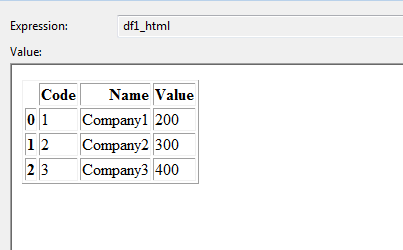
DataFrame 2:
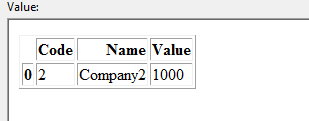
I want to update update dataframe 1 based on matching code and name. In this example Dataframe 1 should be updated as below:
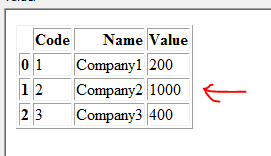
Note : Row with Code =2 and Name= Company2 is updated with value 1000 (coming from Dataframe 2)
import pandas as pd

data1 = {
         'Code': [1, 2, 3],
         'Name': ['Company1', 'Company2', 'Company3'],
         'Value': [200, 300, 400],

    }
df1 = pd.DataFrame(data1, columns= ['Code','Name','Value'])

data2 = {
         'Code': [2],
         'Name': ['Company2'],
         'Value': [1000],
    }

df2 = pd.DataFrame(data2, columns= ['Code','Name','Value'])
Any pointers or hints?
Answers:
Thank you for visiting the Q&A section on Magenaut. Please note that all the answers may not help you solve the issue immediately. So please treat them as advisements. If you found the post helpful (or not), leave a comment & I’ll get back to you as soon as possible.
Method 1
Using DataFrame.update, which aligns on indices (https://pandas.pydata.org/pandas-docs/stable/generated/pandas.DataFrame.update.html):
>>> df1.set_index('Code', inplace=True)
>>> df1.update(df2.set_index('Code'))
>>> df1.reset_index()  # to recover the initial structure

   Code      Name   Value
0     1  Company1   200.0
1     2  Company2  1000.0
2     3  Company3   400.0
Method 2
You can using concat + drop_duplicates which updates the common rows and adds the new rows in df2
pd.concat([df1,df2]).drop_duplicates(['Code','Name'],keep='last').sort_values('Code')
Out[1280]:
   Code      Name  Value
0     1  Company1    200
0     2  Company2   1000
2     3  Company3    400
Update due to below comments
df1.set_index(['Code', 'Name'], inplace=True)

df1.update(df2.set_index(['Code', 'Name']))

df1.reset_index(drop=True, inplace=True)
Method 3
You can merge the data first and then use numpy.where, here‘s how to use numpy.where
updated = df1.merge(df2, how='left', on=['Code', 'Name'], suffixes=('', '_new'))
updated['Value'] = np.where(pd.notnull(updated['Value_new']), updated['Value_new'], updated['Value'])
updated.drop('Value_new', axis=1, inplace=True)

   Code      Name   Value
0     1  Company1   200.0
1     2  Company2  1000.0
2     3  Company3   400.0
Method 4
There is a update function available
example:
df1.update(df2)
for more info:
https://pandas.pydata.org/pandas-docs/stable/reference/api/pandas.DataFrame.update.html
Method 5
You can align indices and then use combine_first:
res = df2.set_index(['Code', 'Name'])
         .combine_first(df1.set_index(['Code', 'Name']))
         .reset_index()

print(res)

#    Code      Name   Value
# 0     1  Company1   200.0
# 1     2  Company2  1000.0
# 2     3  Company3   400.0
Method 6
Assuming company and code are redundant identifiers, you can also do
import pandas as pd
vdic = pd.Series(df2.Value.values, index=df2.Name).to_dict()

df1.loc[df1.Name.isin(vdic.keys()), 'Value'] = df1.loc[df1.Name.isin(vdic.keys()), 'Name'].map(vdic)

#   Code      Name  Value
#0     1  Company1    200
#1     2  Company2   1000
#2     3  Company3    400
Method 7
You can use pd.Series.where on the result of left-joining df1 and df2
merged = df1.merge(df2, on=['Code', 'Name'], how='left')
df1.Value = merged.Value_y.where(~merged.Value_y.isnull(), df1.Value)
>>> df1
    Code    Name    Value
0   1   Company1    200.0
1   2   Company2    1000.0
2   3   Company3    400.0
You can change the line to
df1.Value = merged.Value_y.where(~merged.Value_y.isnull(), df1.Value).astype(int)
in order to return the value to be an integer.
Method 8
There’s something I often do.
I merge ‘left’ first:
df_merged = pd.merge(df1, df2, how = 'left', on = 'Code')
Pandas will create columns with extension ‘_x’ (for your left dataframe) and
‘_y’ (for your right dataframe)
You want the ones that came from the right. So just remove any columns with ‘_x’ and rename ‘_y’:
for col in df_merged.columns:
    if '_x' in col:
        df_merged .drop(columns = col, inplace = True)
    if '_y' in col:
        new_name = col.strip('_y')
        df_merged .rename(columns = {col : new_name }, inplace=True)
Method 9
- Append the dataset
- Drop the duplicate by
code - Sort the values
combined_df = combined_df.append(df2).drop_duplicates(['Code'],keep='last').sort_values('Code')
Method 10
None of the above solutions worked for my particular example, which I think is rooted in the dtype of my columns, but I eventually came to this solution
indexes = df1.loc[df1.Code.isin(df2.Code.values)].index
df1.at[indexes,'Value'] = df2['Value'].values
All methods was sourced from stackoverflow.com or stackexchange.com, is licensed under cc by-sa 2.5, cc by-sa 3.0 and cc by-sa 4.0