I am using PySide 1.2.1 with Python 2.7 and I need a widget to draw a colored background.
In Qt Designer I created a simple window consisting of a label, a widget containing three other items and another label. For the widget containing the button, radio button and checkbox I set the styleSheet property to background-color: #FFFFFF.
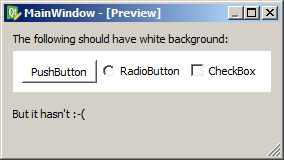
In Qt Designer everything renders as desired:
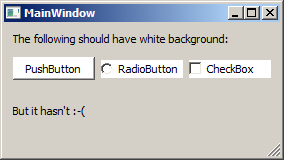
But in Pyside the widget does not draw the background color – but the items on it inherit the color correctly:
Here’s the ui-XML:
<?xml version="1.0" encoding="UTF-8"?>
<ui version="4.0">
 <class>MainWindow</class>
 <widget class="QMainWindow" name="MainWindow">
  <property name="geometry">
   <rect>
    <x>0</x>
    <y>0</y>
    <width>276</width>
    <height>133</height>
   </rect>
  </property>
  <property name="windowTitle">
   <string>MainWindow</string>
  </property>
  <widget class="QWidget" name="centralwidget">
   <layout class="QVBoxLayout" name="verticalLayout" stretch="0,1,1">
    <item>
     <widget class="QLabel" name="label">
      <property name="text">
       <string>The following should have white background:</string>
      </property>
     </widget>
    </item>
    <item>
     <widget class="QWidget" name="widget" native="true">
      <property name="styleSheet">
       <string notr="true">background-color: #FFFFFF</string>
      </property>
      <layout class="QHBoxLayout" name="horizontalLayout">
       <item>
        <widget class="QPushButton" name="pushButton">
         <property name="text">
          <string>PushButton</string>
         </property>
        </widget>
       </item>
       <item>
        <widget class="QRadioButton" name="radioButton">
         <property name="text">
          <string>RadioButton</string>
         </property>
        </widget>
       </item>
       <item>
        <widget class="QCheckBox" name="checkBox">
         <property name="text">
          <string>CheckBox</string>
         </property>
        </widget>
       </item>
      </layout>
     </widget>
    </item>
    <item>
     <widget class="QLabel" name="label_2">
      <property name="text">
       <string>But it hasn't :-(</string>
      </property>
     </widget>
    </item>
   </layout>
  </widget>
  <widget class="QMenuBar" name="menubar">
   <property name="geometry">
    <rect>
     <x>0</x>
     <y>0</y>
     <width>276</width>
     <height>18</height>
    </rect>
   </property>
  </widget>
  <widget class="QStatusBar" name="statusbar"/>
 </widget>
 <resources/>
 <connections/>
</ui>
Here’s my Python code doing nothing special:
import sys

from PySide import QtCore, QtGui

from generated.test import Ui_MainWindow

class MainWindow(Ui_MainWindow,QtCore.QObject):

    def __init__(self, *args, **kwargs):
        Ui_MainWindow.__init__(self, *args, **kwargs)
        QtCore.QObject.__init__(self)

    def setupUi(self, MainWindow):
        Ui_MainWindow.setupUi(self, MainWindow)

def main(argv):
    app = QtGui.QApplication(argv)
    mainwindow = QtGui.QMainWindow()

    ui = MainWindow()
    ui.setupUi(mainwindow)

    mainwindow.show()
    sys.exit(app.exec_())

if __name__ == "__main__":
    main(sys.argv)
I already tried self.widget.setAutoFillBackground(True), but according to the documentation this property is disabled anyway as soon as there’s a valid styleSheet value for the background.
This does not work as well:
p = self.widget.palette()
p.setColor(self.widget.backgroundRole(), QtCore.Qt.white)
self.widget.setPalette(p)
(Got these hints from How to set QWidget background color?)
How can I get the widget to draw the white background color?
Answers:
Thank you for visiting the Q&A section on Magenaut. Please note that all the answers may not help you solve the issue immediately. So please treat them as advisements. If you found the post helpful (or not), leave a comment & I’ll get back to you as soon as possible.
Method 1
Set the WA_StyledBackground attribute on the container widget:
ui = MainWindow()
ui.setupUi(mainwindow)
ui.widget.setAttribute(QtCore.Qt.WA_StyledBackground, True)
(PS: for performance reasons, this attribute isn’t set by default for some widget classes – but the documentation doesn’t seem to specifiy which ones).
All methods was sourced from stackoverflow.com or stackexchange.com, is licensed under cc by-sa 2.5, cc by-sa 3.0 and cc by-sa 4.0