I have added Bootstrap.v3.Datetimepicker NuGet package. Using one of the examples, I created a code similar to this:
<div class="container">
     <div class="col-sm-6" style="height:130px;">
         <div class="form-group">
             <div class='input-group date' id='datetimepicker'>
                <input type='text' class="form-control" />
                <span class="input-group-addon">
                <span class="glyphicon glyphicon-calendar">
                </span>
                </span>
          </div>
       </div>
    </div>
    <script type="text/javascript">
      $(function () {
          $('#datetimepicker').datetimepicker({
              daysOfWeekDisabled: [0, 6]
          });
       });
     </script>
  </div>
But I get an error on my page. Here is the error:
jquery.min.js:2 Uncaught TypeError: $(...).datetimepicker is not a function
at HTMLDocument.<anonymous> (Schedule:137)
at e (jquery.min.js:2)
at t (jquery.min.js:2)
I understand that I need to add scripts and links to css files. How can I do it if I do not see any datatimepicker scripts in my wwwroot folder? How do I reference that script in my html files when the package was brought via NuGet manager?
Answers:
Thank you for visiting the Q&A section on Magenaut. Please note that all the answers may not help you solve the issue immediately. So please treat them as advisements. If you found the post helpful (or not), leave a comment & I’ll get back to you as soon as possible.
Method 1
.NET Core projects use Package References,
so there’s no clean way to get your scripts from a nuget package.
They’re in this directory %UserProfile%.nugetpackages.
For example, installing jQuery will install the scripts in this path C:UsersUser.nugetpackagesjquery1.8.0ContentScripts.
Besides, Microsoft recommends using a package manager like libman or npm for js libraries while nuget will handle assemblies.
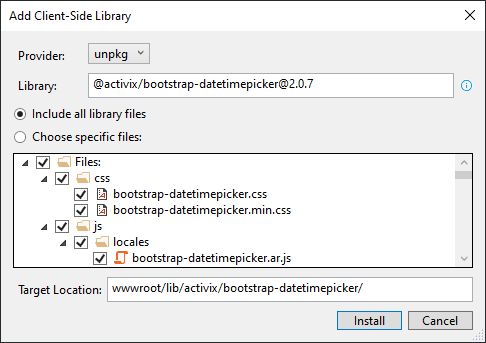
Referencing js libraries using libman:
(Right click on your js libraries folder):
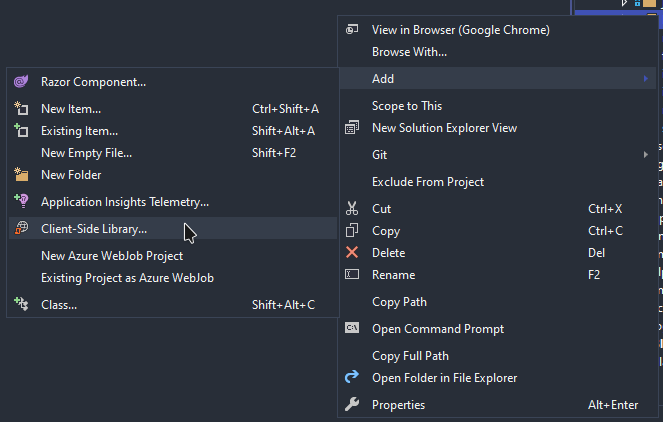
Then search for the library using this format: [email protected]
All methods was sourced from stackoverflow.com or stackexchange.com, is licensed under cc by-sa 2.5, cc by-sa 3.0 and cc by-sa 4.0