I recently updated my WordPress site into the latest WordPress version, and i added a code to my functions.php that would add a capability to subscriber to upload using WordPress media upload. I successfully remove the media library tabs on the later version of WordPress but when I updated the version it seems like the code does not work anymore. Any ideas how to fix this?
This is the previous code which I googled before:
function remove_medialibrary_tab($tabs){
  if ( !current_user_can( 'administrator' ) || !current_user_can( 'editor' ) || !current_user_can( 'contibutor' ) || !current_user_can( 'author' ) ) {
    unset($tabs['library']);
    return $tabs;
  } else {
    return $tabs;
  }
}
add_filter('media_upload_tabs','remove_medialibrary_tab');

if ( !current_user_can('upload_files') ){
    add_action('init', 'allow_user_to_upload');
}

function allow_user_to_upload() {
    $subscriber = get_role('subscriber');
    $subscriber->add_cap('upload_files');
}
Answers:
Thank you for visiting the Q&A section on Magenaut. Please note that all the answers may not help you solve the issue immediately. So please treat them as advisements. If you found the post helpful (or not), leave a comment & I’ll get back to you as soon as possible.
Method 1
If you want to hide the Media Library submenu:

you can do it via the admin_menu action:
function wpse85351_hide_submenus() {
      if(!current_user_can('edit_posts')){
           global $submenu;
           unset($submenu['upload.php'][5]); // hide the Media Library
      }
}
add_action('admin_menu', 'wpse85351_hide_submenus');
If you want to change/remove the Media strings:
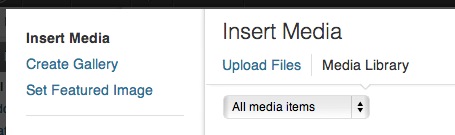
you can use the media_view_strings filter:
function wpse85351_media_strings($strings) {
    // only for subscribers:
    if(!current_user_can('edit_posts')){
        // remove "mediaLibraryTitle"
        unset($strings["mediaLibraryTitle"]);
    }
    return $strings;
}
add_filter('media_view_strings','wpse85351_media_strings');
You can use
!current_user_can('edit_posts')
instead of
!current_user_can( 'administrator' ) || !current_user_can( 'editor' ) || !current_user_can( 'contibutor' ) || !current_user_can( 'author' )
to restrict it only to “subscribers”.
Here is the array of all the Media View Strings that you can unset or change to your needs:
Array
(
    [url] => URL
    [addMedia] => Add Media
    [search] => Search
    [select] => Select
    [cancel] => Cancel
    [selected] => %d selected
    [dragInfo] => Drag and drop to reorder images.
    [uploadFilesTitle] => Upload Files
    [uploadImagesTitle] => Upload Images
    [mediaLibraryTitle] => Media Library
    [insertMediaTitle] => Insert Media
    [createNewGallery] => Create a new gallery
    [returnToLibrary] => ← Return to library
    [allMediaItems] => All media items
    [noItemsFound] => No items found.
    [insertIntoPost] => Insert into post
    [uploadedToThisPost] => Uploaded to this post
    [warnDelete] => You are about to permanently delete this item.
  'Cancel' to stop, 'OK' to delete.
    [insertFromUrlTitle] => Insert from URL
    [setFeaturedImageTitle] => Set Featured Image
    [setFeaturedImage] => Set featured image
    [createGalleryTitle] => Create Gallery
    [editGalleryTitle] => Edit Gallery
    [cancelGalleryTitle] => ← Cancel Gallery
    [insertGallery] => Insert gallery
    [updateGallery] => Update gallery
    [addToGallery] => Add to gallery
    [addToGalleryTitle] => Add to Gallery
    [reverseOrder] => Reverse order
)
All methods was sourced from stackoverflow.com or stackexchange.com, is licensed under cc by-sa 2.5, cc by-sa 3.0 and cc by-sa 4.0