I have this nice little function to remove buttons from the tinyMCE editor in WordPress, so far I’ve been able to remove most of the ones I need to.
function custom_disable_mce_buttons( $opt ) {
    $opt['theme_advanced_disable'] = 'justifyfull,forecolor,removeformat,justifycenter,justifyright,justifyleft,charmap,indent,outdent,undo, redo';
    return $opt;
}
add_filter('tiny_mce_before_init', 'custom_disable_mce_buttons');
The button control list can be found here: http://www.tinymce.com/wiki.php/TinyMCE3x:Buttons/controls
The problem is, there’s a few more ones I’d like to remove, like the spellchecker and the ‘insert more tag’, but I can’t find documentation anywhere of the codes/names for these buttons to remove them.
Any got any info on this?
Answers:
Thank you for visiting the Q&A section on Magenaut. Please note that all the answers may not help you solve the issue immediately. So please treat them as advisements. If you found the post helpful (or not), leave a comment & I’ll get back to you as soon as possible.
Method 1
wp_more – insert more button,
spellchecker – spellchecker button
I’ve tried it with your code on WP 3.5.1 and it worked fine for me.
Method 2
You can try to remove the Spellchecker and the Insert More Tag buttons by adding:
spellchecker, wp_more
to your $opt['theme_advanced_disable'] comma-seperated string.
On my install I have these options:
[theme_advanced_buttons1] => bold,italic,strikethrough,bullist,numlist,blockquote,justifyleft,justifycenter,justifyright,link,unlink,wp_more,spellchecker,wp_fullscreen,wp_adv,separator

[theme_advanced_buttons2] => formatselect,underline,justifyfull,forecolor,pastetext,pasteword,removeformat,charmap,outdent,indent,undo,redo,wp_help
Here is the list:
bold,
italic,
strikethrough,
bullist,
numlist,
blockquote,
justifyleft,
justifycenter,
justifyright,
link,
unlink,
wp_more,
spellchecker,
wp_fullscreen,
wp_adv,
separator,
and
formatselect,
underline,
justifyfull,
forecolor,
pastetext,
pasteword,
removeformat,
charmap,
outdent,
indent,
undo,
redo,
wp_help
Method 3
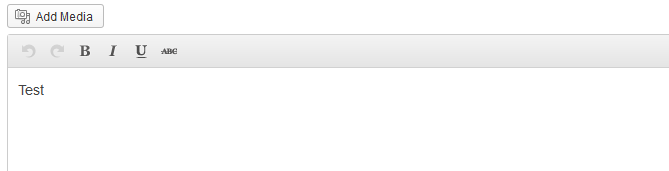
add_filter("mce_buttons", "tinymce_editor_buttons", 99); //targets the first line
add_filter("mce_buttons_2", "tinymce_editor_buttons_second_row", 99); //targets the second line

function tinymce_editor_buttons($buttons) {
return array(
    "undo",
    "redo",
    "separator",
    "bold",
    "italic",
    "underline",
    "strikethrough",
    //"separator",
    //"bullist",
    //"separator",
    //add more here...
    );
}

function tinymce_editor_buttons_second_row($buttons) {
   //return an empty array to remove this line
    return array();
}
Result:
All methods was sourced from stackoverflow.com or stackexchange.com, is licensed under cc by-sa 2.5, cc by-sa 3.0 and cc by-sa 4.0