In Python, given a N_1 x N_2 x N_3 matrix containing either 0s or 1s, I would be looking for a way to display the data in 3D as a N_1 x N_2 x N_3 volume with volumic pixels (voxels) at the location of 1s.
For example, if the coordinates of 1s were [[1, 1, 1], [4, 1, 2], [3, 4, 1]], the desired output would look like this
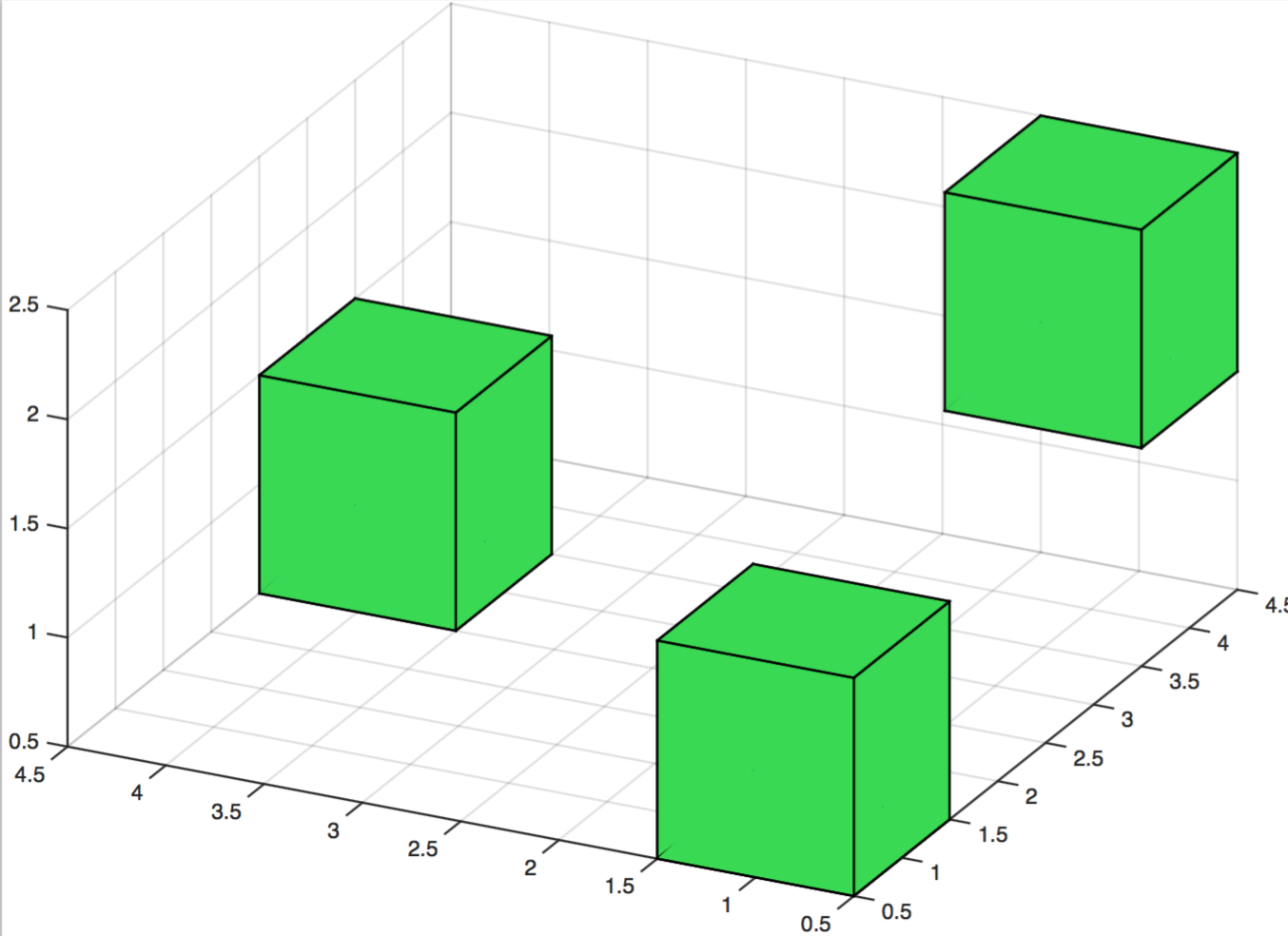
It seems that the mplot3D module of matplotlib could have the potential to achieve this, but I haven’t found any example of this kind of plot. Would anyone be aware of simple solution to tackle this issue?
Thanks a lot in advance for your help.
Answers:
Thank you for visiting the Q&A section on Magenaut. Please note that all the answers may not help you solve the issue immediately. So please treat them as advisements. If you found the post helpful (or not), leave a comment & I’ll get back to you as soon as possible.
Method 1
A. Using voxels
From matplotlib 2.1 on, there is a Axes3D.voxels function available, which pretty much does what’s asked for here. It is however not very easily customized to different sizes, positions or colors.
from mpl_toolkits.mplot3d import Axes3D
import numpy as np
import matplotlib.pyplot as plt
N1 = 10
N2 = 10
N3 = 10
ma = np.random.choice([0,1], size=(N1,N2,N3), p=[0.99, 0.01])

fig = plt.figure()
ax = fig.gca(projection='3d')
ax.set_aspect('equal')

ax.voxels(ma, edgecolor="k")

plt.show()
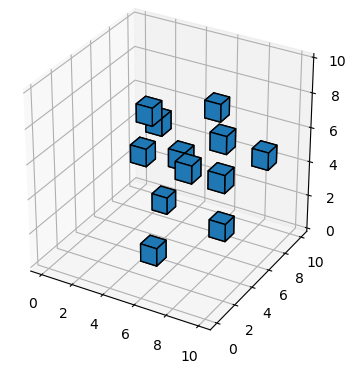
To place the voxels at different positions, see How to scale the voxel-dimensions with Matplotlib?.
B. Using Poly3DCollection
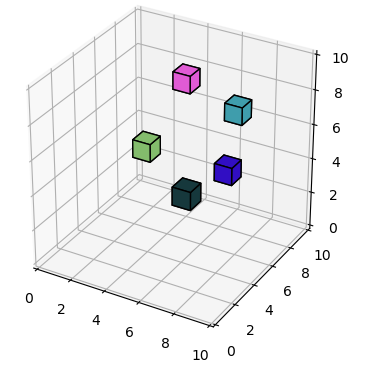
Manually creating the voxels may make the process a little bit more transparent and allows for any kind of customizations of the sizes, positions and colors of the voxels. Another advantage is that here we create a single Poly3DCollection instead of many, making this solution faster than the inbuild voxels.
from mpl_toolkits.mplot3d import Axes3D
import numpy as np
import matplotlib.pyplot as plt
from mpl_toolkits.mplot3d.art3d import Poly3DCollection

def cuboid_data(o, size=(1,1,1)):
    X = [[[0, 1, 0], [0, 0, 0], [1, 0, 0], [1, 1, 0]],
         [[0, 0, 0], [0, 0, 1], [1, 0, 1], [1, 0, 0]],
         [[1, 0, 1], [1, 0, 0], [1, 1, 0], [1, 1, 1]],
         [[0, 0, 1], [0, 0, 0], [0, 1, 0], [0, 1, 1]],
         [[0, 1, 0], [0, 1, 1], [1, 1, 1], [1, 1, 0]],
         [[0, 1, 1], [0, 0, 1], [1, 0, 1], [1, 1, 1]]]
    X = np.array(X).astype(float)
    for i in range(3):
        X[:,:,i] *= size[i]
    X += np.array(o)
    return X

def plotCubeAt(positions,sizes=None,colors=None, **kwargs):
    if not isinstance(colors,(list,np.ndarray)): colors=["C0"]*len(positions)
    if not isinstance(sizes,(list,np.ndarray)): sizes=[(1,1,1)]*len(positions)
    g = []
    for p,s,c in zip(positions,sizes,colors):
        g.append( cuboid_data(p, size=s) )
    return Poly3DCollection(np.concatenate(g),
                            facecolors=np.repeat(colors,6, axis=0), **kwargs)

N1 = 10
N2 = 10
N3 = 10
ma = np.random.choice([0,1], size=(N1,N2,N3), p=[0.99, 0.01])
x,y,z = np.indices((N1,N2,N3))-.5
positions = np.c_[x[ma==1],y[ma==1],z[ma==1]]
colors= np.random.rand(len(positions),3)

fig = plt.figure()
ax = fig.gca(projection='3d')
ax.set_aspect('equal')

pc = plotCubeAt(positions, colors=colors,edgecolor="k")
ax.add_collection3d(pc)

ax.set_xlim([0,10])
ax.set_ylim([0,10])
ax.set_zlim([0,10])
#plotMatrix(ax, ma)
#ax.voxels(ma, edgecolor="k")

plt.show()
C. Using plot_surface
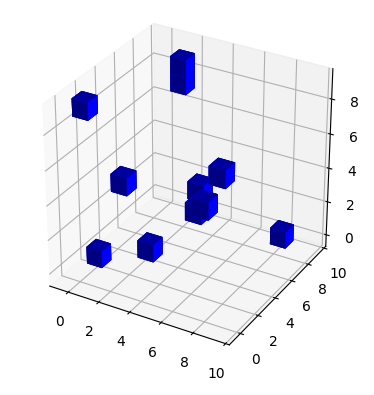
Adapting a code from this answer (which is partly based on this answer), one can easily plot cuboids as surface plots.
One then can iterate over the input array and upon finding a 1 plot a cuboid at the position corresponding to the array indices.
The advantage here is that you get nice shading on the surfaces, adding to the 3D effect. A disadvantage may be that the cubes may not behave physical in some cases, e.g. they might overlap for certain viewing angles.
from mpl_toolkits.mplot3d import Axes3D
import numpy as np
import matplotlib.pyplot as plt

def cuboid_data(pos, size=(1,1,1)):
    # code taken from
    # https://stackoverflow.com/a/35978146/4124317
    # suppose axis direction: x: to left; y: to inside; z: to upper
    # get the (left, outside, bottom) point
    o = [a - b / 2 for a, b in zip(pos, size)]
    # get the length, width, and height
    l, w, h = size
    x = [[o[0], o[0] + l, o[0] + l, o[0], o[0]],
         [o[0], o[0] + l, o[0] + l, o[0], o[0]],
         [o[0], o[0] + l, o[0] + l, o[0], o[0]],
         [o[0], o[0] + l, o[0] + l, o[0], o[0]]]
    y = [[o[1], o[1], o[1] + w, o[1] + w, o[1]],
         [o[1], o[1], o[1] + w, o[1] + w, o[1]],
         [o[1], o[1], o[1], o[1], o[1]],
         [o[1] + w, o[1] + w, o[1] + w, o[1] + w, o[1] + w]]
    z = [[o[2], o[2], o[2], o[2], o[2]],
         [o[2] + h, o[2] + h, o[2] + h, o[2] + h, o[2] + h],
         [o[2], o[2], o[2] + h, o[2] + h, o[2]],
         [o[2], o[2], o[2] + h, o[2] + h, o[2]]]
    return np.array(x), np.array(y), np.array(z)

def plotCubeAt(pos=(0,0,0),ax=None):
    # Plotting a cube element at position pos
    if ax !=None:
        X, Y, Z = cuboid_data( pos )
        ax.plot_surface(X, Y, Z, color='b', rstride=1, cstride=1, alpha=1)

def plotMatrix(ax, matrix):
    # plot a Matrix
    for i in range(matrix.shape[0]):
        for j in range(matrix.shape[1]):
            for k in range(matrix.shape[2]):
                if matrix[i,j,k] == 1:
                    # to have the
                    plotCubeAt(pos=(i-0.5,j-0.5,k-0.5), ax=ax)

N1 = 10
N2 = 10
N3 = 10
ma = np.random.choice([0,1], size=(N1,N2,N3), p=[0.99, 0.01])

fig = plt.figure()
ax = fig.gca(projection='3d')
ax.set_aspect('equal')

plotMatrix(ax, ma)

plt.show()
Method 2
The upcomming matplotlib version 2.1 does have a function and examples for 3D voxels.
If you use anaconda you can install it through the conda-forge channel.
conda install -c conda-forge matplotlib
All methods was sourced from stackoverflow.com or stackexchange.com, is licensed under cc by-sa 2.5, cc by-sa 3.0 and cc by-sa 4.0