Say I have data about 3 trading strategies, each with and without transaction costs. I want to plot, on the same axes, the time series of each of the 6 variants (3 strategies * 2 trading costs). I would like the “with transaction cost” lines to be plotted with alpha=1 and linewidth=1 while I want the “no transaction costs” to be plotted with alpha=0.25 and linewidth=5. But I would like the color to be the same for both versions of each strategy.
I would like something along the lines of:
fig, ax = plt.subplots(1, 1, figsize=(10, 10))

for c in with_transaction_frame.columns:
    ax.plot(with_transaction_frame[c], label=c, alpha=1, linewidth=1)

****SOME MAGIC GOES HERE TO RESET THE COLOR CYCLE

for c in no_transaction_frame.columns:
    ax.plot(no_transaction_frame[c], label=c, alpha=0.25, linewidth=5)

ax.legend()
What is the appropriate code to put on the indicated line to reset the color cycle so it is “back to the start” when the second loop is invoked?
Answers:
Thank you for visiting the Q&A section on Magenaut. Please note that all the answers may not help you solve the issue immediately. So please treat them as advisements. If you found the post helpful (or not), leave a comment & I’ll get back to you as soon as possible.
Method 1
You can reset the colorcycle to the original with Axes.set_color_cycle. Looking at the code for this, there is a function to do the actual work:
def set_color_cycle(self, clist=None):
    if clist is None:
        clist = rcParams['axes.color_cycle']
    self.color_cycle = itertools.cycle(clist
And a method on the Axes which uses it:
def set_color_cycle(self, clist):
    """
    Set the color cycle for any future plot commands on this Axes.

    *clist* is a list of mpl color specifiers.
    """
    self._get_lines.set_color_cycle(clist)
    self._get_patches_for_fill.set_color_cycle(clist)
This basically means you can call the set_color_cycle with None as the only argument, and it will be replaced with the default cycle found in rcParams[‘axes.color_cycle’].
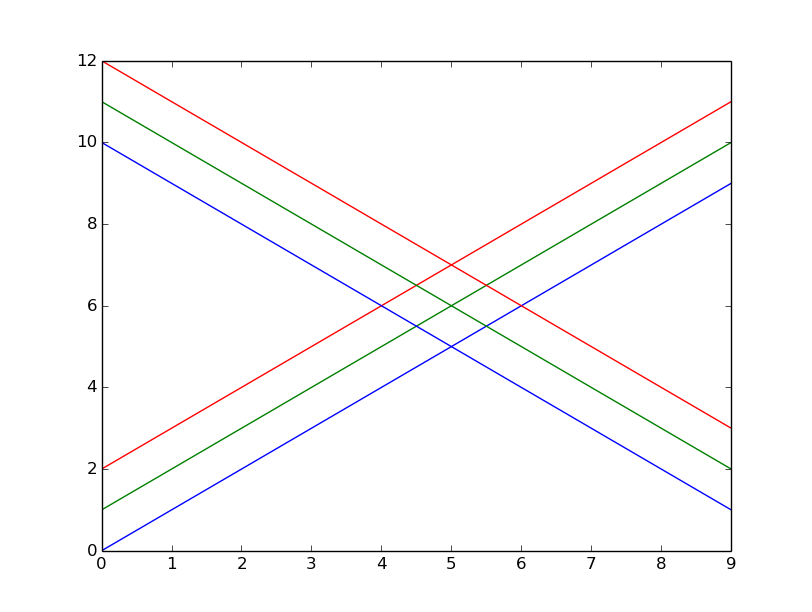
I tried this with the following code and got the expected result:
import matplotlib.pyplot as plt
import numpy as np

for i in range(3):
    plt.plot(np.arange(10) + i)

# for Matplotlib version < 1.5
plt.gca().set_color_cycle(None)
# for Matplotlib version >= 1.5
plt.gca().set_prop_cycle(None)

for i in range(3):
    plt.plot(np.arange(10, 1, -1) + i)

plt.show()
Method 2
As the answer given by @pelson uses set_color_cycle and this is deprecated in Matplotlib 1.5, I thought it would be useful to have an updated version of his solution using set_prop_cycle:
import matplotlib.pyplot as plt
import numpy as np

for i in range(3):
    plt.plot(np.arange(10) + i)

plt.gca().set_prop_cycle(None)

for i in range(3):
    plt.plot(np.arange(10, 0, -1) + i)

plt.show()
Remark also that I had to change np.arange(10,1,-1) to np.arange(10,0,-1). The former gave an array of only 9 elements. This probably arises from using different Numpy versions. Mine is 1.10.2.
EDIT: Removed the need to use rcParams. Thanks to @divenex for pointing that out in a comment.
Method 3
Since you mentioned you’re using seaborn, what I would recommend doing is:
with sns.color_palette(n_colors=3):

    ax.plot(...)
    ax.plot(...)
This will set the color palette to use the currently active color cycle, but only the first three colors from it. It’s also a general purpose solution for any time you want to set a temporary color cycle.
Note that the only thing that actually needs to be under the with block is whatever you are doing to create the Axes object (i.e. plt.subplots, fig.add_subplot(), etc.). This is just because of how the matplotlib color cycle itself works.
Doing what you specifically want, “resetting” the color cycle, is possible, but it’s a hack and I wouldn’t do it in any kind of production code. Here, though, is how it could happen:
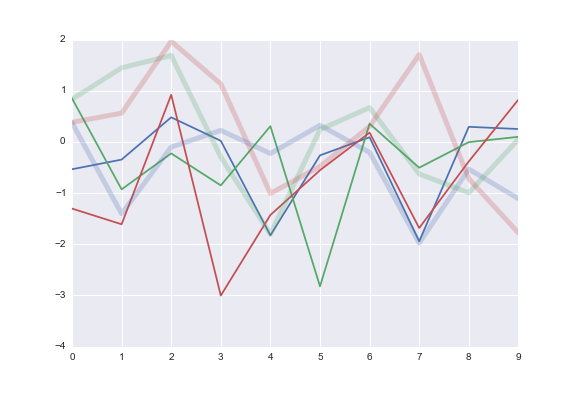
f, ax = plt.subplots()
ax.plot(np.random.randn(10, 3))
ax._get_lines.color_cycle = itertools.cycle(sns.color_palette())
ax.plot(np.random.randn(10, 3), lw=5, alpha=.25)
Method 4
Simply choose your colours and assign them to a list, then when you plot your data iterate over a zip object containing your column and the colour you wish.
colors = ['red', 'blue', 'green']

for col, color in zip(colors, with_transaction_frame.columns):
    ax.plot(with_transaction_frame[col], label=col, alpha=1.0, linewidth=1.0, color=color)

for col, color in zip(no_transaction_frame.columns):
    ax.plot(no_transaction_frame[col], label=col, alpha=0.25, linewidth=5, color=color)
zip creates a list that aggregates the elements from each of your lists. This allows you to iterate over both easily at the same time.
Method 5
You can get the colors from seaborn like this: colors = sns.color_palette(). Ffisegydd’s answer would then work great. You could also get the color to plot using the modulus/remainder operater (%): mycolor = colors[icolumn % len(colors]. I use often use this approach myself. So you could do:
for icol, column in enumerate(with_transaction_frame.columns):

    mycolor = colors[icol % len(colors]

    ax.plot(with_transaction_frame[col], label=col, alpha=1.0, color=mycolor)
Ffisegydd’s answer may be more ‘pythonic’, though.
Method 6
As an addition to the already excellent answers, you can consider using a colormap:
import matplotlib.pyplot as plt
import numpy as np

cmap = plt.cm.viridis

datarange = np.arange(4)

for d in datarange:
    # generate colour by feeding float between 0 and 1 to colormap
    color = cmap(d/np.max(datarange))
    plt.plot(np.arange(5)+d, c=color)

for d in datarange:
    # generate colour by feeding float between 0 and 1 to colormap
    color = cmap(d/np.max(datarange))
    plt.plot(-np.arange(5)+d, c=color)

All methods was sourced from stackoverflow.com or stackexchange.com, is licensed under cc by-sa 2.5, cc by-sa 3.0 and cc by-sa 4.0