I want to go from this data frame which is basically one hot encoded.
 In [2]: pd.DataFrame({"monkey":[0,1,0],"rabbit":[1,0,0],"fox":[0,0,1]})

    Out[2]:
       fox  monkey  rabbit
    0    0       0       1
    1    0       1       0
    2    1       0       0
    3    0       0       0
    4    0       0       0
To this one which is ‘reverse’ one-hot encoded.
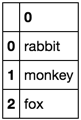
    In [3]: pd.DataFrame({"animal":["monkey","rabbit","fox"]})
    Out[3]:
       animal
    0  monkey
    1  rabbit
    2     fox
I imagine there’s some sort of clever use of apply or zip to do thins but I’m not sure how… Can anyone help?
I’ve not had much success using indexing etc to try to solve this problem.
Answers:
Thank you for visiting the Q&A section on Magenaut. Please note that all the answers may not help you solve the issue immediately. So please treat them as advisements. If you found the post helpful (or not), leave a comment & I’ll get back to you as soon as possible.
Method 1
UPDATE: i think ayhan is right and it should be:
df.idxmax(axis=1)
Demo:
In [40]: s = pd.Series(['dog', 'cat', 'dog', 'bird', 'fox', 'dog'])

In [41]: s
Out[41]:
0     dog
1     cat
2     dog
3    bird
4     fox
5     dog
dtype: object

In [42]: pd.get_dummies(s)
Out[42]:
   bird  cat  dog  fox
0   0.0  0.0  1.0  0.0
1   0.0  1.0  0.0  0.0
2   0.0  0.0  1.0  0.0
3   1.0  0.0  0.0  0.0
4   0.0  0.0  0.0  1.0
5   0.0  0.0  1.0  0.0

In [43]: pd.get_dummies(s).idxmax(1)
Out[43]:
0     dog
1     cat
2     dog
3    bird
4     fox
5     dog
dtype: object
OLD answer: (most probably, incorrect answer)
try this:
In [504]: df.idxmax().reset_index().rename(columns={'index':'animal', 0:'idx'})
Out[504]:
   animal  idx
0     fox    2
1  monkey    1
2  rabbit    0
data:
In [505]: df
Out[505]:
   fox  monkey  rabbit
0    0       0       1
1    0       1       0
2    1       0       0
3    0       0       0
4    0       0       0
Method 2
I would use apply to decode the columns:
In [2]: animals = pd.DataFrame({"monkey":[0,1,0,0,0],"rabbit":[1,0,0,0,0],"fox":[0,0,1,0,0]})

In [3]: def get_animal(row):
   ...:     for c in animals.columns:
   ...:         if row[c]==1:
   ...:             return c

In [4]: animals.apply(get_animal, axis=1)
Out[4]:
0    rabbit
1    monkey
2       fox
3      None
4      None
dtype: object
Method 3
This works with both single and multiple labels.
We can use advanced indexing to tackle this problem. Here is the link.
import pandas as pd

df = pd.DataFrame({"monkey":[1,1,0,1,0],"rabbit":[1,1,1,1,0],
    "fox":[1,0,1,0,0], "cat":[0,0,0,0,1]})

df['tags']='' # to create an empty column

for col_name in df.columns:
    df.ix[df[col_name]==1,'tags']= df['tags']+' '+col_name

print df
And the result is:
   cat  fox  monkey  rabbit                tags
0    0    1       1       1   fox monkey rabbit
1    0    0       1       1       monkey rabbit
2    0    1       0       1          fox rabbit
3    0    0       1       1       monkey rabbit
4    1    0       0       0                 cat
Explanation:
We iterate over the columns on the dataframe.
df.ix[selection criteria, columns to write value] = value
df.ix[df[col_name]==1,'tags']= df['tags']+' '+col_name
The above line basically finds you all the places where df[col_name] == 1, selects column ‘tags’ and set it to the RHS value which is df[‘tags’]+’ ‘+ col_name
Note: .ix has been deprecated since Pandas v0.20. You should instead use .loc or .iloc, as appropriate.
Method 4
I’d do:
cols = df.columns.to_series().values
pd.DataFrame(np.repeat(cols[None, :], len(df), 0)[df.astype(bool).values], df.index[df.any(1)])
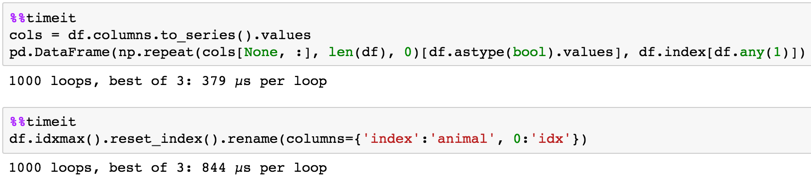
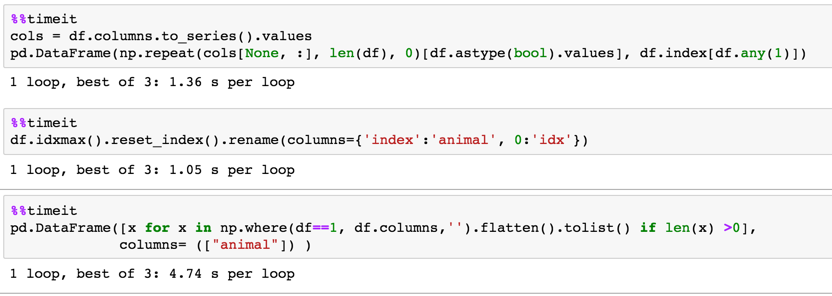
Timing
MaxU’s method has edge for large dataframes
Small df 5 x 3
Large df 1000000 x 52
Method 5
You could try using melt(). This method also works when you have multiple OHE labels for a row.
# Your OHE dataframe
df = pd.DataFrame({"monkey":[0,1,0],"rabbit":[1,0,0],"fox":[0,0,1]})

mel = df.melt(var_name=['animal'], value_name='value') # Melting

mel[mel.value == 1].reset_index(drop=True) # this gives you the result
Method 6
Try this:
df = pd.DataFrame({"monkey":[0,1,0,1,0],"rabbit":[1,0,0,0,0],"fox":[0,0,1,0,0], "cat":[0,0,0,0,1]})
df

   cat  fox  monkey  rabbit
0    0    0       0       1
1    0    0       1       0
2    0    1       0       0
3    0    0       1       0
4    1    0       0       0

pd.DataFrame([x for x in np.where(df ==1, df.columns,'').flatten().tolist() if len(x) >0],columns= (["animal"]) )

   animal
0  rabbit
1  monkey
2     fox
3  monkey
4     cat
Method 7
It can be achieved with a simple apply on dataframe
# function to get column name with value one for each row in dataframe
def get_animal(row):
    return(row.index[row.apply(lambda x: x==1)][0])

# prepare a animal column
df['animal'] = df.apply(lambda row:get_animal(row), axis=1)
All methods was sourced from stackoverflow.com or stackexchange.com, is licensed under cc by-sa 2.5, cc by-sa 3.0 and cc by-sa 4.0