I have a WordPress install for a personal blog and I’m gradually porting all of the little web bits I have written over the years to pages on the blog.
One such page is http://www.projecttoomanycooks.co.uk/cgi-bin/memory/majorAnalysis.py which is a simple python script that returns a list of words – I’d like to embedd that behavior within a wordpress page – could someone point me in the right direction for the easyist way of running a spot of python within wordpress?
EDIT – following the wonderful answer below, I have got a lot futher… but unfortunately still not quite there…
I have python that executes on server…
projecttoomanycooks server [~/public_html/joereddington/wp-content/plugins]#./hello.py
Hello World!
and it’s in the same directory as the activated plugin…
The python code… which has the following code…
#!/usr/bin/python
print("Hello World!")
The php:
<?php
/**
 * Plugin Name: Joe's python thing.
 * Plugin URI: http://URI_Of_Page_Describing_Plugin_and_Updates
 * Description: A brief description of the Plugin.
 * Version: The Plugin's Version Number, e.g.: 1.0
 * Author: Name Of The Plugin Author
 * Author URI: http://URI_Of_The_Plugin_Author
 * License: A "Slug" license name e.g. GPL2
 */
/*from http://wordpress.stackexchange.com/questions/120259/running-a-python-scri
pt-within-wordpress/120261?noredirect=1#120261  */
add_shortcode( 'python', 'embed_python' );

function embed_python( $attributes )
{
    $data = shortcode_atts(
        array(
            'file' => 'hello.py'
        ),
        $attributes
    );
    $handle = popen( __DIR__ . '/' . $data['file'], 'r');
    $read   = fread($handle, 2096);
    pclose($handle);

    return $read;
}
Answers:
Thank you for visiting the Q&A section on Magenaut. Please note that all the answers may not help you solve the issue immediately. So please treat them as advisements. If you found the post helpful (or not), leave a comment & I’ll get back to you as soon as possible.
Method 1
You can use popen() to read or write to a Python script (this works with any other language too). If you need interaction (passing variables) use proc_open().
A simple example to print Hello World! in a WordPress plugin
Create the plugin, register a shortcode:
<?php # -*- coding: utf-8 -*-
/* Plugin Name: Python embedded */

add_shortcode( 'python', 'embed_python' );

function embed_python( $attributes )
{
    $data = shortcode_atts(
        [
            'file' => 'hello.py'
        ],
        $attributes
    );

    $handle = popen( __DIR__ . '/' . $data['file'], 'r' );
    $read = '';

    while ( ! feof( $handle ) )
    {
        $read .= fread( $handle, 2096 );
    }

    pclose( $handle );

    return $read;
}
Now you can use that shortcode in the post editor with [python] or [python file="filename.py"].
Put the Python scripts you want to use into the same directory as the plugin file. You can also put them into a directory and adjust the path in the shortcode handler.
Now create a complex Python script like this:
print("Hello World!")
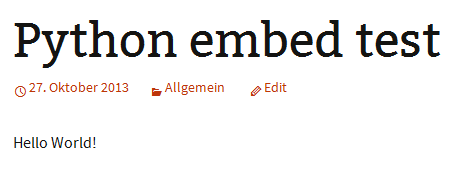
And that’s all. Use the shortcode, and get this output:
Method 2
I followed the example script from the first answer, but was getting no output or errors.
I changed this line:
$handle = popen( __DIR__ . '/' . $data['file'], 'r' );
to this:
$handle = popen( __DIR__ . '/' . $data['file'] . ' 2>&1', 'r' );
and then got a “permission denied” message.
On the console, I ran
chmod 777 hello.py
refreshed the page, and everything worked perfectly.
This may be the issue Joe was seeing above. I don’t have enough rep to make a comment, sorry. Hope this helps someone.
Method 3
Here’s a little script that uses proc_open as noted above, to sent one simple text variable to a python script:
add_shortcode( 'execute_python', 'execute_python_with_argv' );

function execute_python_with_argv( $attributes ){

$description = array (
    0 => array("pipe", "r"),  // stdin
    1 => array("pipe", "w"),  // stdout
    2 => array("pipe", "w")   // stderr
);

$application_system = "python ";
$application_path .= plugin_dir_path( __FILE__ );
$application_name .= "hello.py";
$separator = " ";

$application = $application_system.$application_path.$application_name.$separator;

$argv1 = '"output to receive back from python script"';
$pipes = array();

$proc = proc_open ( $application.$argv1 , $description , $pipes );

//echo proc_get_status($proc)['pid'];

if (is_resource ( $proc ))
{
    echo "Stdout : " . stream_get_contents ( $pipes [1] ); //Reading stdout buffer
    fclose ( $pipes [1] ); //Closing stdout buffer
    fclose ( $pipes [2] ); //Closing stderr buffer

    $return_value = proc_close($proc);
    echo "<br/>command returned: $return_value<br/>";
}

$application_test = glitch_player_DIR.$application_name;

echo "<br/>Is ".$application_test." executable? ".is_executable($application_test)." ";
echo "readable? ".is_readable($application_test)." ";
echo "writable? ".is_writable($application_test)." ";

} //EOF main/shortcode function
Added a few tests as the bottom to see if the python file is rwx. I think a better way to send the argv would be using fwrite, but it wasn’t working for me following this tutorial.
Here is the python script I used. As noted in comments above, something like #!/usr/bin/env python may be necessary, depending on server.
#!/usr/bin/env python

from sys import argv

script, what_he_said = argv

print "This is what you submitted: %s n n Isn't that amazing, man? " % what_he_said
All methods was sourced from stackoverflow.com or stackexchange.com, is licensed under cc by-sa 2.5, cc by-sa 3.0 and cc by-sa 4.0