I am trying to make a simple scatter plot in pyplot using a Pandas DataFrame object, but want an efficient way of plotting two variables but have the symbols dictated by a third column (key). I have tried various ways using df.groupby, but not successfully. A sample df script is below. This colours the markers according to ‘key1’, but Id like to see a legend with ‘key1’ categories. Am I close? Thanks.
import numpy as np
import pandas as pd
import matplotlib.pyplot as plt
df = pd.DataFrame(np.random.normal(10,1,30).reshape(10,3), index = pd.date_range('2010-01-01', freq = 'M', periods = 10), columns = ('one', 'two', 'three'))
df['key1'] = (4,4,4,6,6,6,8,8,8,8)
fig1 = plt.figure(1)
ax1 = fig1.add_subplot(111)
ax1.scatter(df['one'], df['two'], marker = 'o', c = df['key1'], alpha = 0.8)
plt.show()
Answers:
Thank you for visiting the Q&A section on Magenaut. Please note that all the answers may not help you solve the issue immediately. So please treat them as advisements. If you found the post helpful (or not), leave a comment & I’ll get back to you as soon as possible.
Method 1
You can use scatter for this, but that requires having numerical values for your key1, and you won’t have a legend, as you noticed.
It’s better to just use plot for discrete categories like this. For example:
import matplotlib.pyplot as plt
import numpy as np
import pandas as pd
np.random.seed(1974)

# Generate Data
num = 20
x, y = np.random.random((2, num))
labels = np.random.choice(['a', 'b', 'c'], num)
df = pd.DataFrame(dict(x=x, y=y, label=labels))

groups = df.groupby('label')

# Plot
fig, ax = plt.subplots()
ax.margins(0.05) # Optional, just adds 5% padding to the autoscaling
for name, group in groups:
    ax.plot(group.x, group.y, marker='o', linestyle='', ms=12, label=name)
ax.legend()

plt.show()
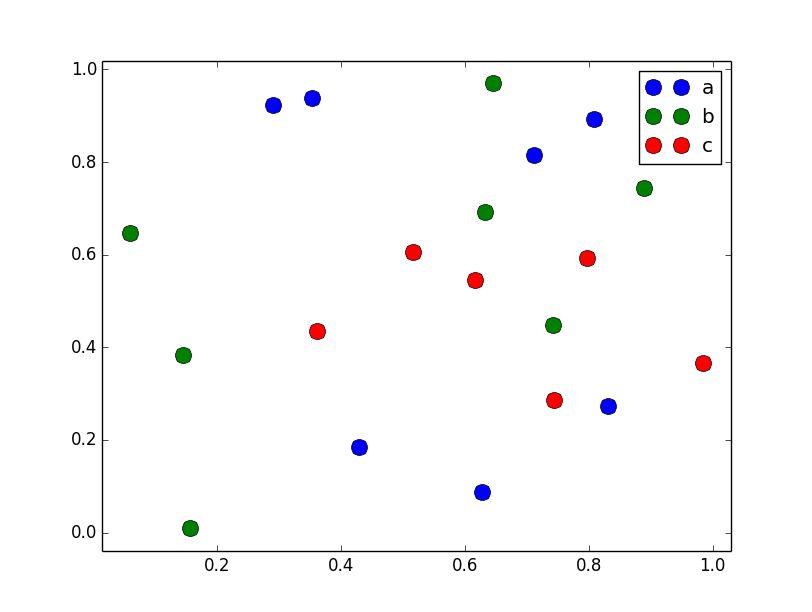
If you’d like things to look like the default pandas style, then just update the rcParams with the pandas stylesheet and use its color generator. (I’m also tweaking the legend slightly):
import matplotlib.pyplot as plt
import numpy as np
import pandas as pd
np.random.seed(1974)

# Generate Data
num = 20
x, y = np.random.random((2, num))
labels = np.random.choice(['a', 'b', 'c'], num)
df = pd.DataFrame(dict(x=x, y=y, label=labels))

groups = df.groupby('label')

# Plot
plt.rcParams.update(pd.tools.plotting.mpl_stylesheet)
colors = pd.tools.plotting._get_standard_colors(len(groups), color_type='random')

fig, ax = plt.subplots()
ax.set_color_cycle(colors)
ax.margins(0.05)
for name, group in groups:
    ax.plot(group.x, group.y, marker='o', linestyle='', ms=12, label=name)
ax.legend(numpoints=1, loc='upper left')

plt.show()
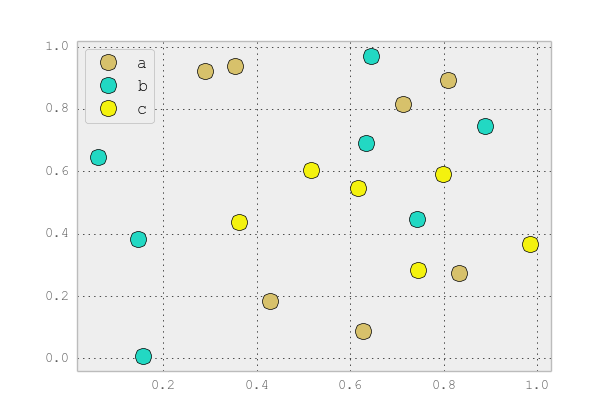
Method 2
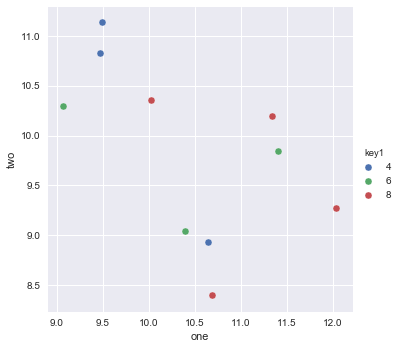
This is simple to do with Seaborn (pip install seaborn) as a oneliner
sns.scatterplot(x_vars="one", y_vars="two", data=df, hue="key1")
:
import seaborn as sns
import pandas as pd
import numpy as np
np.random.seed(1974)

df = pd.DataFrame(
    np.random.normal(10, 1, 30).reshape(10, 3),
    index=pd.date_range('2010-01-01', freq='M', periods=10),
    columns=('one', 'two', 'three'))
df['key1'] = (4, 4, 4, 6, 6, 6, 8, 8, 8, 8)

sns.scatterplot(x="one", y="two", data=df, hue="key1")
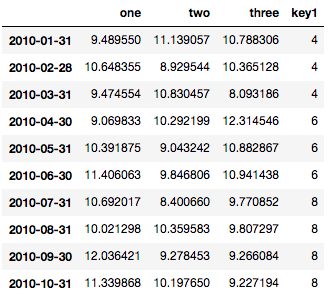
Here is the dataframe for reference:
Since you have three variable columns in your data, you may want to plot all pairwise dimensions with:
sns.pairplot(vars=["one","two","three"], data=df, hue="key1")
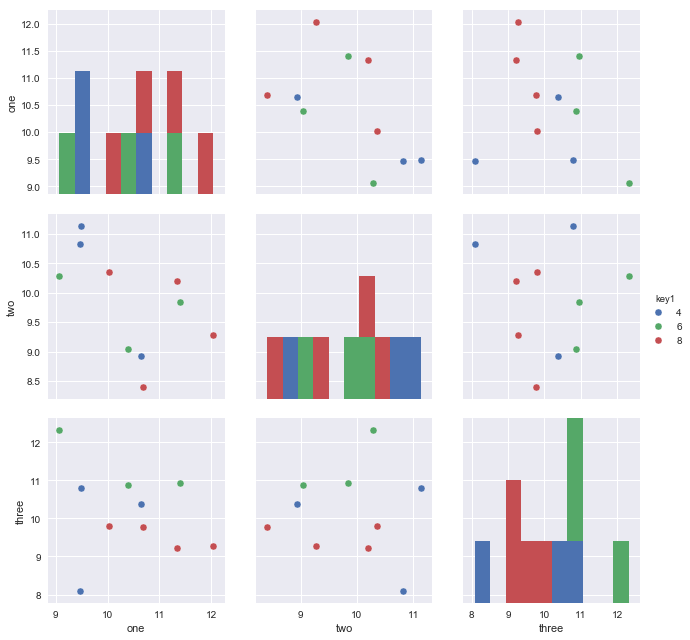
https://rasbt.github.io/mlxtend/user_guide/plotting/category_scatter/ is another option.
Method 3
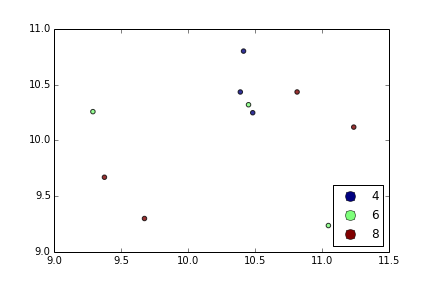
With plt.scatter, I can only think of one: to use a proxy artist:
df = pd.DataFrame(np.random.normal(10,1,30).reshape(10,3), index = pd.date_range('2010-01-01', freq = 'M', periods = 10), columns = ('one', 'two', 'three'))
df['key1'] = (4,4,4,6,6,6,8,8,8,8)
fig1 = plt.figure(1)
ax1 = fig1.add_subplot(111)
x=ax1.scatter(df['one'], df['two'], marker = 'o', c = df['key1'], alpha = 0.8)

ccm=x.get_cmap()
circles=[Line2D(range(1), range(1), color='w', marker='o', markersize=10, markerfacecolor=item) for item in ccm((array([4,6,8])-4.0)/4)]
leg = plt.legend(circles, ['4','6','8'], loc = "center left", bbox_to_anchor = (1, 0.5), numpoints = 1)
And the result is:
Method 4
You can use df.plot.scatter, and pass an array to c= argument defining the color of each point:
import numpy as np
import pandas as pd
import matplotlib.pyplot as plt
df = pd.DataFrame(np.random.normal(10,1,30).reshape(10,3), index = pd.date_range('2010-01-01', freq = 'M', periods = 10), columns = ('one', 'two', 'three'))
df['key1'] = (4,4,4,6,6,6,8,8,8,8)
colors = np.where(df["key1"]==4,'r','-')
colors[df["key1"]==6] = 'g'
colors[df["key1"]==8] = 'b'
print(colors)
df.plot.scatter(x="one",y="two",c=colors)
plt.show()

Method 5
From matplotlib 3.1 onwards you can use .legend_elements(). An example is shown in Automated legend creation. The advantage is that a single scatter call can be used.
In this case:
import numpy as np
import pandas as pd
import matplotlib.pyplot as plt

df = pd.DataFrame(np.random.normal(10,1,30).reshape(10,3),
                  index = pd.date_range('2010-01-01', freq = 'M', periods = 10),
                  columns = ('one', 'two', 'three'))
df['key1'] = (4,4,4,6,6,6,8,8,8,8)


fig, ax = plt.subplots()
sc = ax.scatter(df['one'], df['two'], marker = 'o', c = df['key1'], alpha = 0.8)
ax.legend(*sc.legend_elements())
plt.show()
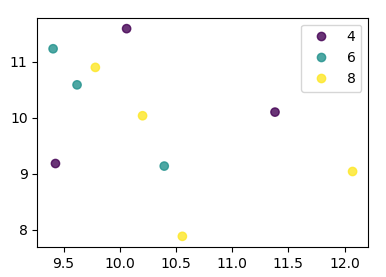
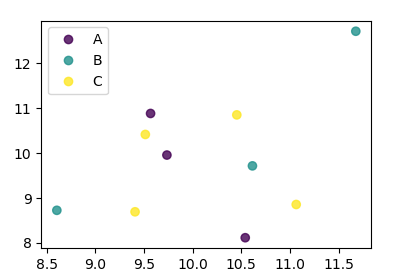
In case the keys were not directly given as numbers, it would look as
import numpy as np
import pandas as pd
import matplotlib.pyplot as plt

df = pd.DataFrame(np.random.normal(10,1,30).reshape(10,3),
                  index = pd.date_range('2010-01-01', freq = 'M', periods = 10),
                  columns = ('one', 'two', 'three'))
df['key1'] = list("AAABBBCCCC")

labels, index = np.unique(df["key1"], return_inverse=True)

fig, ax = plt.subplots()
sc = ax.scatter(df['one'], df['two'], marker = 'o', c = index, alpha = 0.8)
ax.legend(sc.legend_elements()[0], labels)
plt.show()
Method 6
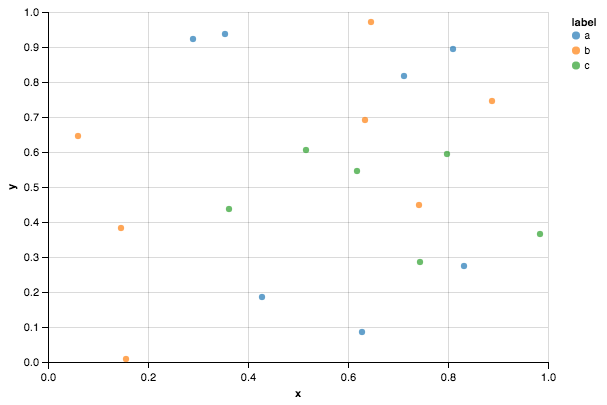
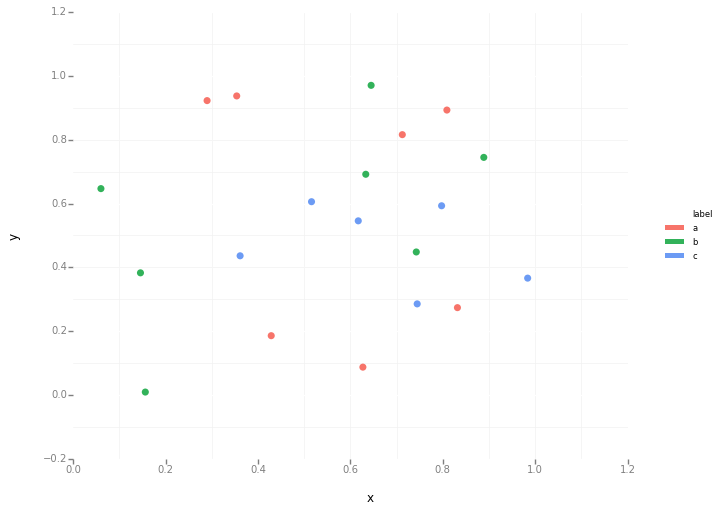
You can also try Altair or ggpot which are focused on declarative visualisations.
import numpy as np
import pandas as pd
np.random.seed(1974)

# Generate Data
num = 20
x, y = np.random.random((2, num))
labels = np.random.choice(['a', 'b', 'c'], num)
df = pd.DataFrame(dict(x=x, y=y, label=labels))
Altair code
from altair import Chart
c = Chart(df)
c.mark_circle().encode(x='x', y='y', color='label')
ggplot code
from ggplot import *
ggplot(aes(x='x', y='y', color='label'), data=df) +
geom_point(size=50) +
theme_bw()
Method 7
It’s rather hacky, but you could use one1 as a Float64Index to do everything in one go:
df.set_index('one').sort_index().groupby('key1')['two'].plot(style='--o', legend=True)
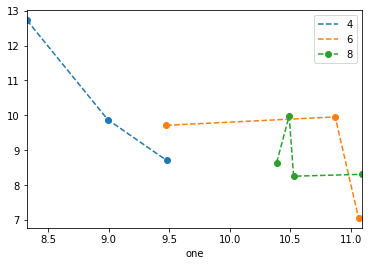
Note that as of 0.20.3, sorting the index is necessary, and the legend is a bit wonky.
Method 8
seaborn has a wrapper function scatterplot that does it more efficiently.
sns.scatterplot(data = df, x = 'one', y = 'two', data = 'key1'])
All methods was sourced from stackoverflow.com or stackexchange.com, is licensed under cc by-sa 2.5, cc by-sa 3.0 and cc by-sa 4.0