I am trying to scrape data which is generated dynamically from mouseover events.
I want to capture the information from the Hash Rate Distribution chart from
https://slushpool.com/stats/?c=btc which is generated when you scroll over each circle.
The code below gets the html data from the website, and returns the table which is filled once the mouse passes over a circle. However, I have not been able to figure out how to trigger the mouseover event for each circle to fill the table.
from lxml import etree
from xml.etree import ElementTree
from selenium import webdriver

driver_path = "#Firefox web driver"
browser = webdriver.Firefox(executable_path=driver_path)
browser.get("https://slushpool.com/stats/?c=btc")


page = browser.page_source #Get page html
tree = etree.HTML(page) #create etree

table_Xpath = '/html/body/div[1]/div/div/div/div/div[5]/div[1]/div/div/div[2]/div[2]/div[2]/div/table'

table =tree.xpath(table_Xpath) #get table using Xpath

print(ElementTree.tostring(table[0])) #Returns empty table.
#Should return data from each mouseover event
Is there a way to trigger the mouseover event for each circle, then extract the generated data.
Thank you in advance for the help!
Answers:
Thank you for visiting the Q&A section on Magenaut. Please note that all the answers may not help you solve the issue immediately. So please treat them as advisements. If you found the post helpful (or not), leave a comment & I’ll get back to you as soon as possible.
Method 1
To trigger the mouseover event for each circle you have to induce WebDriverWait for the visibility_of_all_elements_located() and you can use the following Locator Strategies:
-
Code Block:
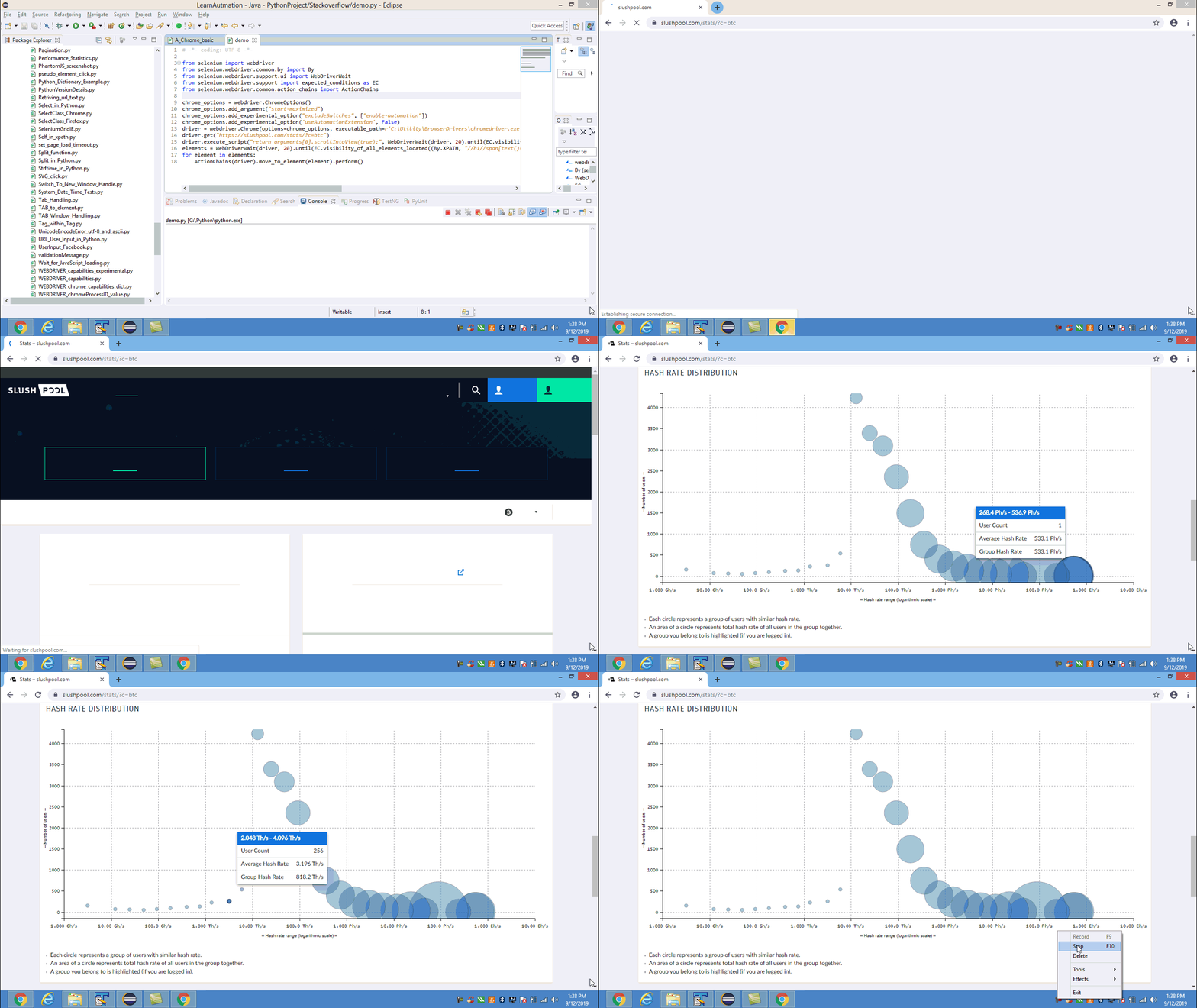
from selenium import webdriver from selenium.webdriver.common.by import By from selenium.webdriver.support.ui import WebDriverWait from selenium.webdriver.support import expected_conditions as EC from selenium.webdriver.common.action_chains import ActionChains chrome_options = webdriver.ChromeOptions() chrome_options.add_argument("start-maximized") chrome_options.add_experimental_option("excludeSwitches", ["enable-automation"]) chrome_options.add_experimental_option('useAutomationExtension', False) driver = webdriver.Chrome(options=chrome_options, executable_path=r'C:UtilityBrowserDriverschromedriver.exe') driver.get("https://slushpool.com/stats/?c=btc") driver.execute_script("return arguments[0].scrollIntoView(true);", WebDriverWait(driver, 20).until(EC.visibility_of_element_located((By.XPATH, "//h1//span[text()='Distribution']")))) elements = WebDriverWait(driver, 20).until(EC.visibility_of_all_elements_located((By.XPATH, "//h1//span[text()='Distribution']//following::div[1]/*[name()='svg']//*[name()='g']//*[name()='g' and @class='paper']//*[name()='circle']"))) for element in elements: ActionChains(driver).move_to_element(element).perform() - Browser Snapshot:
Method 2
This is the circle locator you mean:
.find_element_by_css_selector('._1p0PmxVw._3GzjmWLG')
But it will change because mouseover effect, to be:
.find_element_by_css_selector('._1p0PmxVw._3GzjmWLG._1suU9Mx1')

So you need wait until the element to changed for each move.
And the most important is how to inspect a hover element, then you can get the bellow:
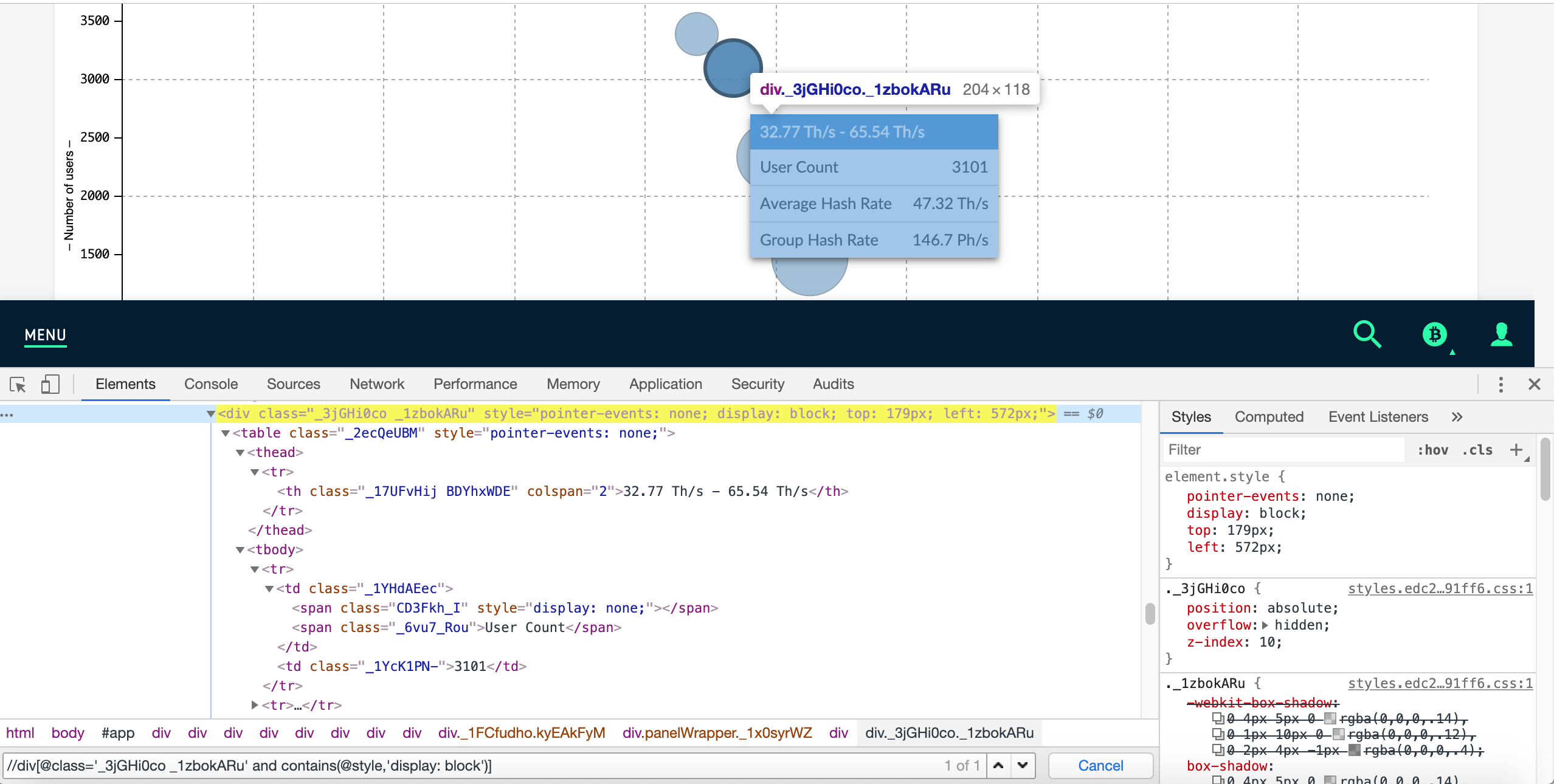
And causes the element for get data you mean to be appear:
xpath: //div[@class="_3jGHi0co _1zbokARu" and contains(@style,"display: block")]
You can use ActionChains to perform move the element.
Finally you can try the bellow code:
browser.get('https://slushpool.com/stats/?c=btc')
browser.maximize_window()

#wait all circle
elements = WebDriverWait(browser, 20).until(EC.visibility_of_all_elements_located((By.CSS_SELECTOR, '._1p0PmxVw._3GzjmWLG')))
table = browser.find_element_by_class_name('paper')

#move perform -> to table
browser.execute_script("arguments[0].scrollIntoView(true);", table)

data = []
for circle in elements:
    #move perform -> to each circle
    ActionChains(browser).move_to_element(circle).perform()
    # wait change mouseover effect
    mouseover = WebDriverWait(browser, 5).until(EC.visibility_of_element_located((By.XPATH, '//div[@class="_3jGHi0co _1zbokARu" and contains(@style,"display: block")]')))
    data.append(mouseover.text)

print(data[0])
print(data)
Following import:
from selenium.webdriver.common.by import By
from selenium.webdriver.support.ui import WebDriverWait
from selenium.webdriver.support import expected_conditions as EC
from selenium.webdriver import ActionChains
Console output:
- First data >
data[0]536.9 Ph/s – 1.074 Eh/s
User Count 2
Average Hash Rate 546.1 Ph/s
Group Hash Rate 1.092 Eh/s
- All data >
data
[u'536.9 Ph/s - 1.074 Eh/snUser Count 2nAverage Hash Rate 546.9 Ph/snGroup Hash Rate 1.094 Eh/s', u'67.11 Ph/s - 134.2 Ph/snUser Count 14nAverage Hash Rate 91.27 Ph/snGroup Hash Rate 1.278 Eh/s', u'67.11 Ph/s - 134.2 Ph/snUser Count 14nAverage Hash Rate 91.27 Ph/snGroup Hash Rate 1.278 Eh/s', u'16.78 Ph/s - 33.55 Ph/snUser Count 23nAverage Hash Rate 23.36 Ph/snGroup Hash Rate 537.2 Ph/s', u'8.389 Ph/s - 16.78 Ph/snUser Count 33nAverage Hash Rate 11.80 Ph/snGroup Hash Rate 389.4 Ph/s', u'4.194 Ph/s - 8.389 Ph/snUser Count 67nAverage Hash Rate 5.704 Ph/snGroup Hash Rate 382.2 Ph/s', u'2.097 Ph/s - 4.194 Ph/snUser Count 137nAverage Hash Rate 2.959 Ph/snGroup Hash Rate 405.3 Ph/s', u'1.049 Ph/s - 2.097 Ph/snUser Count 233nAverage Hash Rate 1.475 Ph/snGroup Hash Rate 343.7 Ph/s', u'1.049 Ph/s - 2.097 Ph/snUser Count 233nAverage Hash Rate 1.475 Ph/snGroup Hash Rate 343.7 Ph/s', u'524.3 Th/s - 1.049 Ph/snUser Count 397nAverage Hash Rate 731.4 Th/snGroup Hash Rate 290.4 Ph/s', u'262.1 Th/s - 524.3 Th/snUser Count 745nAverage Hash Rate 360.3 Th/snGroup Hash Rate 268.4 Ph/s', u'131.1 Th/s - 262.1 Th/snUser Count 1479nAverage Hash Rate 182.7 Th/snGroup Hash Rate 270.1 Ph/s', u'65.54 Th/s - 131.1 Th/snUser Count 2351nAverage Hash Rate 92.47 Th/snGroup Hash Rate 217.4 Ph/s', u'32.77 Th/s - 65.54 Th/snUser Count 3107nAverage Hash Rate 47.23 Th/snGroup Hash Rate 146.8 Ph/s', u'16.38 Th/s - 32.77 Th/snUser Count 3380nAverage Hash Rate 25.24 Th/snGroup Hash Rate 85.30 Ph/s', u'8.192 Th/s - 16.38 Th/snUser Count 4276nAverage Hash Rate 13.00 Th/snGroup Hash Rate 55.57 Ph/s', u'4.096 Th/s - 8.192 Th/snUser Count 540nAverage Hash Rate 5.953 Th/snGroup Hash Rate 3.215 Ph/s', u'2.048 Th/s - 4.096 Th/snUser Count 284nAverage Hash Rate 3.193 Th/snGroup Hash Rate 906.8 Th/s', u'1.024 Th/s - 2.048 Th/snUser Count 226nAverage Hash Rate 1.368 Th/snGroup Hash Rate 309.1 Th/s', u'512.0 Gh/s - 1.024 Th/snUser Count 136nAverage Hash Rate 774.4 Gh/snGroup Hash Rate 105.3 Th/s', u'256.0 Gh/s - 512.0 Gh/snUser Count 116nAverage Hash Rate 401.5 Gh/snGroup Hash Rate 46.57 Th/s', u'128.0 Gh/s - 256.0 Gh/snUser Count 75nAverage Hash Rate 186.4 Gh/snGroup Hash Rate 13.98 Th/s', u'64.00 Gh/s - 128.0 Gh/snUser Count 78nAverage Hash Rate 96.39 Gh/snGroup Hash Rate 7.518 Th/s', u'32.00 Gh/s - 64.00 Gh/snUser Count 70nAverage Hash Rate 45.68 Gh/snGroup Hash Rate 3.198 Th/s', u'16.00 Gh/s - 32.00 Gh/snUser Count 48nAverage Hash Rate 23.37 Gh/snGroup Hash Rate 1.122 Th/s', u'8.000 Gh/s - 16.00 Gh/snUser Count 62nAverage Hash Rate 11.91 Gh/snGroup Hash Rate 738.5 Gh/s', u'4.000 Gh/s - 8.000 Gh/snUser Count 153nAverage Hash Rate 3.078 Gh/snGroup Hash Rate 471.0 Gh/s']
All methods was sourced from stackoverflow.com or stackexchange.com, is licensed under cc by-sa 2.5, cc by-sa 3.0 and cc by-sa 4.0