When I load the website (https://notes.goncaloperes.com) on mobile one can see the two menus/navigations that exist

However, when it loads, the two navs are merged and the second menu buttons can only be found in the burguer menu on top.

The primary nav looks fine on the burguer menu, however, it would be helpful to see the second menu as it appears before the merge (as seen in the first image). How do I do that?
Information that may help:
When checking the code in the console, I can see that the id genesis-nav-secondary and class nav-secondary genesis-responsive-menu has the style “display: none”. But if I make it visible, it still doesn’t solve the issue, as the menu items were moved to the genesis-nav-primary (as one can see in the image bellow). Note that even the class in a line that was moved, such as the one with the blue color, has “moved-item-nav-secondary”.
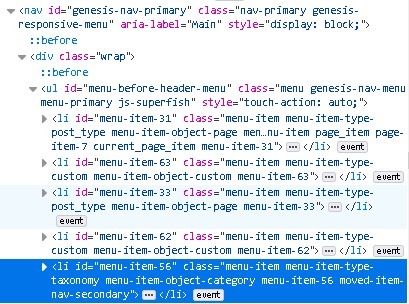
This is how the section for the second nav looks like
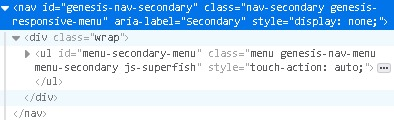
As one can see from the image, it is hidden (“style=”display: none;” and we see from the grey color).
If, in the HTML, in the browser console, one removes the style="display: none;" and adds the following in the Additional CSS
nav#genesis-nav-secondary.nav-secondary.genesis-responsive-menu{
display: inline;
}
or
nav#genesis-nav-secondary.nav-secondary.genesis-responsive-menu{
display: unset;
}
One can see that there’s a new line that appears. This seems to define the bottom line from the second nav section.

Answers:
Thank you for visiting the Q&A section on Magenaut. Please note that all the answers may not help you solve the issue immediately. So please treat them as advisements. If you found the post helpful (or not), leave a comment & I’ll get back to you as soon as possible.
Method 1
In functions.php, change the function magazine_responsive_menu_settings() to the following:
function magazine_responsive_menu_settings() {

    $settings = [
        'mainMenu'    => __( 'Menu', 'magazine-pro' ),
        'subMenu'     => __( 'Submenu', 'magazine-pro' ),
        'menuClasses' => [
            'combine' => [
                '.nav-primary',
                '.nav-header',
            ],
        ],
    ];

    return $settings;

}
Basically, in the combine, I removed '.nav-secondary',
This is how it looks like now

All methods was sourced from stackoverflow.com or stackexchange.com, is licensed under cc by-sa 2.5, cc by-sa 3.0 and cc by-sa 4.0