I have created a custom post type with custom taxonomies. Now I need help with the permalinks.
Now is like that:
- custom post type archive:
example.com/custom-post-type/ - taxonomy archive:
example.com/taxonomy/ - single custom post type:
example.com/custom-post-type/single/
It should be like that:
- custom post type archive:
example.com/custom-post-type/ - taxonomy archive
example.com/custom-post-type/taxonomy/ - single custom post type:
example.com/custom-post-type/taxonomy/single/
How can I achieve that?
Answers:
Thank you for visiting the Q&A section on Magenaut. Please note that all the answers may not help you solve the issue immediately. So please treat them as advisements. If you found the post helpful (or not), leave a comment & I’ll get back to you as soon as possible.
Method 1
Plugin Recommendation
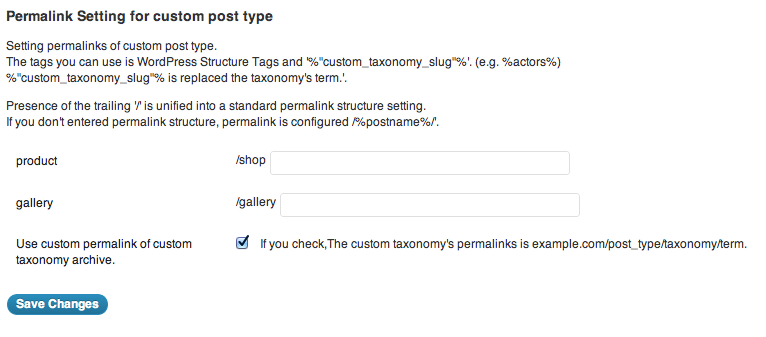
I’ve had some great experience with the plugin Custom Post Type Permalinks.
Here’s the settings panel that it provides which allows you to define your structure per custom post type.
Adding More Permalink Tags
If you want to further extend the permalink structure tags for your needs you can take a look at the add_rewrite_tag API function.
CTP Tax Archive
The CPT Permalinks plugin won’t take care of your CPT Tax archive, so you need to add the following rewrite rule to your functions.php file:
add_rewrite_rule('^(your-cpt)/(taxonomy_1|taxonomy_1|taxonomy_3)/?','index.php?post_type=$matches[1]&taxonomy=$matches[2]','top');
You will obviously need to replace your-cpt and the taxonomy names in the regex.
Testing
I highly recommend you to use the Monkeyman Rewrite Analyzer to help understand what rewrites are registered and how they match your URLs.
Hope this helps you out.
All methods was sourced from stackoverflow.com or stackexchange.com, is licensed under cc by-sa 2.5, cc by-sa 3.0 and cc by-sa 4.0