here is the code I create textbox from C# code..
for (int x = 0; x < 30; x++)
            {
                            TextBox txt = new TextBox();
                            txt.ID = "txt - " + x.ToString();
                            data.Controls.Add(txt);
                            data.Controls.Add(new LiteralControl("<br/>"));
             }
all textbox will be stick to each other.. I wonder can I add padding-top in the loop? how may I do it?
thanks for your help and your suggestion and comment is appreaciated.
This is create by using C#
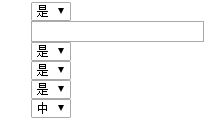
I wish want got space like this.
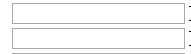
please ignore the drop down box.. its just example.
Answers:
Thank you for visiting the Q&A section on Magenaut. Please note that all the answers may not help you solve the issue immediately. So please treat them as advisements. If you found the post helpful (or not), leave a comment & I’ll get back to you as soon as possible.
Method 1
I hope you know something about CSS and stylesheets?
You can render anything you want in the backend like in your example: textboxes.
Using CSS you can add some style to it. This doesn’t needs to be done during the creation of your controls.
In your example just create a stylesheet like default.css and add it into your page using:
<link rel="stylesheet" type="text/css" href="./css/default.css" rel="nofollow noreferrer noopener" />
Then using following code you can add some padding or even better some margin to your inputs:
input[type="text"] {
    margin-bottom: 10px;
}
Another solution is using classes:
ASP.NET
for (int x = 0; x < 30; x++)
{
     TextBox txt = new TextBox();
     txt.ID = "txt - " + x.ToString();
     txt.CssClass = "form-control"; //Assign a css class to your textbox
     data.Controls.Add(txt);
     data.Controls.Add(new LiteralControl("<br/>"));
}
CSS
.form-control {
    margin-bottom: 10px;
}
All methods was sourced from stackoverflow.com or stackexchange.com, is licensed under cc by-sa 2.5, cc by-sa 3.0 and cc by-sa 4.0