This question contains its own answer at the bottom. Use preallocated arrays.
Following-up from this question years ago, is there a canonical “shift” function in numpy? I don’t see anything from the documentation.
Here’s a simple version of what I’m looking for:
def shift(xs, n):
    if n >= 0:
        return np.r_[np.full(n, np.nan), xs[:-n]]
    else:
        return np.r_[xs[-n:], np.full(-n, np.nan)]
Using this is like:
In [76]: xs
Out[76]: array([ 0.,  1.,  2.,  3.,  4.,  5.,  6.,  7.,  8.,  9.])

In [77]: shift(xs, 3)
Out[77]: array([ nan,  nan,  nan,   0.,   1.,   2.,   3.,   4.,   5.,   6.])

In [78]: shift(xs, -3)
Out[78]: array([  3.,   4.,   5.,   6.,   7.,   8.,   9.,  nan,  nan,  nan])
This question came from my attempt to write a fast rolling_product yesterday. I needed a way to “shift” a cumulative product and all I could think of was to replicate the logic in np.roll().
So np.concatenate() is much faster than np.r_[]. This version of the function performs a lot better:
def shift(xs, n):
    if n >= 0:
        return np.concatenate((np.full(n, np.nan), xs[:-n]))
    else:
        return np.concatenate((xs[-n:], np.full(-n, np.nan)))
An even faster version simply pre-allocates the array:
def shift(xs, n):
    e = np.empty_like(xs)
    if n >= 0:
        e[:n] = np.nan
        e[n:] = xs[:-n]
    else:
        e[n:] = np.nan
        e[:n] = xs[-n:]
    return e
The above proposal is the answer. Use preallocated arrays.
Answers:
Thank you for visiting the Q&A section on Magenaut. Please note that all the answers may not help you solve the issue immediately. So please treat them as advisements. If you found the post helpful (or not), leave a comment & I’ll get back to you as soon as possible.
Method 1
Not numpy but scipy provides exactly the shift functionality you want,
import numpy as np
from scipy.ndimage.interpolation import shift

xs = np.array([ 0.,  1.,  2.,  3.,  4.,  5.,  6.,  7.,  8.,  9.])

shift(xs, 3, cval=np.NaN)
where default is to bring in a constant value from outside the array with value cval, set here to nan. This gives the desired output,
array([ nan, nan, nan, 0., 1., 2., 3., 4., 5., 6.])
and the negative shift works similarly,
shift(xs, -3, cval=np.NaN)
Provides output
array([ 3., 4., 5., 6., 7., 8., 9., nan, nan, nan])
Method 2
For those who want to just copy and paste the fastest implementation of shift, there is a benchmark and conclusion(see the end). In addition, I introduce fill_value parameter and fix some bugs.
Benchmark
import numpy as np
import timeit

# enhanced from IronManMark20 version
def shift1(arr, num, fill_value=np.nan):
    arr = np.roll(arr,num)
    if num < 0:
        arr[num:] = fill_value
    elif num > 0:
        arr[:num] = fill_value
    return arr

# use np.roll and np.put by IronManMark20
def shift2(arr,num):
    arr=np.roll(arr,num)
    if num<0:
         np.put(arr,range(len(arr)+num,len(arr)),np.nan)
    elif num > 0:
         np.put(arr,range(num),np.nan)
    return arr

# use np.pad and slice by me.
def shift3(arr, num, fill_value=np.nan):
    l = len(arr)
    if num < 0:
        arr = np.pad(arr, (0, abs(num)), mode='constant', constant_values=(fill_value,))[:-num]
    elif num > 0:
        arr = np.pad(arr, (num, 0), mode='constant', constant_values=(fill_value,))[:-num]

    return arr

# use np.concatenate and np.full by chrisaycock
def shift4(arr, num, fill_value=np.nan):
    if num >= 0:
        return np.concatenate((np.full(num, fill_value), arr[:-num]))
    else:
        return np.concatenate((arr[-num:], np.full(-num, fill_value)))

# preallocate empty array and assign slice by chrisaycock
def shift5(arr, num, fill_value=np.nan):
    result = np.empty_like(arr)
    if num > 0:
        result[:num] = fill_value
        result[num:] = arr[:-num]
    elif num < 0:
        result[num:] = fill_value
        result[:num] = arr[-num:]
    else:
        result[:] = arr
    return result

arr = np.arange(2000).astype(float)

def benchmark_shift1():
    shift1(arr, 3)

def benchmark_shift2():
    shift2(arr, 3)

def benchmark_shift3():
    shift3(arr, 3)

def benchmark_shift4():
    shift4(arr, 3)

def benchmark_shift5():
    shift5(arr, 3)

benchmark_set = ['benchmark_shift1', 'benchmark_shift2', 'benchmark_shift3', 'benchmark_shift4', 'benchmark_shift5']

for x in benchmark_set:
    number = 10000
    t = timeit.timeit('%s()' % x, 'from __main__ import %s' % x, number=number)
    print '%s time: %f' % (x, t)
benchmark result:
benchmark_shift1 time: 0.265238
benchmark_shift2 time: 0.285175
benchmark_shift3 time: 0.473890
benchmark_shift4 time: 0.099049
benchmark_shift5 time: 0.052836
Conclusion
shift5 is winner! It’s OP’s third solution.
Method 3
Benchmarks & introducing Numba
1. Summary
- The accepted answer (
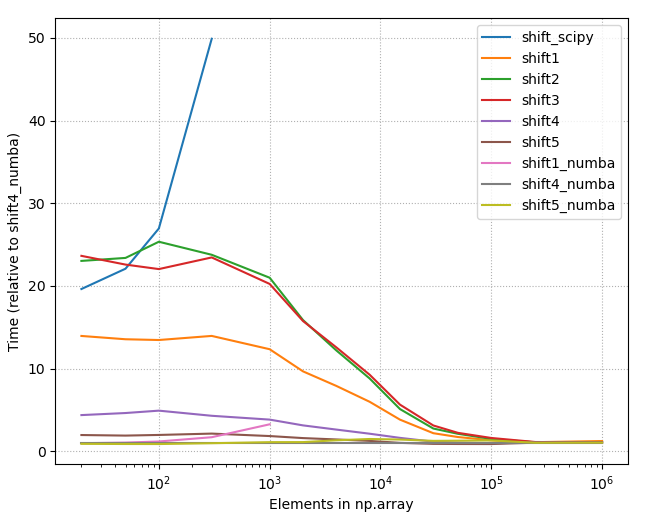
scipy.ndimage.interpolation.shift) is the slowest solution listed in this page. - Numba (@numba.njit) gives some performance boost when array size smaller than ~25.000
- “Any method” equally good when array size large (>250.000).
- The fastest option really depends on
(1) Length of your arrays
(2) Amount of shift you need to do. - Below is the picture of the timings of all different methods listed on this page (2020-07-11), using constant shift = 10. As one can see, with small array sizes some methods are use more than +2000% time than the best method.
2. Detailed benchmarks with the best options
- Choose
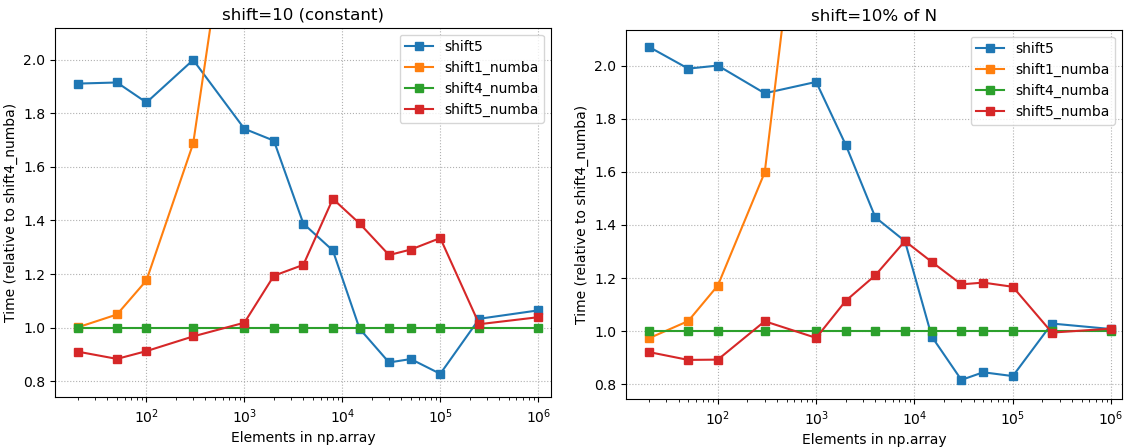
shift4_numba(defined below) if you want good all-arounder
3. Code
3.1 shift4_numba
- Good all-arounder; max 20% wrt. to the best method with any array size
- Best method with medium array sizes: ~ 500 < N < 20.000.
- Caveat: Numba jit (just in time compiler) will give performance boost only if you are calling the decorated function more than once. The first call takes usually 3-4 times longer than the subsequent calls. You can get even more performance boost with ahead of time compiled numba.
import numba

@numba.njit
def shift4_numba(arr, num, fill_value=np.nan):
    if num >= 0:
        return np.concatenate((np.full(num, fill_value), arr[:-num]))
    else:
        return np.concatenate((arr[-num:], np.full(-num, fill_value)))
3.2. shift5_numba
- Best option with small (N <= 300.. 1500) array sizes. Treshold depends on needed amount of shift.
- Good performance on any array size; max + 50% compared to the fastest solution.
- Caveat: Numba jit (just in time compiler) will give performance boost only if you are calling the decorated function more than once. The first call takes usually 3-4 times longer than the subsequent calls. You can get even more performance boost with ahead of time compiled numba.
import numba

@numba.njit
def shift5_numba(arr, num, fill_value=np.nan):
    result = np.empty_like(arr)
    if num > 0:
        result[:num] = fill_value
        result[num:] = arr[:-num]
    elif num < 0:
        result[num:] = fill_value
        result[:num] = arr[-num:]
    else:
        result[:] = arr
    return result
3.3. shift5
- Best method with array sizes ~ 20.000 < N < 250.000
- Same as
shift5_numba, just remove the @numba.njit decorator.
4 Appendix
4.1 Details about used methods
shift_scipy:scipy.ndimage.interpolation.shift(scipy 1.4.1) – The option from accepted answer, which is clearly the slowest alternative.shift1:np.rollandout[:num] xnp.nanby IronManMark20 & gzcshift2:np.rollandnp.putby IronManMark20shift3:np.padandsliceby gzcshift4:np.concatenateandnp.fullby chrisaycockshift5: using two timesresult[slice] = xby chrisaycockshift#_numba: @numba.njit decorated versions of the previous.
The shift2 and shift3 contained functions that were not supported by the current numba (0.50.1).
4.2 Other test results
4.2.1 Relative timings, all methods
4.2.2 Raw timings, all methods
4.2.3 Raw timings, few best methods
- Raw timings with small arrays, constant shift (10), few best methods
- Raw timings with small arrays, 10% shift, few best methods
- Raw timings with large arrays, constant shift (10), few best methods
- Raw timings with large arrays, 10% shift, few best methods
Method 4
There is no single function that does what you want. Your definition of shift is slightly different than what most people are doing. The ways to shift an array are more commonly looped:
>>>xs=np.array([1,2,3,4,5])
>>>shift(xs,3)
array([3,4,5,1,2])
However, you can do what you want with two functions.
Consider a=np.array([ 0., 1., 2., 3., 4., 5., 6., 7., 8., 9.]):
def shift2(arr,num):
    arr=np.roll(arr,num)
    if num<0:
         np.put(arr,range(len(arr)+num,len(arr)),np.nan)
    elif num > 0:
         np.put(arr,range(num),np.nan)
    return arr
>>>shift2(a,3)
[ nan  nan  nan   0.   1.   2.   3.   4.   5.   6.]
>>>shift2(a,-3)
[  3.   4.   5.   6.   7.   8.   9.  nan  nan  nan]
After running cProfile on your given function and the above code you provided, I found that the code you provided makes 42 function calls while shift2 made 14 calls when arr is positive and 16 when it is negative. I will be experimenting with timing to see how each performs with real data.
Method 5
You can convert ndarray to Series or DataFrame with pandas first, then you can use shift method as you want.
Example:
In [1]: from pandas import Series

In [2]: data = np.arange(10)

In [3]: data
Out[3]: array([0, 1, 2, 3, 4, 5, 6, 7, 8, 9])

In [4]: data = Series(data)

In [5]: data
Out[5]:
0    0
1    1
2    2
3    3
4    4
5    5
6    6
7    7
8    8
9    9
dtype: int64

In [6]: data = data.shift(3)

In [7]: data
Out[7]:
0    NaN
1    NaN
2    NaN
3    0.0
4    1.0
5    2.0
6    3.0
7    4.0
8    5.0
9    6.0
dtype: float64

In [8]: data = data.values

In [9]: data
Out[9]: array([ nan,  nan,  nan,   0.,   1.,   2.,   3.,   4.,   5.,   6.])
Method 6
You can also do this with Pandas:
Using a 2356-long array:
import numpy as np

xs = np.array([...])
Using scipy:
from scipy.ndimage.interpolation import shift

%timeit shift(xs, 1, cval=np.nan)
# 956 µs ± 77.9 µs per loop (mean ± std. dev. of 7 runs, 1000 loops each)
Using Pandas:
import pandas as pd

%timeit pd.Series(xs).shift(1).values
# 377 µs ± 9.42 µs per loop (mean ± std. dev. of 7 runs, 1000 loops each)
In this example, using Pandas was about ~8 times faster than Scipy
Method 7
If you want a one-liner from numpy and aren’t too concerned about performance, try:
np.sum(np.diag(the_array,1),0)[:-1]
Explanation: np.diag(the_array,1) creates a matrix with your array one-off the diagonal, np.sum(...,0) sums the matrix column-wise, and ...[:-1] takes the elements that would correspond to the size of the original array. Playing around with the 1 and :-1 as parameters can give you shifts in different directions.
Method 8
A simple and effective way supporting numba and negative shift values like Pandas library. It prevents corrupting the original array in arguments, and also works with an integer array:
import numpy as np
from numba import njit

@njit
def numba_shift(arr_: np.ndarray, shift: np.int32 = 1) -> np.ndarray:
    arr = arr_.copy().astype(np.float64)
    if shift > 0:
        arr[shift:] = arr[:-shift]
        arr[:shift] = np.nan
    else:
        arr[:shift] = arr[-shift:]
        arr[shift:] = np.nan
    return arr
Example:
ar = np.array([1,2,3,4,5,6])
numba_shift(ar,-1)

    array([ 2.,  3.,  4.,  5.,  6., nan])
Timeit:
%timeit numba_shift(ar,-1)

1.02 µs ± 9.42 ns per loop (mean ± std. dev. of 7 runs, 1000000 loops each)
Note: if you dont need numba, just with numpy, then delete the line @njit and the numba import.
Method 9
Maybe np.roll is what you need
arr = np.arange(10)
shift = 2  # shift length
arr_1 = np.roll(arr, shift=shift)
arr_1[:shift] = np.nan
Method 10
My solution involves np.roll and masked arrays:
import numpy as np
import numpy.ma as ma # this is for masked array

def shift(arr, shift):
    r_arr = np.roll(arr, shift=shift)
    m_arr = ma.masked_array(r_arr,dtype=float)
    if shift > 0: m_arr[:shift] = ma.masked
    else: m_arr[shift:] = ma.masked
    return m_arr.filled(np.nan)
Basically, I just use np.roll to shift the array, then use ma.masked_array to mark the unwanted elements as invalid, and fill those invalid positions with np.nan. I set the dtype to float so that filling with np.nan wouldn’t cause any problems.
In [11]: shift(arr, 3)
Out[11]: array([nan, nan, nan,  0.,  1.,  2.,  3.,  4.,  5.,  6.])

In [12]: shift(arr, -3)
Out[12]: array([ 3.,  4.,  5.,  6.,  7.,  8.,  9., nan, nan, nan])
Method 11
Here is a generalization of the fast answer (shift5) to support arbitrary multidimensional arrays:
def shift(array, offset, constant_values=0):
  """Returns copy of array shifted by offset, with fill using constant."""
  array = np.asarray(array)
  offset = np.atleast_1d(offset)
  assert len(offset) == array.ndim
  new_array = np.empty_like(array)

  def slice1(o):
    return slice(o, None) if o >= 0 else slice(0, o)

  new_array[tuple(slice1(o) for o in offset)] = (
      array[tuple(slice1(-o) for o in offset)])

  for axis, o in enumerate(offset):
    new_array[(slice(None),) * axis +
              (slice(0, o) if o >= 0 else slice(o, None),)] = constant_values

  return new_array
Method 12
Here’s a solution for two dimensions that’s not using special built-in-functions from numpy and thus is compatible with numba.
def shift(array, dy, dx):
    n, m = array.shape[:2]
    e = np.zeros((n, m))
    if dy > 0 and dx > 0:
        e[dy:, dx:] = array[:-dy, :-dx]
        return e
    elif dy > 0 and dx < 0:
        e[dy:, :dx] = array[:-dy, -dx:]
        return e
    elif dy < 0 and dx > 0:
        e[:dy, dx:] = array[-dy:, :-dx]
        return e
    elif dy < 0 and dx < 0:
        e[:dy, :dx] = array[-dy:, -dx:]
        return e
    elif dy < 0 and dx == 0:
        e[:dy, :] = array[-dy:, :]
        return e
    elif dy > 0 and dx == 0:
        e[dy:, :] = array[:-dy, :]
        return e
    elif dy == 0 and dx < 0:
        e[:, :dx] = array[:, -dx:]
        return e
    elif dy == 0 and dx > 0:
        e[:, dx:] = array[:, :-dx]
        return e
Method 13
I think I have a quicker solution: why don’t just use deque ?
I added 2 benchmark to the benchmarked solution from @gzc:
def shift6(arr, num, fill_value=np.nan):
    for _ in range(num):
        darr.appendleft(fill_value)

def shift7(arr, num, fill_value=np.nan):
    darr = deque(arr)
    for _ in range(num):
        darr.appendleft(fill_value)

darr = deque(arr)

def benchmark_shift6():
    shift6(arr, 3)

def benchmark_shift7():
    shift6(arr, 3)

benchmark_set = ['benchmark_shift1', 'benchmark_shift2', 'benchmark_shift3', 'benchmark_shift4', 'benchmark_shift5', 'benchmark_shift6', 'benchmark_shift7']
And on my laptop the output is a lot of better than any other solutions proposed:
%s time: ('benchmark_shift1', 0.08232757700170623)
%s time: ('benchmark_shift2', 0.0934765400015749)
%s time: ('benchmark_shift3', 0.14349375600431813)
%s time: ('benchmark_shift4', 0.03575193700089585)
%s time: ('benchmark_shift5', 0.01389261399890529)
%s time: ('benchmark_shift6', 0.0025887360025080852)
%s time: ('benchmark_shift7', 0.0024806019937386736)
Method 14
One way to do it without spilt the code into cases
with array:
def shift(arr, dx, default_value):
    result = np.empty_like(arr)
    get_neg_or_none = lambda s: s if s < 0 else None
    get_pos_or_none = lambda s: s if s > 0 else None
    result[get_neg_or_none(dx): get_pos_or_none(dx)] = default_value
    result[get_pos_or_none(dx): get_neg_or_none(dx)] = arr[get_pos_or_none(-dx): get_neg_or_none(-dx)]
    return result
with matrix it can be done like this:
def shift(image, dx, dy, default_value):
    res = np.full_like(image, default_value)

    get_neg_or_none = lambda s: s if s < 0 else None
    get_pos_or_none = lambda s : s if s > 0 else None

    res[get_pos_or_none(-dy): get_neg_or_none(-dy), get_pos_or_none(-dx): get_neg_or_none(-dx)] =
        image[get_pos_or_none(dy): get_neg_or_none(dy), get_pos_or_none(dx): get_neg_or_none(dx)]
    return res
All methods was sourced from stackoverflow.com or stackexchange.com, is licensed under cc by-sa 2.5, cc by-sa 3.0 and cc by-sa 4.0