I have a plugin which creates a page upon activation and then removes it on deactivation. As part of the page creation, I wanted to use a shortcode in the post content, so I added a shortcode with add_shortcode() first.
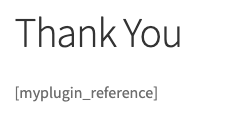
For debug purposes, I immediately test the shortcode with shortcode_exists() and print out an appropriate log statement. The logs indicate that the shortcode exists. On the page automatically created, it just shows the shortcode name [myplugin_reference]. Even if I manually create a page and insert the shortcode, I get the same result.
I even installed a simple plugin – JSM’s Show Registered Shortcodes which shows a list of registered shortcodes, and my shortcode isn’t in the list.
Here is my code:
function install_myplugin() {
    add_shortcode( 'myplugin_reference', 'myplugin_shortcode_reference' );
    if ( shortcode_exists( 'myplugin_reference' ) ) {
        error_log( 'Shortcode "myplugin_reference" added successfully' );
    } else {
        error_log( 'Shortcode "myplugin_reference" not added' );
    }

    $templates = get_page_templates();
    $post      = array(
        'post_title'   => __( 'Thank You', 'myplugin-payment-gateway' ),
        'post_content' => '[myplugin_reference]',
        'post_status'  => 'publish',
        'post_name'    => 'myplugin-thank-you',
        'post_type'    => 'page'
    );

    if ( isset( $templates['Full width'] ) ) {
        $post['page_template'] = $templates['Full width'];
    }

    $page_id = wp_insert_post( $post, true );
    add_option( 'myplugin_thankyou_page_id', $page_id );
}

function uninstall_myplugin() {
    $page_id = get_option( 'myplugin_thankyou_page_id' );
    if ( $page_id ) {
        wp_delete_post( $page_id, true );
        delete_option( 'myplugin_thankyou_page_id' );
    }
    if ( shortcode_exists( 'myplugin_reference' ) ) {
        remove_shortcode( 'myplugin_reference' );
    }
}

function myplugin_shortcode_reference() {
    wp_enqueue_script( 'jquery' );

    ob_start();
    ?>
    <span id="payment-ref"></span>
    <script type="text/javascript">
        jQuery(function($) {
            let params = {},
                paramPairs = (window.location.search).replace(/^?/, '').split("&");

            // get querystring params
            paramPairs.reduce((acc, current) => {
                const nameValue = current.split("=");
                return params[nameValue[0]] = decodeURIComponent(nameValue[1]);
            }, "");

            if (!!params.reference) {
                $('#payment-ref').html(params.reference);
            }
        });
    </script>
    <?php
    $output = ob_get_contents();
    ob_end_clean();

    return $output;
}

// Activation, Deactivation hooks
register_activation_hook( __FILE__, 'install_myplugin' );
register_deactivation_hook( __FILE__, 'uninstall_myplugin' );
And this is all that appears on the page:
Answers:
Thank you for visiting the Q&A section on Magenaut. Please note that all the answers may not help you solve the issue immediately. So please treat them as advisements. If you found the post helpful (or not), leave a comment & I’ll get back to you as soon as possible.
Method 1
You’re only registering the shortcode on activation. add_shortcode() is not persistent, and since shortcodes are parsed on output, the shortcode needs to be registered on every request. So you need to move add_shortcode() outside of the activation hook:
function install_myplugin() {
    // ...
}

function uninstall_myplugin() {
    // ...
}

function myplugin_shortcode_reference() {
    // ...
}

// Activation, Deactivation hooks
register_activation_hook( __FILE__, 'install_myplugin' );
register_deactivation_hook( __FILE__, 'uninstall_myplugin' );
add_shortcode( 'myplugin_reference', 'myplugin_shortcode_reference' );
All methods was sourced from stackoverflow.com or stackexchange.com, is licensed under cc by-sa 2.5, cc by-sa 3.0 and cc by-sa 4.0