I followed this simple tutorial and managed to create a test web application with signalR. But when I tried to recreate it using ASP.NET website and then browse for the html page, I got the following error:
TypeError: $.connection is undefined
var chat = $.connection.chatHub;
This is the structure of my project if this matters:
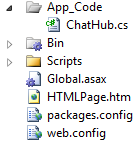
Based on what I found, setting runAllManagedModulesForAllRequests to true in web.config is necessary, so I already did it. Also the tutorial I followed is a little bit outdated since I use VS 2010(i.e. .NET Framework 4) which is only compatible with SignalR v 1.1.3.
How come I can’t get this working in a website but works perfectly in a web application?
Update:
One solution(which I believe to be right) suggests to
Put my code behind file in a seperate .cs file and put that cs file in
App_Code folder
So I tried to change my html file into a .aspx file. This way I have a code behind file (i.e. .aspx.cs) But I’m confused on what it is meant to move the code behind file because nesting my .aspx file to a .aspx.cs file residing in App_Code folder is not allowed.
What does that quoted answer above means?
Update:
Here are my script references in HTMLPage.htm together with the main function.
<!--Reference the jQuery library. -->
<script src="//ajax.googleapis.com/ajax/libs/jquery/1.10.2/jquery.min.js"></script>
<!--Reference the SignalR library. -->
<script src="/Scripts/jquery.signalR-1.1.3.js"></script>
<!--Reference the autogenerated SignalR hub script. -->
<script src="/signalr/hubs"></script>
<!--Add script to update the page and send messages.-->
<script type="text/javascript">
$(function () {
// Declare a proxy to reference the hub.
var chat = $.connection.chatHub;
// Create a function that the hub can call to broadcast messages.
chat.client.broadcastMessage = function (name, message) {
// Html encode display name and message.
var encodedName = $('<div />').text(name).html();
var encodedMsg = $('<div />').text(message).html();
// Add the message to the page.
$('#discussion').append('<li><strong>' + encodedName
+ '</strong>: ' + encodedMsg + '</li>');
};
// Get the user name and store it to prepend to messages.
$('#displayname').val(prompt('Enter your name:', ''));
// Set initial focus to message input box.
$('#message').focus();
// Start the connection.
$.connection.hub.start().done(function () {
$('#sendmessage').click(function () {
// Call the Send method on the hub.
chat.server.send($('#displayname').val(), $('#message').val());
// Clear text box and reset focus for next comment.
$('#message').val('').focus();
});
});
});
</script>
Answers:
Thank you for visiting the Q&A section on Magenaut. Please note that all the answers may not help you solve the issue immediately. So please treat them as advisements. If you found the post helpful (or not), leave a comment & I’ll get back to you as soon as possible.
Method 1
You should always check the console when something doesn’t work – in your case, the page simply can’t find the references to the SignalR script and to /signalr/hubs (and it says so in the console). If you change the urls to “/WebSite18/Scripts/jquery.signalR-1.1.3.js” and “/Website18/signalr/hubs”, it will work.
All methods was sourced from stackoverflow.com or stackexchange.com, is licensed under cc by-sa 2.5, cc by-sa 3.0 and cc by-sa 4.0