Python noob, as in this is my first project, so excuse my unfamiliarity.
The site was working very well until I clicked “log out” on my app. After that, the website would give me this error:
DoesNotExist at /login/
Site matching query does not exist.
I searched everywhere and the only solution I get relates to setting up the site framework, SITE_ID, etc. I think those items on my computer are fine, but I can’t find a walkthrough/guide to help me check on them.
Can anyone tell me what the problem is and how to fix it? Thanks in advance :3
 DATABASES = {
    'default': {
        'ENGINE': 'django.db.backends.sqlite3', # Add 'postgresql_psycopg2', 'postgresql', 'mysql', 'sqlite3' or 'oracle'.
        'NAME': '/home/dotcloud/nhs.db',                      # Or path to database file if using sqlite3.
        'USER': '',                      # Not used with sqlite3.
        'PASSWORD': '',                  # Not used with sqlite3.
        'HOST': '',                      # Set to empty string for localhost. Not used with sqlite3.
        'PORT': '',                      # Set to empty string for default. Not used with sqlite3.
    }
}
Answers:
Thank you for visiting the Q&A section on Magenaut. Please note that all the answers may not help you solve the issue immediately. So please treat them as advisements. If you found the post helpful (or not), leave a comment & I’ll get back to you as soon as possible.
Method 1
If you don’t have a site defined in your database and django wants to reference it, you will need to create one.
From a python manage.py shell :
from django.contrib.sites.models import Site
new_site = Site.objects.create(domain='foo.com', name='foo.com')
print (new_site.id)
Now set that site ID in your settings.py to SITE_ID
Method 2
Table django_site must contain a row with the same value than id (by default equals to 1), as SITE_ID is set to (inside your settings.py).
Method 3
Add SITE_ID = 1 to settings.py in your django project.
Method 4
I fixed it without using python manage.py shell
At first I tried using the commands above using manage.py shell:
from django.contrib.sites.models import Site
new_site = Site.objects.create(domain='foo.com', name='foo.com')
print(new_site.id)
But it gave out an INTEGRITY ERROR
The short answer is add SITE_ID = 1 to your settings.py
If you want to know what your site id is, then go into the actual database, I downloaded sqliteman to see what my table had. So whatever site id you have in the table is what gets assigned to SITE_ID
This is because there is a function get_current that goes looking for SITE_ID and it doesn’t find it in your settings.py
tables
-django_site
--Columns
---id
it should have id as 1, name as example.com, domain as example.com
Method 5
I see answers to create a new site and reference id for that. But if you already have a site or somehow you deleted and created the site again from UI then the id keeps on incrementing. To solve this you can get the id as follows:
python manage.py shell
from django.contrib.sites.models import Site
print(Site.objects.get(name='example.com').id)
Get the id you get here into setting.py . Eg.
SITE_ID = 8
Basically ID in table corresponding yo tour site and in the settings.py should match.
Method 6
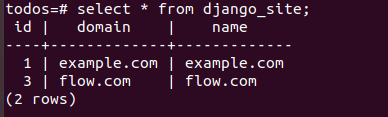
Query the ID in your database django_site tables and set the right one in your Django settings.py, for example: SITE_ID = 3
Method 7
it seems you fotgot to add
SITE_ID=1
in settings.py
All methods was sourced from stackoverflow.com or stackexchange.com, is licensed under cc by-sa 2.5, cc by-sa 3.0 and cc by-sa 4.0