I’m trying to “robustly” center the data labels in a stacked bar chart. A simple code example and the result are given below. As you can see, the data labels aren’t really centered in all rectangles. What am I missing?
import numpy as np
import matplotlib.pyplot as plt

A = [45, 17, 47]
B = [91, 70, 72]

fig = plt.figure(facecolor="white")

ax = fig.add_subplot(1, 1, 1)
bar_width = 0.5
bar_l = np.arange(1, 4)
tick_pos = [i + (bar_width / 2) for i in bar_l]

ax1 = ax.bar(bar_l, A, width=bar_width, label="A", color="green")
ax2 = ax.bar(bar_l, B, bottom=A, width=bar_width, label="B", color="blue")
ax.set_ylabel("Count", fontsize=18)
ax.set_xlabel("Class", fontsize=18)
ax.legend(loc="best")
plt.xticks(tick_pos, ["C1", "C2", "C3"], fontsize=16)
plt.yticks(fontsize=16)

for r1, r2 in zip(ax1, ax2):
    h1 = r1.get_height()
    h2 = r2.get_height()
    plt.text(r1.get_x() + r1.get_width() / 2., h1 / 2., "%d" % h1, ha="center", va="bottom", color="white", fontsize=16, fontweight="bold")
    plt.text(r2.get_x() + r2.get_width() / 2., h1 + h2 / 2., "%d" % h2, ha="center", va="bottom", color="white", fontsize=16, fontweight="bold")

plt.show()
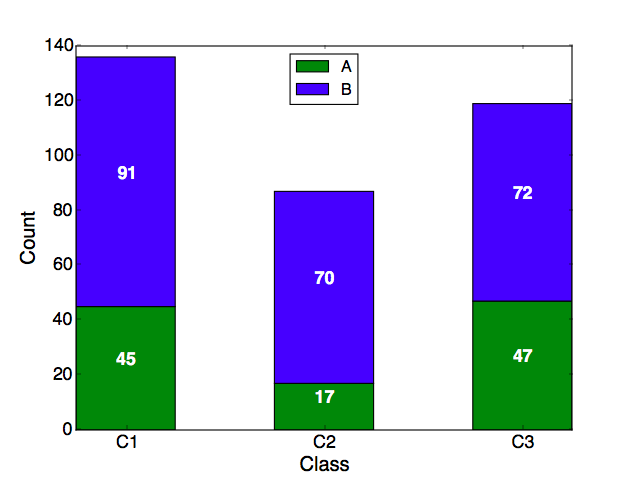
Answers:
Thank you for visiting the Q&A section on Magenaut. Please note that all the answers may not help you solve the issue immediately. So please treat them as advisements. If you found the post helpful (or not), leave a comment & I’ll get back to you as soon as possible.
Method 1
- The following method is more succinct, and easily scales.
- Putting the data into a
pandas.DataFrameis the easiest way to plot a stacked bar plot. - Using
pandas.DataFrame.plot.bar(stacked=True), orpandas.DataFrame.plot(kind='bar', stacked=True), is the easiest way to plot a stacked bar plot.- This method returns a
matplotlib.axes.Axesor anumpy.ndarrayof them.
- This method returns a
- Since
seabornis just a high-level API formatplotlib, these solutions also work withseabornplots, as shown in How to annotate a seaborn barplot with the aggregated value.
Imports & Test DataFrame
import pandas as pd
import matplotlib.pyplot as plt

A = [45, 17, 47]
B = [91, 70, 72]
C = [68, 43, 13]

# pandas dataframe
df = pd.DataFrame(data={'A': A, 'B': B, 'C': C})
df.index = ['C1', 'C2', 'C3']

     A   B   C
C1  45  91  68
C2  17  70  43
C3  47  72  13
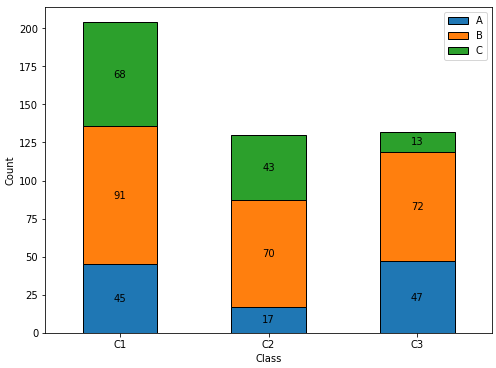
Updated for matplotlib v3.4.2
- Use
matplotlib.pyplot.bar_label- Will automatically center the values in the bar.
- See this answer for additional details about
.bar_label()
- See the matplotlib: Bar Label Demo page for additional formatting options.
- Tested with
pandas v1.2.4, which is usingmatplotlibas the plot engine. - If some sections of the bar plot will be zero, see my answer, which shows how to customize the
labelsfor.bar_label(). ax.bar_label(c, fmt='%0.0f', label_type='center')will change the number format to show no decimal places, if needed.
ax = df.plot(kind='bar', stacked=True, figsize=(8, 6), rot=0, xlabel='Class', ylabel='Count')
for c in ax.containers:

    # Optional: if the segment is small or 0, customize the labels
    labels = [v.get_height() if v.get_height() > 0 else '' for v in c]

    # remove the labels parameter if it's not needed for customized labels
    ax.bar_label(c, labels=labels, label_type='center')
Annotation Resources – from matplotlib v3.4.2
- Adding value labels on a matplotlib bar chart – Contains a list of many
.bar_labelexamples - How to annotate each segment of a stacked bar chart
- How to plot and annotate multiple data columns in a seaborn barplot
- How to annotate a seaborn barplot with the aggregated value
- stack bar plot in matplotlib and add label to each section
- How to add multiple annotations to a barplot
- How to plot and annotate a grouped bar chart
Original Answer
- Using the
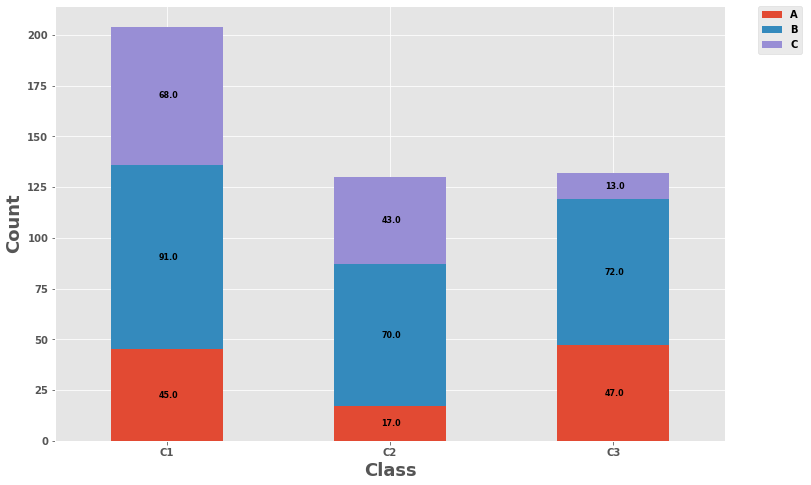
.patchesmethod unpacks a list ofmatplotlib.patches.Rectangleobjects, one for each of the sections of the stacked bar.- Each
.Rectanglehas methods for extracting the various values that define the rectangle. - Each
.Rectangleis in order from left to right, and bottom to top, so all the.Rectangleobjects, for each level, appear in order, when iterating through.patches.
- Each
- The labels are made using an f-string,
label_text = f'{height}', so any additional text can be added as needed, such aslabel_text = f'{height}%'label_text = f'{height:0.0f}'will display numbers with no decimal places.
Plot
plt.style.use('ggplot')

ax = df.plot(stacked=True, kind='bar', figsize=(12, 8), rot='horizontal')

# .patches is everything inside of the chart
for rect in ax.patches:
    # Find where everything is located
    height = rect.get_height()
    width = rect.get_width()
    x = rect.get_x()
    y = rect.get_y()

    # The height of the bar is the data value and can be used as the label
    label_text = f'{height}'  # f'{height:.2f}' to format decimal values

    # ax.text(x, y, text)
    label_x = x + width / 2
    label_y = y + height / 2

    # plot only when height is greater than specified value
    if height > 0:
        ax.text(label_x, label_y, label_text, ha='center', va='center', fontsize=8)

ax.legend(bbox_to_anchor=(1.05, 1), loc='upper left', borderaxespad=0.)
ax.set_ylabel("Count", fontsize=18)
ax.set_xlabel("Class", fontsize=18)
plt.show()
- To plot a horizontal bar:
kind='barh'label_text = f'{width}'if width > 0:
- Attribution: jsoma/chart.py
Method 2
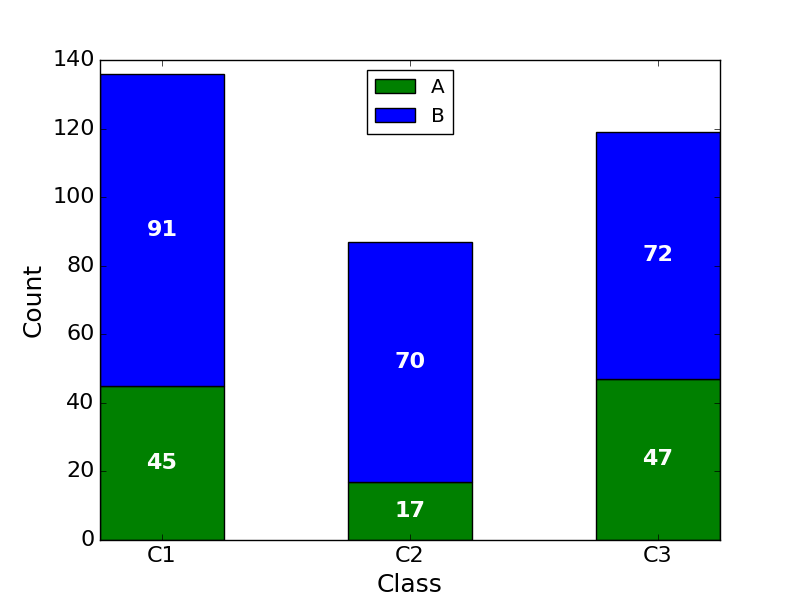
Why you wrote va="bottom"? You have to use va="center".
All methods was sourced from stackoverflow.com or stackexchange.com, is licensed under cc by-sa 2.5, cc by-sa 3.0 and cc by-sa 4.0