I’d like to store a one dimensional string array as an entry in my appSettings. I can’t simply separate elements with , or | because the elements themselves could contain those characters.
I was thinking of storing the array as JSON then deserializing it using the JavaScriptSerializer.
Is there a “right” / better way to do this?
(My JSON idea feels kinda hacky)
Answers:
Thank you for visiting the Q&A section on Magenaut. Please note that all the answers may not help you solve the issue immediately. So please treat them as advisements. If you found the post helpful (or not), leave a comment & I’ll get back to you as soon as possible.
Method 1
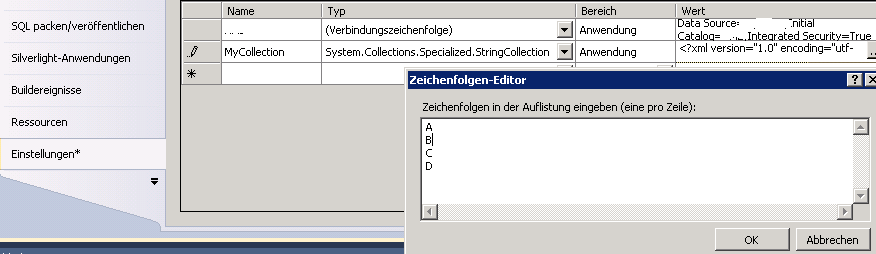
You could use the AppSettings with a System.Collections.Specialized.StringCollection.
var myStringCollection = Properties.Settings.Default.MyCollection;
foreach (String value in myStringCollection)
{
    // do something
}
Each value is separated by a new line.
Here’s a screenshot (german IDE but it might be helpful anyway)
Method 2
For strings it is easy, simply add the following to your web.config file:
<add key="myStringArray" value="fred,Jim,Alan" />
and then you can retrieve the value into an array as follows:
var myArray = ConfigurationManager.AppSettings["myStringArray"].Split(',');
Method 3
ASP.Net Core supports it binding a list of strings or objects.
For strings as mentioned, it is possible to retrieve it through AsEnumerable().
Or a list of objects via Get<List<MyObject>>(). The sample is below.
appsettings.json:
{
 ...
   "my_section": {
     "objs": [
       {
         "id": "2",
         "name": "Object 1"
       },
       {
         "id": "2",
         "name": "Object 2"
       }
     ]
   }
 ...
}
Class to represent the object
public class MyObject
{
    public string Id { get; set; }
    public string Name { get; set; }
}
Code to retrieve from appsettings.json
Configuration.GetSection("my_section:objs").Get<List<MyObject>>();
Method 4
For integers I found the following way quicker.
First of all create a appSettings key with integer values separated by commas in your app.config.
<add key="myIntArray" value="1,2,3,4" />
Then split and convert the values into int array by using LINQ
int[] myIntArray = ConfigurationManager.AppSettings["myIntArray"].Split(',').Select(n => Convert.ToInt32(n)).ToArray();
Method 5
You may also consider using custom configuration section/Collection for this purpose.
Here is a sample:
<configSections>
    <section name="configSection" type="YourApp.ConfigSection, YourApp"/>
</configSections>

<configSection xmlns="urn:YourApp">
  <stringItems>
    <item value="String Value"/>
  </stringItems>
</configSection>
You can also check on this excellent Visual Studio add-in that allows you to graphically design .NET Configuration Sections and automatically generates all the required code and a schema definition (XSD) for them.
All methods was sourced from stackoverflow.com or stackexchange.com, is licensed under cc by-sa 2.5, cc by-sa 3.0 and cc by-sa 4.0