I am unable to stream a word document that I create on the fly down to the browser. I am constantly getting a message from Microsoft Word that the document is corrupt.
When I run the code via a Console Application and take ASP.NET out of the picture, the document is generated correctly with no problems. I believe everything centers around writing the file down.
Here is my code:
using (MemoryStream mem = new MemoryStream())
{
    // Create Document
    using (WordprocessingDocument wordDocument = WordprocessingDocument.Create(mem, WordprocessingDocumentType.Document, true))
    {
        // Add a main document part.
        MainDocumentPart mainPart = wordDocument.AddMainDocumentPart();

        new Document(new Body()).Save(mainPart);

        Body body = mainPart.Document.Body;
        body.Append(new Paragraph(new Run(new Text("Hello World!"))));

        mainPart.Document.Save();
        // Stream it down to the browser

        // THIS IS PROBABLY THE CRUX OF THE MATTER <---
        Response.AppendHeader("Content-Disposition", "attachment;filename=HelloWorld.docx");
        Response.ContentType = "application/vnd.ms-word.document";
        mem.WriteTo(Response.OutputStream);
        Response.End();
    }
}
I have looked at a lot of links – but nothing quite works. I lot of people use MemoryStream.WriteTo and some use BinaryWrite – at this point I’m not sure what the correct way is. Also I’ve tried the longer content type, i.e. application/vnd.openxmlformats-officedocument.wordprocessingml.document but no luck.
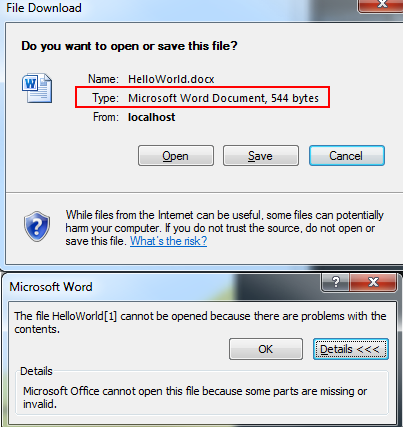
Some screenshots – even if you try to recover you get the same “parts are missing or invalid”
Solution for those who stumble on this question:
Within the using directive of the WordProcessingDocument, you must call:
wordDocument.Save();
Also to correctly stream the MemoryStream, use this in the outer using block:
Response.ContentType = "application/vnd.openxmlformats-officedocument.wordprocessingml.document";
Response.AppendHeader("Content-Disposition", "attachment;filename=HelloWorld.docx");
mem.Position = 0;
mem.CopyTo(Response.OutputStream);
Response.Flush();
Response.End();

Answers:
Thank you for visiting the Q&A section on Magenaut. Please note that all the answers may not help you solve the issue immediately. So please treat them as advisements. If you found the post helpful (or not), leave a comment & I’ll get back to you as soon as possible.
Method 1
Use CopyTo instead, there is a bug in WriteTo which makes it fail to write the entire content of the buffer when the target stream does not support writing everything in one go.
Method 2
As variant for .NET Framework 3.5 and lower. This version of framework haven’t method CopyTo in class Stream. Therefore, method WriteTo is replaced by next code:
byte[] arr = documentStream.ToArray();
fileStream.Write(arr, 0, arr.Length);
Example was found by http://blogs.msdn.com/b/mcsuksoldev/archive/2010/04/09/creating-a-new-microsoft-word-document-from-a-template-using-openxml.aspx
Method 3
I believe your ContentType value is incorrect; that is for Word 97 – 2003 format. Change it to:
application/vnd.openxmlformats-officedocument.wordprocessingml.document
and see if that fixes the problem.
Method 4
I copied and pasted your code and noticed that the :”wordDocument.close();” clausule was missing, added it and it worked (I did it in Asp.NET MVC witing an action)
Method 5
(This is using OpenXML SDK v 2.10.0 and .Net Core v2.2)
I know this has been answered but I wanted to throw out another option. It is correct that trying to send a stream back in File() like below will result in a corrupt document:
                MemoryStream updateStream = new MemoryStream();
                wordDocument.Save();
                wordDocument.Clone(updateStream);


                return File(updateStream, "application/vnd.openxmlformats-officedocument.wordprocessingml.document");
`
A super simple alternative/workaround would be to simply convert your stream to a byte[] like below and it will result in a working word docx
                MemoryStream updateStream = new MemoryStream();
                wordDocument.Save();
                wordDocument.Clone(updateStream);


                return File(updateStream.ToArray(), "application/vnd.openxmlformats-officedocument.wordprocessingml.document");
Method 6
To expand on Rodion’s answer and match the variables used in the questions this is what worked for me:
Response.ContentType = "application/vnd.openxmlformats-officedocument.wordprocessingml.document";
Response.AppendHeader("Content-Disposition", "attachment;filename=HelloWorld.docx");
mem.Position = 0;
byte[] arr = mem.ToArray();
Response.BinaryWrite(arr);
Response.Flush();
Response.End();
Method 7
First of all, always include Content-Length. If browser does not know the length of the http response body, then the connection remains opened (keep-alive). If there is no other way, save content to temp file (with delete on close option), and then get the content length.
Second, the document processing IN-MEM does not work for all options (for example, you cannot insert chunk into the document. You must use file mode).
Below is the sample for aspnet core :
[HttpPost]
public async Task<ActionResult<MopedResponse>> PostAsync(IFormCollection collection)
{

    string pathTemp = Path.GetTempFileName(); // get the temp file name

    // create or process the word file

    // reopen it for serving

    FileStream merged = new FileStream(pathTemp, FileMode.Open, FileAccess.Read, FileShare.None, 4096, FileOptions.DeleteOnClose);

    System.Net.Mime.ContentDisposition cd = new System.Net.Mime.ContentDisposition
    {
        FileName = "parafa.docx",
        Inline = true  // false = prompt the user for downloading;  true = browser to try to show the file inline
    };
    Response.Headers.Add("Content-Disposition", cd.ToString());
    Response.Headers.Add("Content-Length", merged.Length.ToString());

    return File(merged, "application/vnd.openxmlformats-officedocument.wordprocessingml.document", "mywordFile1.docx");

}
All methods was sourced from stackoverflow.com or stackexchange.com, is licensed under cc by-sa 2.5, cc by-sa 3.0 and cc by-sa 4.0