Why does Pandas tell me that I have objects, although every item in the selected column is a string — even after explicit conversion.
This is my DataFrame:
<class 'pandas.core.frame.DataFrame'>
Int64Index: 56992 entries, 0 to 56991
Data columns (total 7 columns):
id            56992  non-null values
attr1         56992  non-null values
attr2         56992  non-null values
attr3         56992  non-null values
attr4         56992  non-null values
attr5         56992  non-null values
attr6         56992  non-null values
dtypes: int64(2), object(5)
Five of them are dtype object. I explicitly convert those objects to strings:
for c in df.columns:
    if df[c].dtype == object:
        print "convert ", df[c].name, " to string"
        df[c] = df[c].astype(str)
Then, df["attr2"] still has dtype object, although type(df["attr2"].ix[0] reveals str, which is correct.
Pandas distinguishes between int64 and float64 and object. What is the logic behind it when there is no dtype str? Why is a str covered by object?
Answers:
Thank you for visiting the Q&A section on Magenaut. Please note that all the answers may not help you solve the issue immediately. So please treat them as advisements. If you found the post helpful (or not), leave a comment & I’ll get back to you as soon as possible.
Method 1
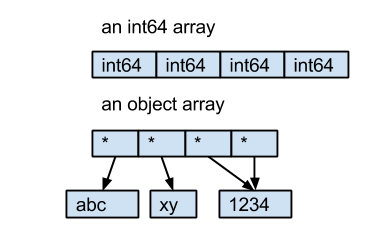
The dtype object comes from NumPy, it describes the type of element in a ndarray. Every element in an ndarray must have the same size in bytes. For int64 and float64, they are 8 bytes. But for strings, the length of the string is not fixed. So instead of saving the bytes of strings in the ndarray directly, Pandas uses an object ndarray, which saves pointers to objects; because of this the dtype of this kind ndarray is object.
Here is an example:
- the int64 array contains 4 int64 value.
- the object array contains 4 pointers to 3 string objects.
Method 2
@HYRY’s answer is great. I just want to provide a little more context..
Arrays store data as contiguous, fixed-size memory blocks. The combination of these properties together is what makes arrays lightning fast for data access. For example, consider how your computer might store an array of 32-bit integers, [3,0,1].
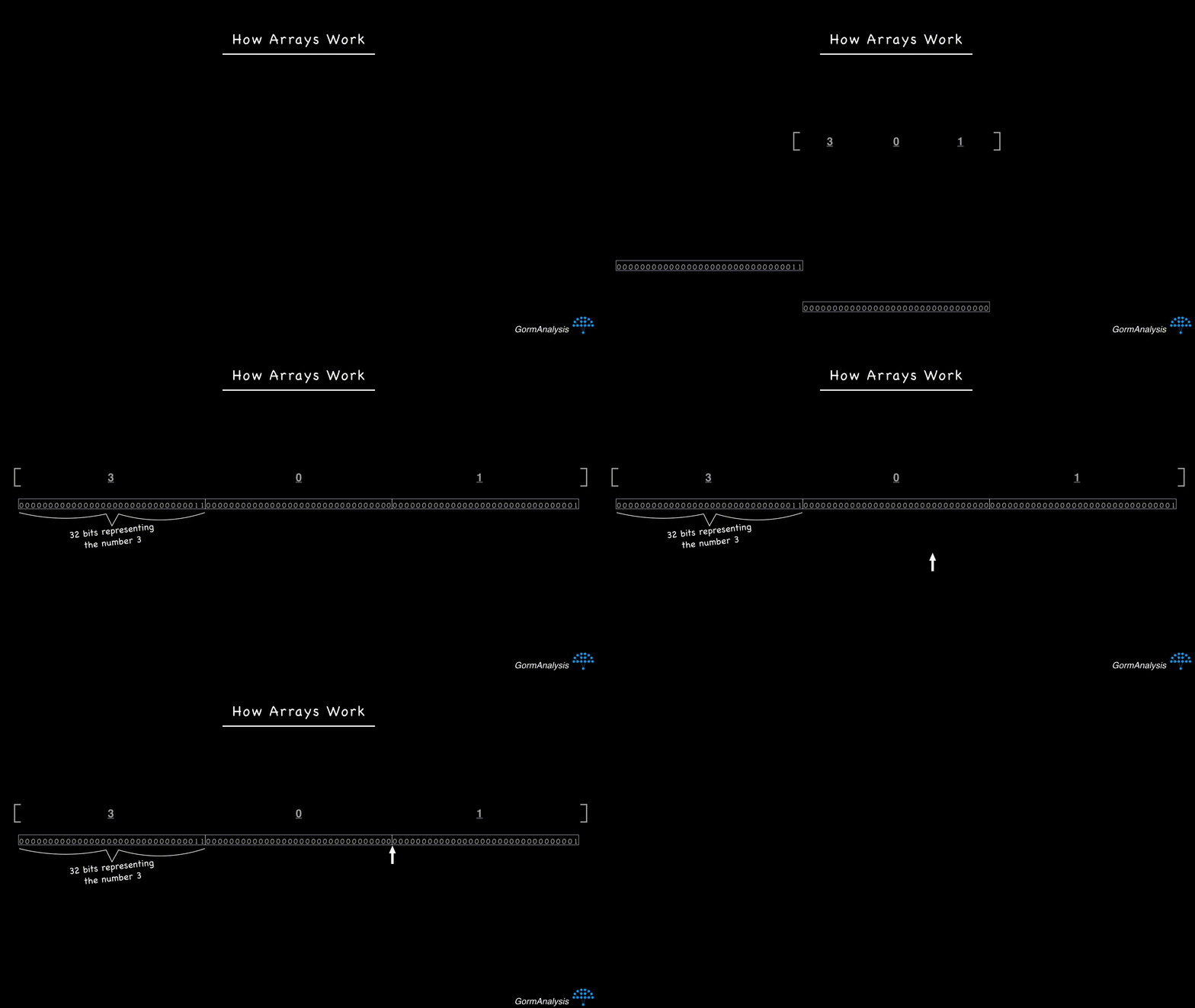
If you ask your computer to fetch the 3rd element in the array, it’ll start at the beginning and then jump across 64 bits to get to the 3rd element. Knowing exactly how many bits to jump across is what makes arrays fast.
Now consider the sequence of strings ['hello', 'i', 'am', 'a', 'banana']. Strings are objects that vary in size, so if you tried to store them in contiguous memory blocks, it’d end up looking like this.
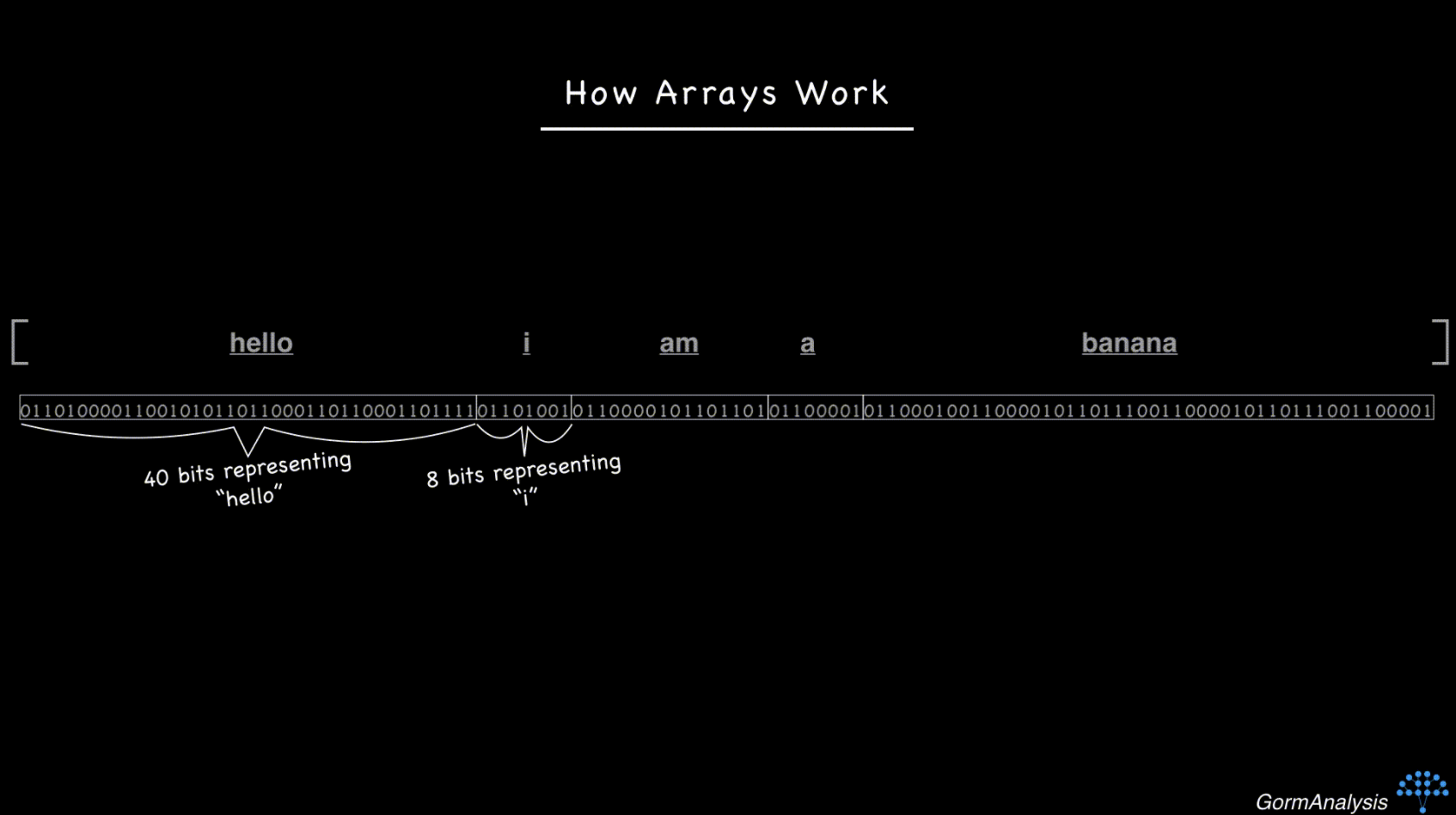
Now your computer doesn’t have a fast way to access a randomly requested element. The key to overcoming this is to use pointers. Basically, store each string in some random memory location, and fill the array with the memory address of each string. (Memory addresses are just integers.) So now, things look like this
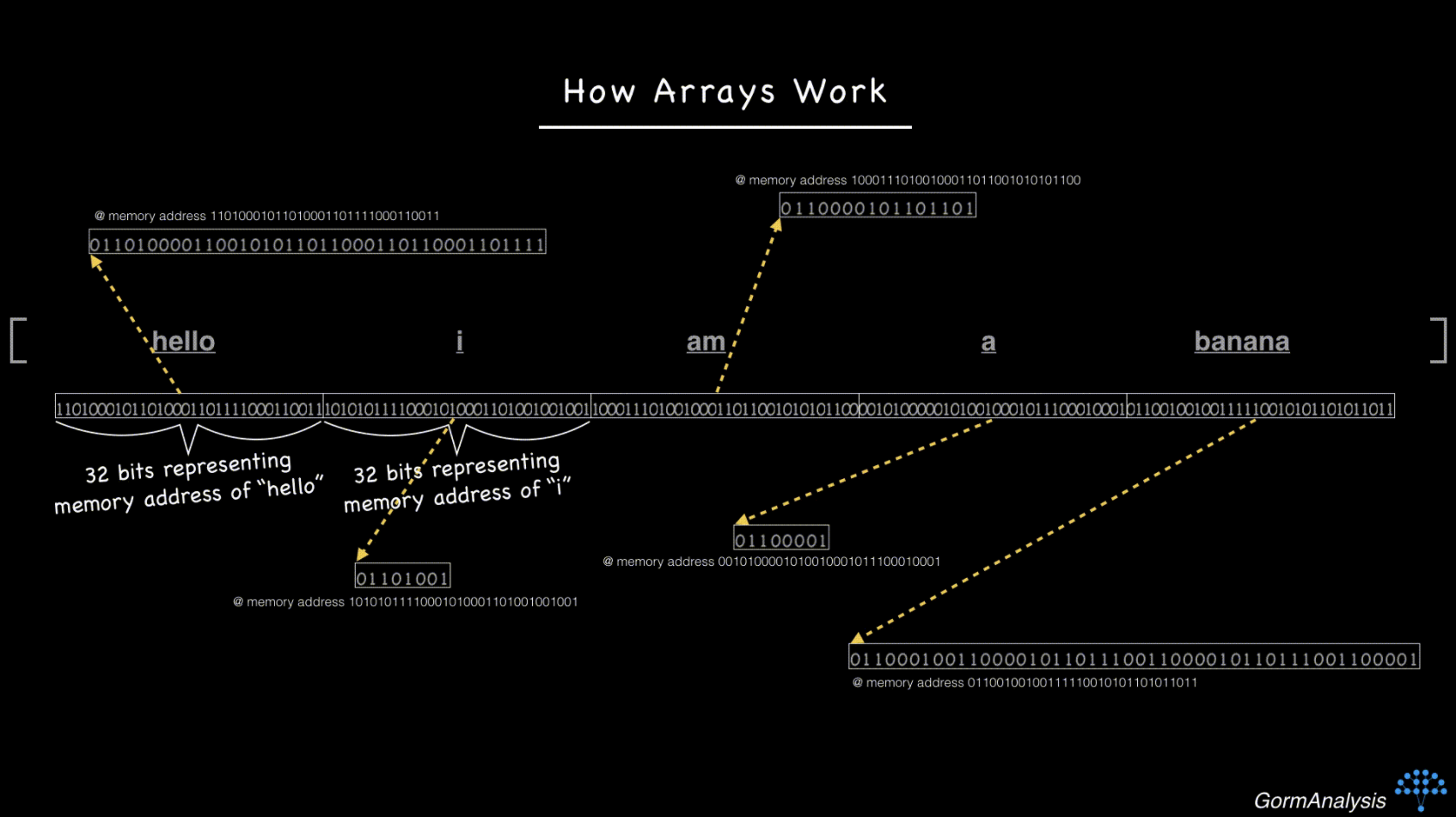
Now, if you ask your computer to fetch the 3rd element, just as before, it can jump across 64 bits (assuming the memory addresses are 32-bit integers) and then make one extra step to go fetch the string.
The challenge for NumPy is that there’s no guarantee the pointers are actually pointing to strings. That’s why it reports the dtype as ‘object’.
Shamelessly gonna plug my own course on NumPy where I originally discussed this.
Method 3
The accepted answer is good. I just wanted to reference the documentation. The documentation says:
Pandas uses the object dtype for storing strings.
The accepted answer did a great job explaining the “why”; strings are variable-length:
But for strings, the length of the string is not fixed.
But as the leading comment on the accepted answer once said : “Don’t worry about it; it’s supposed to be like this.”
Method 4
As of version 1.0.0 (January 2020), pandas has introduced as an experimental feature providing first-class support for string types through pandas.StringDtype.
While you’ll still be seeing object by default, the new type can be used by specifying a dtype of pd.StringDtype or simply 'string':
>>> pd.Series(['abc', None, 'def'])
0     abc
1    None
2     def
dtype: object
>>> pd.Series(['abc', None, 'def'], dtype=pd.StringDtype())
0     abc
1    <NA>
2     def
dtype: string
>>> pd.Series(['abc', None, 'def']).astype('string')
0     abc
1    <NA>
2     def
dtype: string
All methods was sourced from stackoverflow.com or stackexchange.com, is licensed under cc by-sa 2.5, cc by-sa 3.0 and cc by-sa 4.0