I’m trying to learn asp.net and so far I can load other page contents without refreshing using Ajax.Actionlink and AjaxOptions() but I can’t figure it out how to use ajax when submitting a form. I did a lot of googling but couldn’t find the appropriate solution. Here are my codes,
Controller page
namespace CrudMvc.Controllers
{
public class HomeController : Controller
{
    sampleDBEntities db = new sampleDBEntities();
    //
    // GET: /Home/

    public ActionResult Index()
    {
        return View(db.myTables.ToList());
    }

    public PartialViewResult Details(int id = 0)
    {
        myTable Table = db.myTables.Find(id);
        return PartialView(Table);
    }

    [HttpGet]
    public PartialViewResult Create()
    {
        return PartialView();
    }

    [HttpPost]
    public ActionResult Create(myTable table)
    {
        if (ModelState.IsValid)
        {
            db.myTables.Add(table);
            db.SaveChanges();
            return RedirectToAction("Index");
        }
        return View(table);
    }

    protected override void Dispose(bool disposing)
    {
        db.Dispose();
        base.Dispose(disposing);
    }
}
}
Index View page
@model IEnumerable<CrudMvc.Models.myTable>

@{
ViewBag.Title = "Index";
Layout = "~/Views/Shared/_Layout.cshtml";
}

<script src="~/Scripts/jquery-1.7.1.min.js"></script>
<script src="~/Scripts/jquery.unobtrusive-ajax.min.js"></script>

<h2>Index</h2>

<p>
@Ajax.ActionLink("Add New", "Create", new AjaxOptions()
   {
    HttpMethod = "GET",
    UpdateTargetId = "info",
    InsertionMode = InsertionMode.Replace
   })
</p>
<div id="main">
<table>
<tr>
    <th>
        @Html.DisplayNameFor(model => model.name)
    </th>
    <th>Action</th>
</tr>

@foreach (var item in Model) {
<tr>
    <td>
        @Html.DisplayFor(modelItem => item.name)
    </td>
    <td>
        @Ajax.ActionLink("Details", "Details", new{ id=item.id}, new AjaxOptions()
   {
    HttpMethod = "GET",
    UpdateTargetId = "info",
    InsertionMode = InsertionMode.Replace
   })
    </td>
</tr>
}
</table>
</div>
<div id="info"></div>
Create View Page
@model CrudMvc.Models.myTable

@{
ViewBag.Title = "Create";
Layout = "~/Views/Shared/_Layout.cshtml";
}

<h2>Create</h2>

@using (Html.BeginForm()) {
@Html.ValidationSummary(true)

<fieldset>
    <legend>myTable</legend>

    <div class="editor-label">
        @Html.LabelFor(model => model.id)
    </div>
    <div class="editor-field">
        @Html.EditorFor(model => model.id)
        @Html.ValidationMessageFor(model => model.id)
    </div>

    <div class="editor-label">
        @Html.LabelFor(model => model.name)
    </div>
    <div class="editor-field">
        @Html.EditorFor(model => model.name)
        @Html.ValidationMessageFor(model => model.name)
    </div>
    <p>
        <input type="submit" value="Create" />
    </p>
</fieldset>
}

<script>
var form = $('#main');
$.ajax({
    cache: false,
    async: true,
    type: "POST",
    url: form.attr('action'),
    data: form.serialize(),
    success: function (data) {
        alert(data);
    }
});
</script>

<div>
@Html.ActionLink("Back to List", "Index")
</div>

@section Scripts {
@Scripts.Render("~/bundles/jqueryval")
}
Answers:
Thank you for visiting the Q&A section on Magenaut. Please note that all the answers may not help you solve the issue immediately. So please treat them as advisements. If you found the post helpful (or not), leave a comment & I’ll get back to you as soon as possible.
Method 1
Here goes the complete example –
Lets create a simple model –
public class Details
{
    public string Name { get; set; }
    public string Email { get; set; }
}
Now lets create couple of Actions to make GET and POST requests using AJAX BEGINFORM –
    static List<Details> details = new List<Details>();
    public ActionResult GetMe()
    {
        return View();
    }

    public ActionResult SaveData(Details d)
    {
        details.Add(d);
        return Json(details.Count, JsonRequestBehavior.AllowGet);
    }
Then lets create a simple view which will host Ajax.BeginForm() –
@model RamiSamples.Controllers.Details

@{
    ViewBag.Title = "Ajax";
}

<h2>Ajax</h2>
<script src="~/Scripts/jquery-1.8.2.min.js"></script>
<script src="~/Scripts/jquery.unobtrusive-ajax.min.js"></script>

@using (Ajax.BeginForm("SaveData", new AjaxOptions()
{
    InsertionMode = InsertionMode.Replace,
    UpdateTargetId = "dane"
}))
{
    @Html.AntiForgeryToken()
    @Html.ValidationSummary(true)

    <fieldset>
        <legend>Details</legend>

        <div class="editor-label">
            @Html.LabelFor(model => model.Name)
        </div>
        <div class="editor-field">
            @Html.EditorFor(model => model.Name)
            @Html.ValidationMessageFor(model => model.Name)
        </div>

        <div class="editor-label">
            @Html.LabelFor(model => model.Email)
        </div>
        <div class="editor-field">
            @Html.EditorFor(model => model.Email)
            @Html.ValidationMessageFor(model => model.Email)
        </div>

        <p>
            <input type="submit" value="Create" />
        </p>
    </fieldset>
}

<div id="dane">
    Number of Details :
</div>
Now when the page gets rendered –
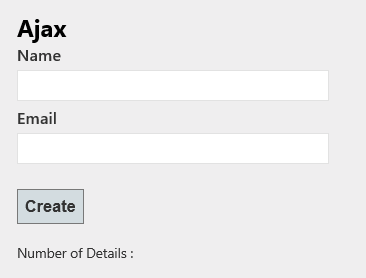
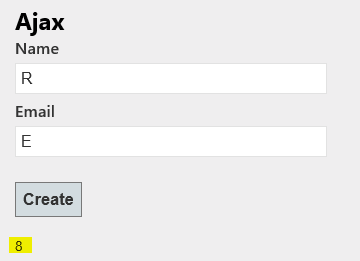
Now when you enter data and click on create button –

And then the page will automatically updated with the number of additions as shown below –
All methods was sourced from stackoverflow.com or stackexchange.com, is licensed under cc by-sa 2.5, cc by-sa 3.0 and cc by-sa 4.0