I have an ASP.NET Web API 2 project to which I have added Swagger – Swashbuckle v5.6.0. Everything works fine. Swagger UI renders test endpoints for my API as expected.
I added a new Controller to my API. There is a GET action with a complex type parameter. For complex types, Web API tries to read the value from the message body. This is the default behaviour.
Here is my GET action:
    [HttpGet]
    [Route("search")]
    [ResponseType(typeof(List<SearchModel>))]
    public IHttpActionResult Search(SearchModel searchOptions)
    {
        //....

        return Ok();
    }
And her is my complex type:
public class SearchModel
{
    public string FirstName { get; set; }
    public string LastName { get; set; }

    [DataType(DataType.EmailAddress)]
    [EmailAddress]
    public string Email { get; set; }

    public string AddressLine1 { get; set; }

    public string City { get; set; }

    public string Telephone { get; set; }

    public string MobilePhone { get; set; }
}
The problem:
But Swagger UI doesn’t render body parameter field for my complex type in the GET action. For POST and PUT actions Swagger UI renders body parameter fields as expected but not for the complex type in my GET action.
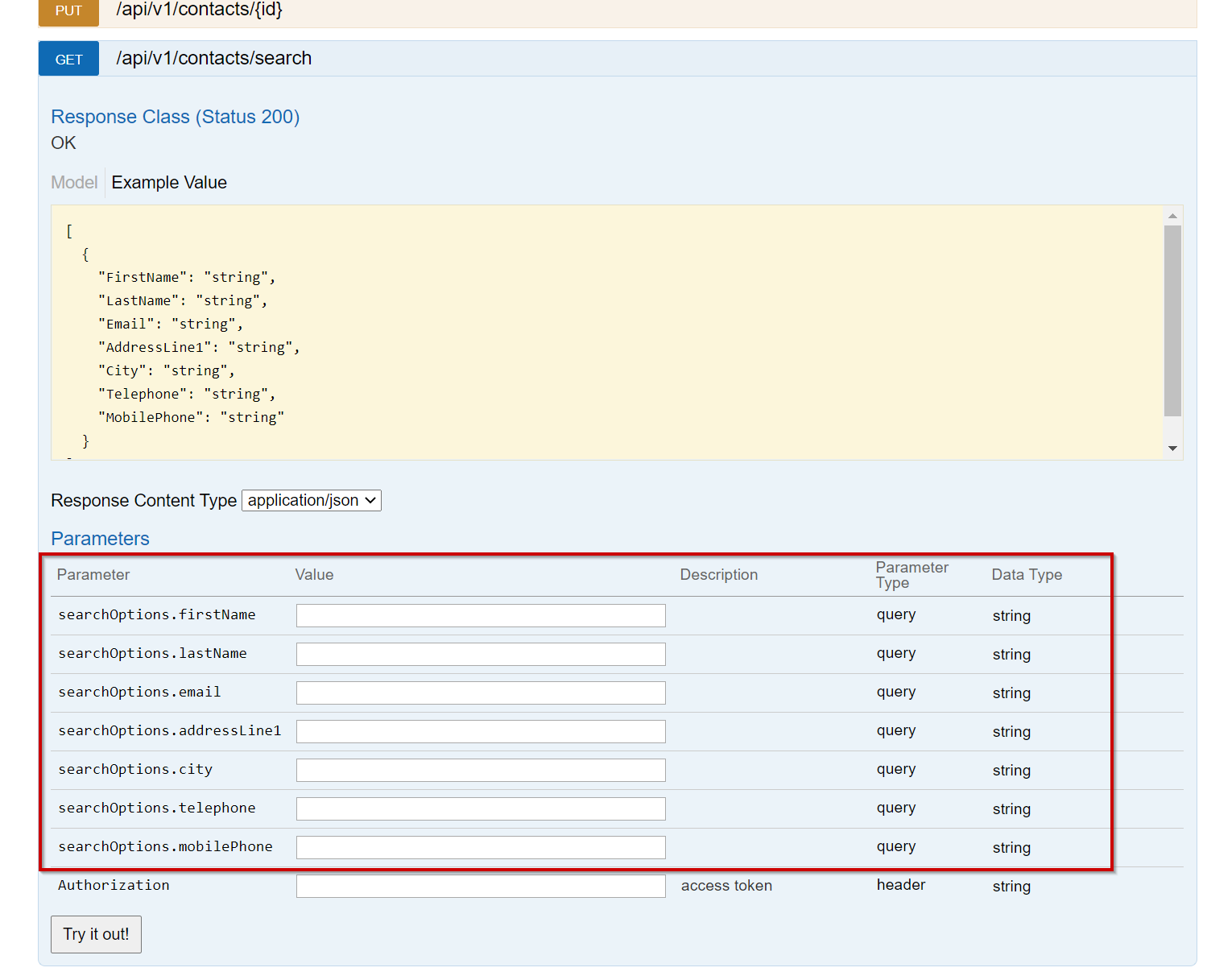
As can be seen in the screenshot Swagger UI renders query parameters fields for attributes in my complex type instead of rendering a body parameter field for my type as it does in the case of POST and PUT.
My GET action is working fine when testing from Postman and filling the json in the body of the request. By setting breakpoint in the action inside Visual Studio I can see the values are bound to my object in the action parameter.
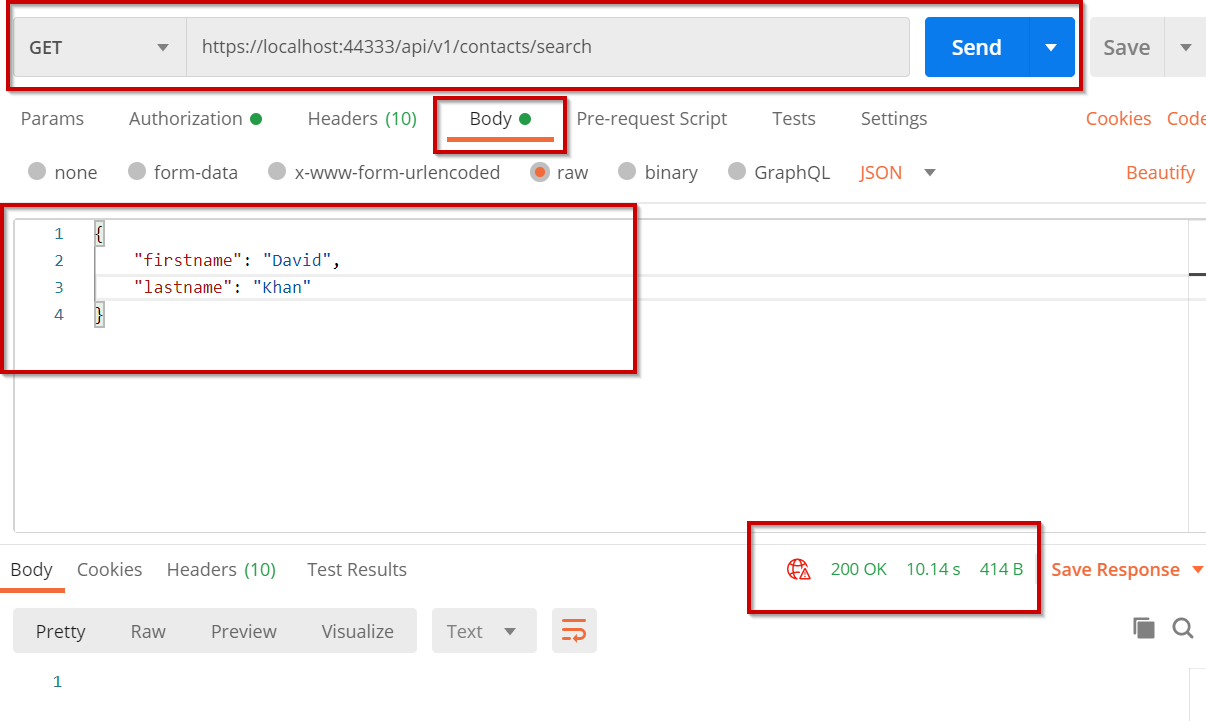
I have tried to decorate the parameter in my action with [FromBody] (which is the default for complex type) but same result.
Is this a bug in Swagger? Or am I missing something?
Answers:
Thank you for visiting the Q&A section on Magenaut. Please note that all the answers may not help you solve the issue immediately. So please treat them as advisements. If you found the post helpful (or not), leave a comment & I’ll get back to you as soon as possible.
Method 1
Sadly, you can’t do what you want with Swagger. You can’t send a request model in an HTTP GET method. You can however change the swagger UI to look like this:
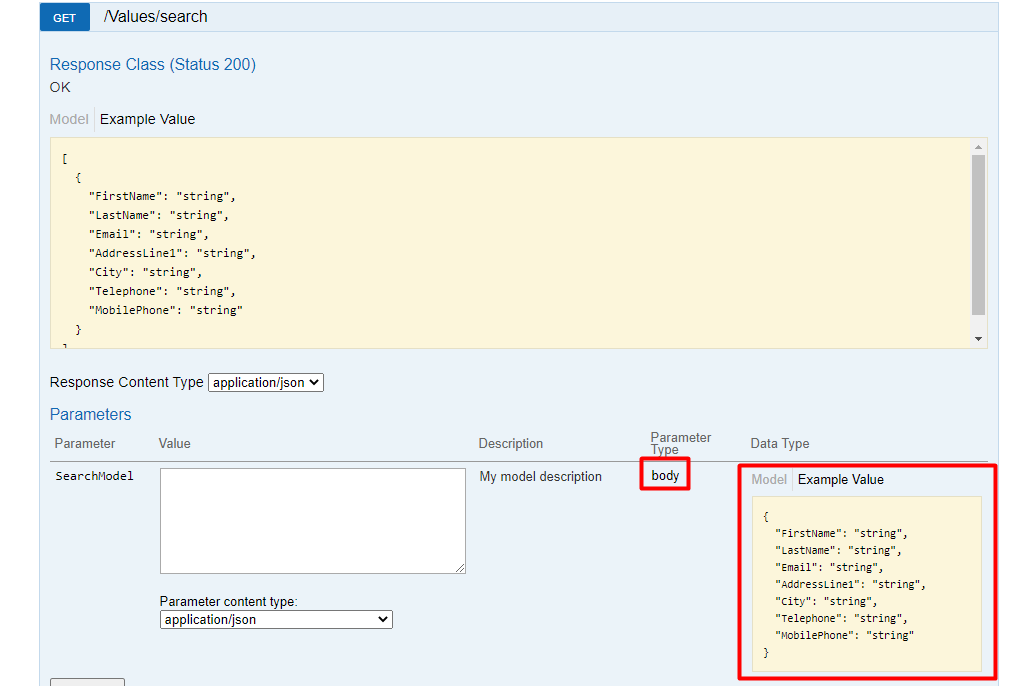
but you won’t be able to receive the model in your controller.
This is a known issue within the Swagger developers and it was discussed in 2016 and the final decision is that swagger won’t support a request body in an HTTP GET method. Here is the link to the already closed issue.
You have three options here:
- Leave the method as it is, and test it in Postman, but not in Swagger.
- Follow the below steps to achieve the picture above, but please note, that it will only fix the UI part and you will always end up with
nullSearchModelin the controller when you pressTry it out!in swagger. - Make it a
[HttpPostmethod instead of[HttpGet].
How to make swagger UI display GET method with request body:
First, create one Attribute class:
public class ModelInBodyAttribute : Attribute
{
    public ModelInBodyAttribute(string modelName, string description, bool isRequired)
    {
        this.ModelName = modelName;
        this.Description = description;
        this.IsRequired = IsRequired;
    }

    public string ModelName { get; set; }
    public bool IsRequired { get; set; }
    public string Description { get; set; }
}
Then you can decorate your method in the controller:
[ModelInBody(modelName: nameof(SearchModel), description: "My model description", isRequired: true)]
[HttpGet]
[Route("search")]
[ResponseType(typeof(List<SearchModel>))]
public IHttpActionResult Search(SearchModel searchOptions)
{
    //....

    return Ok(new List<SearchModel>());
}
After that create IOperationFilter class (ModelInBodyOperationFilter):
public class ModelInBodyOperationFilter : IOperationFilter
{
    public void Apply(Operation operation, SchemaRegistry schemaRegistry, ApiDescription apiDescription)
    {
        var attribute = apiDescription.GetControllerAndActionAttributes<ModelInBodyAttribute>().FirstOrDefault();
        if (attribute == null)
        {
            return;
        }

        operation.parameters.Clear();
        operation.parameters.Add(new Parameter
        {
            name = attribute.ModelName,
            description = attribute.Description,
            @in = "body",
            required = attribute.IsRequired,
            schema = new Schema { @ref = $"#/definitions/{attribute.ModelName}" }
        });
    }
}
Lastly, don’t forget to register the IOperationFilter in SwaggerConfig:
c.OperationFilter<ModelInBodyOperationFilter>();
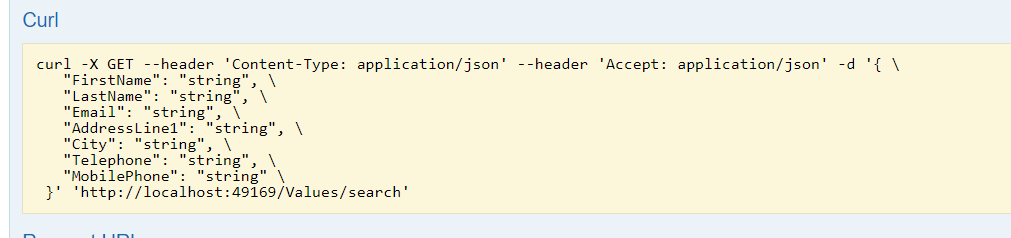
When you send the request via swagger, you will notice that the Curl part is absolutely correct, but still, in your controller there is nothing.

Method 2
There are endless discussions on whether you should have a PAYLOAD “Body content” in a GET request. As you mentioned it’s supported by HTTP but you will find in the internet that many people suggest not to do it. I guess that swagger team also expect you not to use it.
All methods was sourced from stackoverflow.com or stackexchange.com, is licensed under cc by-sa 2.5, cc by-sa 3.0 and cc by-sa 4.0