I have couple of update panels and jquery tabs on page. And also I am loading couple user controls on update panels. After user waited for couple of minutes (not checked the time approx 40 mins). when user send request from submit button it is giving below error?
'Sys.WebForms.PageRequestManagerServerErrorException:
Sys.WebForms.PageRequestManagerServerErrorException: An unknown
error occurred while processing the request on the server. The status
code returned from the server was: 0' when calling method:
[nsIDOMEventListener::handleEvent]
I am not able trace this issue to fix. But I am sure. This is causing by Ajax. Gurus, if you knows solution. Please let me know.
Answers:
Thank you for visiting the Q&A section on Magenaut. Please note that all the answers may not help you solve the issue immediately. So please treat them as advisements. If you found the post helpful (or not), leave a comment & I’ll get back to you as soon as possible.
Method 1
This issue sometimes occurs when you have a control registered as an AsyncPostbackTrigger in multiple update panels.
If that’s not the problem, try adding the following right after the script manager declaration, which I found in this post by manowar83, which copies and slightly modifies this post by larryw:
<script type="text/javascript" language="javascript">
    Sys.WebForms.PageRequestManager.getInstance().add_endRequest(EndRequestHandler);
    function EndRequestHandler(sender, args){
        if (args.get_error() != undefined){
            args.set_errorHandled(true);
        }
    }
</script>
There are a few more solutions discussed here: http://forums.asp.net/t/1066976.aspx/9/10
Method 2
I had this issue and I spent hours trying to fix it.
The solution ticked as answered will not fix the error only handle it.
The best approach is to check the IIS log files and the error should be there. It appears that the update panel encapsulates the real error and outputs it as a ‘javascript error’.
For instance my error was that I forgot to make a class [Serializable]. Although this worked fine locally it did not work when deployed on the server.
Method 3
I got this error when I had my button in the GridView in an UpdatePanel… deubbing my code I found that the above error is caused because of another internal error “A potentially dangerous Request.Form value was detected from the client”
Finally I figured out that one of my TextBoxes on the page has XML/HTML content and this in-turn causing above error
when I removed the xml/HTML and tested the button click … it worked as expected.
Method 4
Brother this piece of code is not a solution just change it to
<script type="text/javascript" language="javascript">
    Sys.WebForms.PageRequestManager.getInstance().add_endRequest(EndRequestHandler);
    function EndRequestHandler(sender, args){
        if (args.get_error() != undefined){
            **alert(args.get_error().message.substr(args.get_error().name.length + 2));**
            args.set_errorHandled(true);
        }
    }
</script>
and you will see the error is there but you are just not throwing it on UI.
Method 5
I have got the same issue, here I give my problem and my solution hoping this would help someone:
Following other people recommendation I went to the log of the server (Windows Server 2012 in my case) in :
Control Panel -> Administrative Tools -> Event Viewer
Then in the left side:
Windows Logs -> Application:
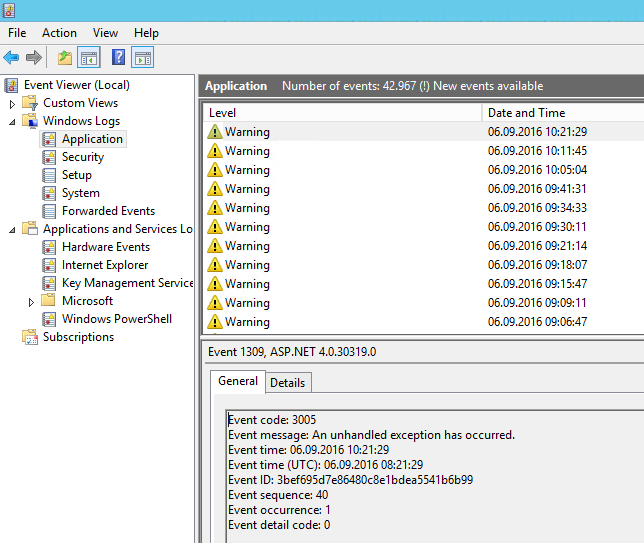
In the warnings I found the message from my site and in my case it was due to a null reference:
*Exception type: NullReferenceException
Exception message: Object reference not set to an instance of an object.*
And checking at the function described in the log I found a non initialized object and that was it.
So it could be a null reference exception in the code.
Hope someone find this useful, greetings.
Method 6
This solution is helpful too:
Add validateRequest="false" in the <%@ Page directive.
This is because ASP.net examines input from the browser for dangerous values. More info in this link
Method 7
I also faced the same issue , and none of these worked. In my case this was fixed by adding these lines in config file.
<appSettings>
  <add key="aspnet:MaxHttpCollectionKeys" value="100000" />
</appSettings>

<system.web.extensions>
  <scripting>
    <scriptResourceHandler enableCompression="false" enableCaching="true"/>
  </scripting>
</system.web.extensions>
Method 8
This is not the real problem, if you want to see why this is happening then please go to error log file of IIS.
in case of visual studio kindly navigate to:
C:UsersUserDocumentsIISExpressTraceLogFiles[your project name].
arrange file here in datewise descending and then open very first file.
it will look like:
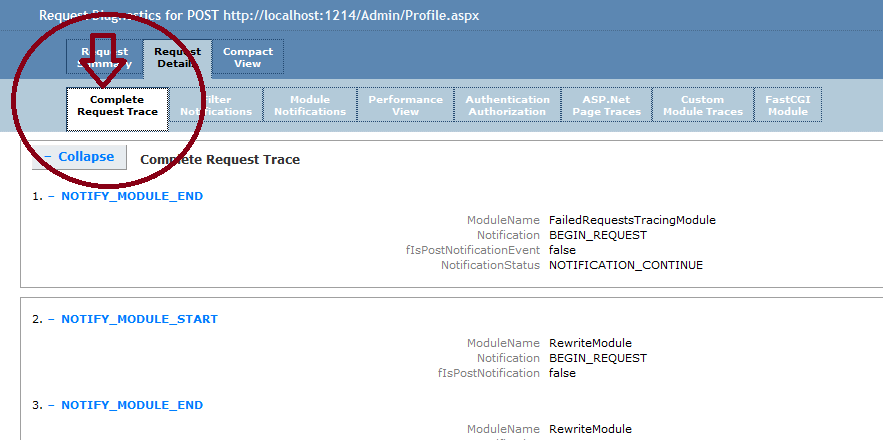
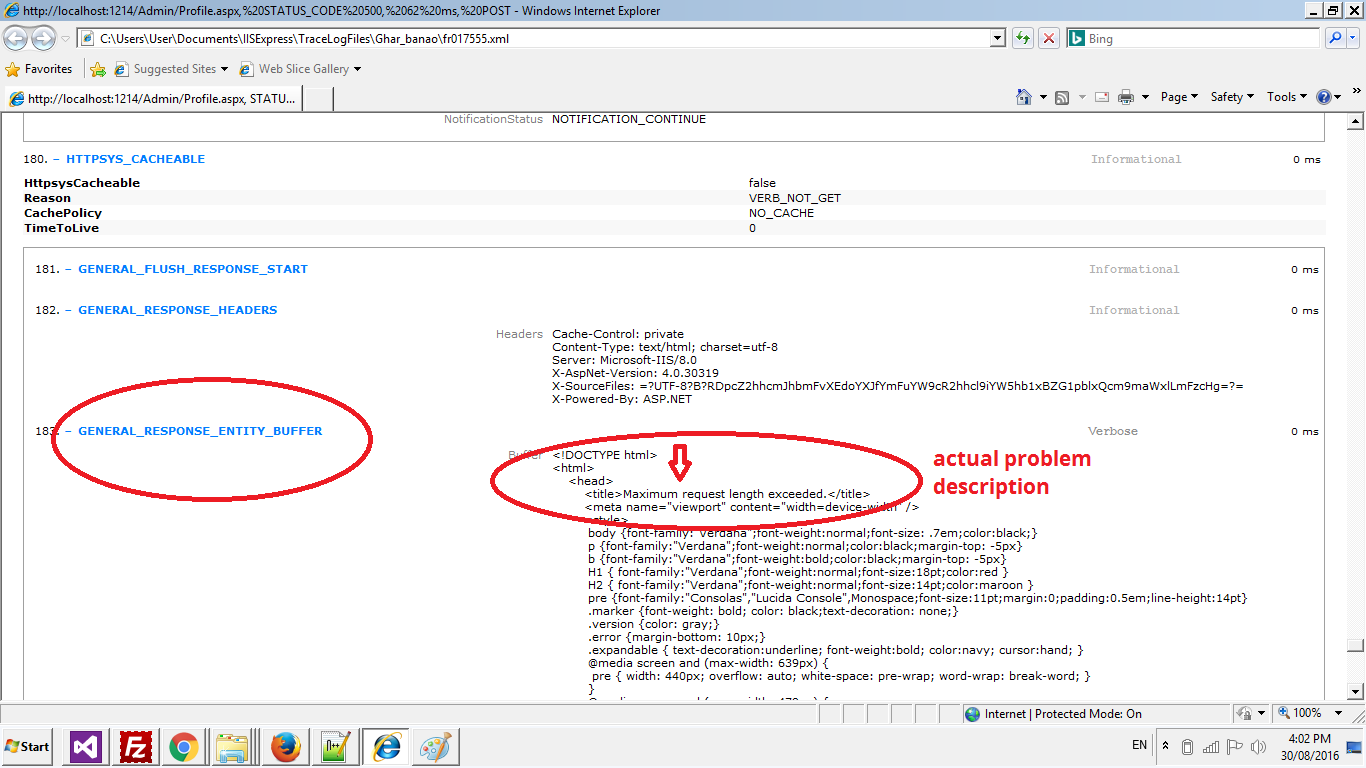
now scroll down to bottom to see the GENERAL_RESPONSE_ENTITY_BUFFER
it is the actual problem. now solve it the above problem will solve automatically.
Method 9
For those using the internal IIS of Visual Studio, try the following:
- Generate the error message.
- Break the debugger at the error display.
- Check the callstack. You should see ‘raise’.
- Double click ‘raise’.
- Check the internals of ‘sender’ parameter. You will see a ‘_xmlHttpRequest’ property.
- Open the ‘_xmlHttpRequest’ property, and you’ll see a ‘response’ property.
- The ‘response’ property will have the actual message.
I hope this helps someone out there!
Method 10
Check your Application Event Log – my issue was Telerik RadCompression HTTP Module which I disabled in the Web.config.
Method 11
@JS5 , I also faced the same issue as you: ImageButton causing exceptions inside UpdatePanel only on production server and IE. After some research I found this:
There is an issue with ImageButtons and UpdatePanels. The update to
.NET 4.5 is fixed there. It has something to do with Microsoft
changed the x,y axis of a button click from Int to Double so you can
tell where on the button you clicked and it’s throwing a conversion
error.
I’m using NetFramework 2.0 and IIS 6, so, the suggested solution was to downgrade IE compatibility adding a meta tag:
<meta http-equiv="X-UA-Compatible" content="IE=9" />
I’ve done this via Page_Load method only on the page I needed to:
Sub Page_Load(ByVal sender As Object, ByVal e As EventArgs)
    Dim tag As HtmlMeta = New HtmlMeta()

    tag.HttpEquiv = "X-UA-Compatible"
    tag.Content = "IE=9"

    Header.Controls.Add(tag)
End Sub
Hope this helps someone.
Method 12
I had the same issue, when i was trying out a way to solve it, i found out that the update panel was causing this issue. Depending on my requirement i could remove the update panel and get rid of the issue.
So it’s a possible solution for the issue.
Method 13
We also faced the same issue, and the problem could only be reproduced in the server (i.e., not locally, which made it even harder to fix, because we could not debug the application), and when using IE. We had a page with an update panel, and within this update panel a modalpopupextender, which also contained an update panel. After trying several solutions that did not work, we fix it by replacing every imagebutton within the modalpopupextender with a linkbutton, and within it the image needed.
Method 14
Use the following code below inside updatepanel.
<script type="text/javascript" language="javascript">
    Sys.WebForms.PageRequestManager.getInstance().add_endRequest(EndRequestHandler);
    function EndRequestHandler(sender, args){
        if (args.get_error() != undefined){
            args.set_errorHandled(true);
        }
    }
</script>
Method 15
For me the problem was that I was using a <button> instead of a <asp:LinkButton>
Method 16
Some times due to some code you get HTML tags in a text filed, like I was replacing some characters with new line BR tag of HTML and by mistake I also replaced it in the text that was supposed to be displayed in a Multiline text box so my multiline text box had a new line HTML tag BR in it coming dynamically due to my string replace function and I started getting this JavaScript error and as this HTML code was displayed in a text box that was in an update panel I start getting this error so I made the correction and all was fine. So before copying pasting anything please look at your code and see that all tag are closed proper and no irrelevant code data is coming to text boxes or Drop down lists. This error always come due to ill formed tags and irrelevant data.
Method 17
My fix for this was to remove any HTML markup that was in the Text=”” property of a TextBox in my asp.net code, inside an update panel. If you have more than one update panel on a page, it will affect them all, which makes it harder to work out which panel has the issue. Chris’s answer above lead me to find this, but his is a very hidden answer but I think a very relevant one so here is an answer explained.
<asp:TextBox ID="bookingTBox" runat="server" ToolTip="" Width="150px" Text="<Auto Assigned>" CssClass="textboxItalicFormat"></asp:TextBox>
The above code will give this error.
The below will not.
<asp:TextBox ID="bookingTBox" runat="server" ToolTip="" Width="150px" Text="Auto Assigned" CssClass="textboxItalicFormat"></asp:TextBox>
In the second textbox code I have removed the < and > from the Text=”” property. Please try this before spending time adding lines of script code, etc.
Method 18
Had this problem when using AsyncFileUploader in an iFrame. Error came when using firefox. Worked in chrome just fine. It seemed like either the parent page or iframe page was loading out of sync and the parent page could not find the controls on the iframe page. Added a simple javascript alert to say that the file was uploaded. This gave the controls enough time to load and since the controls were available, everything loaded without an error.
Method 19
I had this issue when I upgraded my project to 4.5 framework and the GridView had Empty Data Template. Something changed and the following statement which previously was returning the Empty Data Template was now returning the Header Row.
GridViewRow dr = (GridViewRow)this.grdViewRoleMembership.Controls[0].Controls[0];
I changed it to below and the error went away and the GridView started working as expected.
GridViewRow dr = (GridViewRow)this.grdViewRoleMembership.Controls[0].Controls[1];
I hope this helps someone.
Method 20
This issue for me was caused by a database mapping error.
I attempted to use a select() call on a datasource with errors in the code behind. My controls were within an update panel and the actual cause was hidden.
Usually, if you can temporarily remove the update panel, asp.net will return a more useful error message.
Method 21
” 1- Go to the web.config of your application “
” 2- Add a new entry under < system.web > “
3- Also Find the pages tag and set validateRequest=False
Only this works for me. !!
Method 22
Be sure to put tilde and forward slash(~/) when CDN is the root directory. I think it’s an issue in IIS
Method 23
as my friend @RaviKumar mentioned above one reason of following problem is that some piece of data transferred from code to UI contain raw html tags which make request invalid for example I had a textarea and in my code I had set its value by code below
txtAgreement.Text = Data.Agreement
And when I compiled the page I could see raw html tag inside textarea so I changed textarea to div on which innerhtml works and render html (instead of injecting raw html tags into element) and it worked for me
happy coding
Method 24
<add key="aspnet:MaxHttpCollectionKeys" value="100000"/ >
Add above key to Web.config or App.config to remove this error.
Method 25
I got this error when I had ModalPopupExtender in the update panel… deubbing my code I found that the above error is caused because of updatepanel updatemode is conditional… so i change it to always then problem is solved.
Method 26
This was working fine in my code.. i solved my issue.. really
Add below code in web.config file.
<system.web>
    <httpRuntime executionTimeout="999" maxRequestLength="2097151"/>
</system.web>
Method 27
answer for me was to fix a gridview control which contained a template field that had a dropdownlist which was loaded with a monstrous amount of selectable items- i replaced the DDL with a label field whose data is generated from a function. (i was originally going to allow gridview editing, but have switched to allowing edits on a separate panel displaying the DDL for that field for just that record). hope this might help someone.
Method 28
This error: Uncaught Sys.WebForms.PageRequestManagerServerErrorException ….
i got in backend logic of one UpdatePanel when Oracle made exception because of mispelled column/table in sql command….
All methods was sourced from stackoverflow.com or stackexchange.com, is licensed under cc by-sa 2.5, cc by-sa 3.0 and cc by-sa 4.0