In a Python script, is there any way to tell if the interpreter is in interactive mode? This would be useful so that, for instance, when you run an interactive Python session and import a module, slightly different code is executed (for example, logging is turned off).
I’ve looked at tell whether python is in -i mode and tried the code there, however, that function only returns true if Python has been invoked with the -i flag and not when the command used to invoke interactive mode is python with no arguments.
What I mean is something like this:
if __name__=="__main__":
    #do stuff
elif __pythonIsInteractive__:
    #do other stuff
else:
    exit()
Answers:
Thank you for visiting the Q&A section on Magenaut. Please note that all the answers may not help you solve the issue immediately. So please treat them as advisements. If you found the post helpful (or not), leave a comment & I’ll get back to you as soon as possible.
Method 1
__main__.__file__ doesn’t exist in the interactive interpreter:
import __main__ as main
print hasattr(main, '__file__')
This also goes for code run via python -c, but not python -m.
Method 2
I compared all the methods I found and made a table of results. The best one seems to be this:
hasattr(sys, 'ps1')
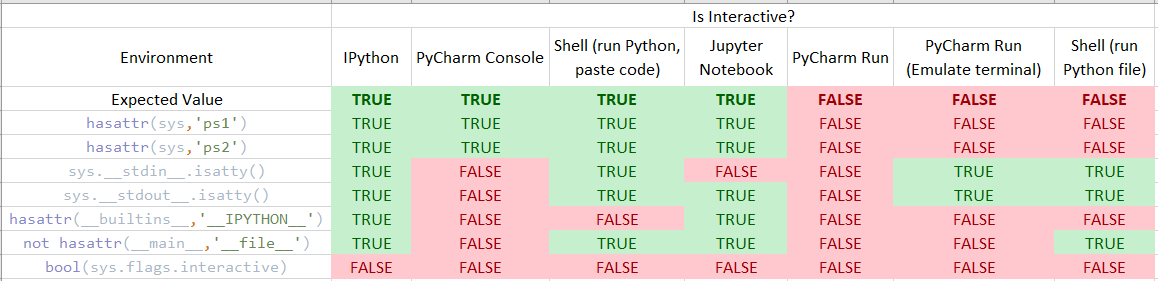
If anyone has other scenarios that might differ, comment and I’ll add it
Method 3
sys.ps1 and sys.ps2 are only defined in interactive mode.
Method 4
Use sys.flags:
if sys.flags.interactive:
    #interactive
else:
    #not interactive
Method 5
From TFM: If no interface option is given, -i is implied, sys.argv[0] is an empty string (“”) and the current directory will be added to the start of sys.path.
If the user invoked the interpreter with python and no arguments, as you mentioned, you could test this with if sys.argv[0] == ''. This also returns true if started with python -i, but according to the docs, they’re functionally the same.
Method 6
The following works both with and without the -i switch:
#!/usr/bin/python
import sys
# Set the interpreter bool
try:
    if sys.ps1: interpreter = True
except AttributeError:
    interpreter = False
    if sys.flags.interactive: interpreter = True

# Use the interpreter bool
if interpreter: print 'We are in the Interpreter'
else: print 'We are running from the command line'
Method 7
Here’s something that would work. Put the following code snippet in a file, and assign the path to that file to the PYTHONSTARTUP environment variable.
__pythonIsInteractive__ = None
And then you can use
if __name__=="__main__":
    #do stuff
elif '__pythonIsInteractive__' in globals():
    #do other stuff
else:
    exit()
http://docs.python.org/tutorial/interpreter.html#the-interactive-startup-file
All methods was sourced from stackoverflow.com or stackexchange.com, is licensed under cc by-sa 2.5, cc by-sa 3.0 and cc by-sa 4.0